
Это третья часть серии статей по основам микросервисных архитектур, в которой вы узнаете, как создать микросервис конвертации валют.
В этой серии статей вы познакомитесь с концепцией микросервисов и узнаете, как создавать микросервисы с помощью Spring Boot и Spring Cloud.
Это руководство поможет вам изучить основы микросервисных архитектур. Мы также начнем рассматривать базовую реализацию микросервиса со Spring Boot.
Мы создадим пару микросервисов и заставим их общаться друг с другом с помощью сервера имен Eureka (Eureka Naming Server) и Ribbon для балансировки нагрузки на стороне клиента.
Это статья входит в серию статей «Микросервисы со Spring Boot»:
Сервис конвертации валют (CCS) может конвертировать множество валют в другую валюту. Он использует Forex сервис для получения текущих значений обмена валюты. CCS является потребителем услуг.
Пример запроса и ответа показан ниже:
Запрос выше позволяет определить стоимость 10000 евро в индийских рупиях.
TotalCalculatedAmount составляет 750000 INR. Диаграмма ниже показывает связь между CCS и FS.

На следующем скриншоте показана структура проекта, который мы создадим.

Некоторые элементы проекта:
Создание микросервиса с Spring Initializr — это легкая прогулка.
Spring Initializr— отличный инструмент для быстрого создания ваших проектов Spring Boot.
С помощью Spring Initializr вы можете создавать самые разные проекты.
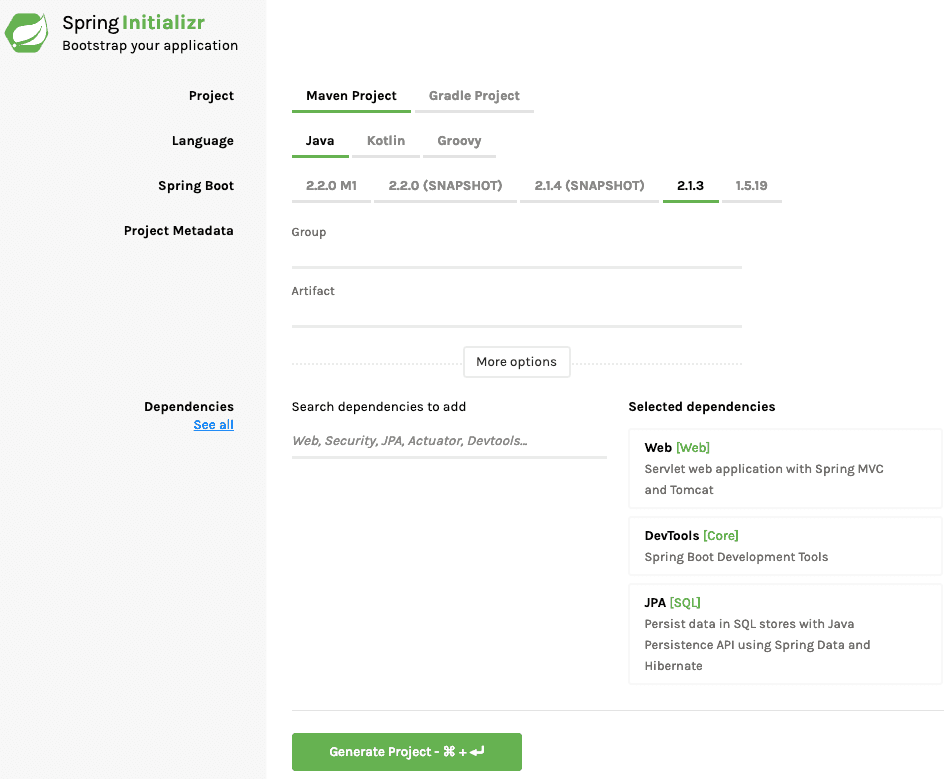
Следующие шаги нужно сделать для создания проекта разработки веб-сервисов:
1. Запустите Spring Initializr и наберите следующее:
2. Нажмите Generate Project.
3. Импортируйте проект в Eclipse: File -> Import -> Existing Maven Project.
Не забудьте указать Feign в зависимостях.
Это простой бин для создания ответа.
Приведенный ниже код демонстрирует реализацию REST клиента для вызова сервиса Forex и обработки ответа. Как видите, для выполнения простого вызова службы нужно написать много кода.
/spring-boot-microservice-currency-conversion-service/src/main/resources/application.properties
Запустите Spring Boot приложение, запустив SpringBootMicroserviceCurrencyConversionApplication.java
Feign предоставляет лучшую альтернативу RestTemplate для вызова REST API.
/spring-boot-microservice-currency-conversion-service/src/main/java/com/in28minutes/springboot/microservice/example/currencyconversion/CurrencyExchangeServiceProxy.java
Сначала мы определим простой прокси:
Выполнение вызова через прокси очень просто. Вы увидите это в действии в коде ниже. Все, что нам нужно было сделать, это автоматически подключить прокси и использовать его для вызова метода.
Прежде чем мы сможем использовать Feign, нам нужно включить его с помощью аннотации @EnableFeignClients в соответствующем пакете, где определены клиентские прокси.
Мы создали два микросервиса и установили связь между ними.
Тем не менее, мы жестко запрограммировали URL для FS в CCS. Это означает, что когда запускаются новые экземпляры FS, у нас нет возможности распределить нагрузку между ними. В следующей части мы включим распределение нагрузки на стороне клиента с помощью Ribbon.
В этой серии статей вы познакомитесь с концепцией микросервисов и узнаете, как создавать микросервисы с помощью Spring Boot и Spring Cloud.
Это руководство поможет вам изучить основы микросервисных архитектур. Мы также начнем рассматривать базовую реализацию микросервиса со Spring Boot.
Мы создадим пару микросервисов и заставим их общаться друг с другом с помощью сервера имен Eureka (Eureka Naming Server) и Ribbon для балансировки нагрузки на стороне клиента.
Это статья входит в серию статей «Микросервисы со Spring Boot»:
- Часть 1. Начало работы с архитектурой микросервисов
- Часть 2. Создание микросервиса Forex
- Часть 3. Создание микросервиса конвертации валют
- Часть 4. Использование Ribbon для балансировки нагрузки
- Часть 5. Использование сервера имен Eureka
Вы изучите
- Как создать микросервис с помощью Spring Boot.
- Как использовать RestTemplate для создания REST сервиса.
- Как использовать Feign для создания REST сервиса.
- Преимущества Feign перед RestTemplate.
Обзор ресурсов
Сервис конвертации валют (CCS) может конвертировать множество валют в другую валюту. Он использует Forex сервис для получения текущих значений обмена валюты. CCS является потребителем услуг.
Пример запроса и ответа показан ниже:
GET to http://localhost:8100/currency-converter/from/EUR/to/INR/quantity/10000
{
  id: 10002,
  from: "EUR",
  to: "INR",
  conversionMultiple: 75,
  quantity: 10000,
  totalCalculatedAmount: 750000,
  port: 8000,
}
Запрос выше позволяет определить стоимость 10000 евро в индийских рупиях.
TotalCalculatedAmount составляет 750000 INR. Диаграмма ниже показывает связь между CCS и FS.
Структура кода проекта
На следующем скриншоте показана структура проекта, который мы создадим.
Некоторые элементы проекта:
- SpringBootMicroserviceCurrencyConversionApplication.java — класс приложения Spring Boot, созданный с помощью Spring Initializer. Этот класс действует как точка запуска приложения.
- pom.xml — содержит все зависимости, необходимые для создания этого проекта. Мы будем использовать Spring Boot Starter Web.
- CurrencyConversionBean.java — Бин для хранения ответа, который мы хотим отправить.
- CurrencyExchangeServiceProxy.java — это будет Feign Proxy для вызова сервиса Forex.
- CurrencyConversionController.java — Spring REST контроллер, предоставляющий сервис конвертации валют. Он будет использовать CurrencyExchangeServiceProxy для вызова сервиса Forex.
Инструменты, которые вам понадобятся
- Maven 3.0+ — инструмент для сборки
- Ваш любимый IDE. Мы используем Eclipse.
- JDK 1.8+
Готовый проект Maven с примерами кода
В Github репозитории есть все примеры кода.
Создание проекта с помощью Spring Initializr
Создание микросервиса с Spring Initializr — это легкая прогулка.
Spring Initializr— отличный инструмент для быстрого создания ваших проектов Spring Boot.
С помощью Spring Initializr вы можете создавать самые разные проекты.
Следующие шаги нужно сделать для создания проекта разработки веб-сервисов:
1. Запустите Spring Initializr и наберите следующее:
- Наберите com.in28minutes.springboot.microservice.example.currencyconversion в качестве группы.
- Наберите в качестве артефакта spring-boot-microservice-currency-conversion.
- Выберите следующие зависимости: Web, DevTools, Feign
2. Нажмите Generate Project.
3. Импортируйте проект в Eclipse: File -> Import -> Existing Maven Project.
Не забудьте указать Feign в зависимостях.
Создание CurrencyConversionBean
Это простой бин для создания ответа.
public class CurrencyConversionBean {
  private Long id;
  private String from;
  private String to;
  private BigDecimal conversionMultiple;
  private BigDecimal quantity;
  private BigDecimal totalCalculatedAmount;
  private int port;
  public CurrencyConversionBean() {
  }
  public CurrencyConversionBean(Long id, String from, String to, BigDecimal conversionMultiple, BigDecimal quantity,
      BigDecimal totalCalculatedAmount, int port) {
    super();
    this.id = id;
    this.from = from;
    this.to = to;
    this.conversionMultiple = conversionMultiple;
    this.quantity = quantity;
    this.totalCalculatedAmount = totalCalculatedAmount;
    this.port = port;
  }
Реализация REST-клиента с RestTemplate
Приведенный ниже код демонстрирует реализацию REST клиента для вызова сервиса Forex и обработки ответа. Как видите, для выполнения простого вызова службы нужно написать много кода.
@RestController
public class CurrencyConversionController {
  private Logger logger = LoggerFactory.getLogger(this.getClass());
  @GetMapping("/currency-converter/from/{from}/to/{to}/quantity/{quantity}")
  public CurrencyConversionBean convertCurrency(@PathVariable String from, @PathVariable String to,
      @PathVariable BigDecimal quantity) {
    Map<String, String> uriVariables = new HashMap<>();
    uriVariables.put("from", from);
    uriVariables.put("to", to);
    ResponseEntity<CurrencyConversionBean> responseEntity = new RestTemplate().getForEntity(
        "http://localhost:8000/currency-exchange/from/{from}/to/{to}", CurrencyConversionBean.class,
        uriVariables);
    CurrencyConversionBean response = responseEntity.getBody();
    return new CurrencyConversionBean(response.getId(), from, to, response.getConversionMultiple(), quantity,
        quantity.multiply(response.getConversionMultiple()), response.getPort());
  }
Настройка имени приложения и порта
/spring-boot-microservice-currency-conversion-service/src/main/resources/application.properties
spring.application.name=currency-conversion-service
server.port=8100
Тестирование микросервиса
Запустите Spring Boot приложение, запустив SpringBootMicroserviceCurrencyConversionApplication.java
GET to http://localhost:8100/currency-converter/from/EUR/to/INR/quantity/10000
{
  id: 10002,
  from: "EUR",
  to: "INR",
  conversionMultiple: 75,
  quantity: 10000,
  totalCalculatedAmount: 750000,
  port: 8000,
}
Создание Feign прокси
Feign предоставляет лучшую альтернативу RestTemplate для вызова REST API.
/spring-boot-microservice-currency-conversion-service/src/main/java/com/in28minutes/springboot/microservice/example/currencyconversion/CurrencyExchangeServiceProxy.java
package com.in28minutes.springboot.microservice.example.currencyconversion;

import org.springframework.cloud.netflix.feign.FeignClient;
import org.springframework.cloud.netflix.ribbon.RibbonClient;
import org.springframework.web.bind.annotation.GetMapping;
import org.springframework.web.bind.annotation.PathVariable;

@FeignClient(name="forex-service" url="localhost:8000")
public interface CurrencyExchangeServiceProxy {
  @GetMapping("/currency-exchange/from/{from}/to/{to}")
  public CurrencyConversionBean retrieveExchangeValue
    (@PathVariable("from") String from, @PathVariable("to") String to);
}
Сначала мы определим простой прокси:
- @FeignClient(name=«forex-service» url=«localhost:8100») — объявляет, что это Feign клиент, а URL-адрес, на котором имеется Forex сервис, является localhost: 8100
- @GetMapping("/currency-exchange/from/{from}/to/{to}") — URI службы, которую мы хотели бы использовать
Использование Feign прокси в контроллере микросервиса
Выполнение вызова через прокси очень просто. Вы увидите это в действии в коде ниже. Все, что нам нужно было сделать, это автоматически подключить прокси и использовать его для вызова метода.
@Autowired
  private CurrencyExchangeServiceProxy proxy;
  @GetMapping("/currency-converter-feign/from/{from}/to/{to}/quantity/{quantity}")
  public CurrencyConversionBean convertCurrencyFeign(@PathVariable String from, @PathVariable String to,
      @PathVariable BigDecimal quantity) {
    CurrencyConversionBean response = proxy.retrieveExchangeValue(from, to);
    logger.info("{}", response);
    return new CurrencyConversionBean(response.getId(), from, to, response.getConversionMultiple(), quantity,
        quantity.multiply(response.getConversionMultiple()), response.getPort());
  }
Включение Feign клиентов
Прежде чем мы сможем использовать Feign, нам нужно включить его с помощью аннотации @EnableFeignClients в соответствующем пакете, где определены клиентские прокси.
@SpringBootApplication
@EnableFeignClients("com.in28minutes.springboot.microservice.example.currencyconversion")
@EnableDiscoveryClient
public class SpringBootMicroserviceCurrencyConversionApplication {
  public static void main(String[] args) {
    SpringApplication.run(SpringBootMicroserviceCurrencyConversionApplication.class, args);
  }
}
Тестирование микросервиса с использованием Feign
GET to http://localhost:8100/currency-converter-feign/from/EUR/to/INR/quantity/10000
{
  id: 10002,
  from: "EUR",
  to: "INR",
  conversionMultiple: 75,
  quantity: 10000,
  totalCalculatedAmount: 750000,
  port: 8000,
}
Резюме
Мы создали два микросервиса и установили связь между ними.
Тем не менее, мы жестко запрограммировали URL для FS в CCS. Это означает, что когда запускаются новые экземпляры FS, у нас нет возможности распределить нагрузку между ними. В следующей части мы включим распределение нагрузки на стороне клиента с помощью Ribbon.
Полный код примера
/spring-boot-microservice-currency-conversion-service/pom.xml
<?xml version="1.0" encoding="UTF-8"?>
<project xmlns="http://maven.apache.org/POM/4.0.0" xmlns:xsi="http://www.w3.org/2001/XMLSchema-instance"
  xsi:schemaLocation="http://maven.apache.org/POM/4.0.0 http://maven.apache.org/xsd/maven-4.0.0.xsd">
  <modelVersion>4.0.0</modelVersion>
  <groupId>com.in28minutes.springboot.microservice.example.currency-conversion</groupId>
  <artifactId>spring-boot-microservice-currency-conversion</artifactId>
  <version>0.0.1-SNAPSHOT</version>
  <packaging>jar</packaging>
  <name>spring-boot-microservice-currency-conversion</name>
  <description>Microservices with Spring Boot and Spring Cloud - Currency Conversion Service</description>
  <parent>
    <groupId>org.springframework.boot</groupId>
    <artifactId>spring-boot-starter-parent</artifactId>
    <version>2.0.0.M3</version>
    <relativePath /> <!-- lookup parent from repository -->
  </parent>
  <properties>
    <project.build.sourceEncoding>UTF-8</project.build.sourceEncoding>
    <project.reporting.outputEncoding>UTF-8</project.reporting.outputEncoding>
    <java.version>1.8</java.version>
    <spring-cloud.version>Finchley.M2</spring-cloud.version>
  </properties>
  <dependencies>
    <dependency>
      <groupId>org.springframework.boot</groupId>
      <artifactId>spring-boot-starter-web</artifactId>
    </dependency>
    <dependency>
      <groupId>org.springframework.cloud</groupId>
      <artifactId>spring-cloud-starter-feign</artifactId>
    </dependency>
    <dependency>
      <groupId>org.springframework.boot</groupId>
      <artifactId>spring-boot-devtools</artifactId>
      <scope>runtime</scope>
    </dependency>
    <dependency>
      <groupId>org.springframework.boot</groupId>
      <artifactId>spring-boot-starter-test</artifactId>
      <scope>test</scope>
    </dependency>
  </dependencies>
  <dependencyManagement>
    <dependencies>
      <dependency>
        <groupId>org.springframework.cloud</groupId>
        <artifactId>spring-cloud-dependencies</artifactId>
        <version>${spring-cloud.version}</version>
        <type>pom</type>
        <scope>import</scope>
      </dependency>
    </dependencies>
  </dependencyManagement>
  <build>
    <plugins>
      <plugin>
        <groupId>org.springframework.boot</groupId>
        <artifactId>spring-boot-maven-plugin</artifactId>
      </plugin>
    </plugins>
  </build>
  <repositories>
    <repository>
      <id>spring-snapshots</id>
      <name>Spring Snapshots</name>
      <url>https://repo.spring.io/snapshot</url>
      <snapshots>
        <enabled>true</enabled>
      </snapshots>
    </repository>
    <repository>
      <id>spring-milestones</id>
      <name>Spring Milestones</name>
      <url>https://repo.spring.io/milestone</url>
      <snapshots>
        <enabled>false</enabled>
      </snapshots>
    </repository>
  </repositories>
  <pluginRepositories>
    <pluginRepository>
      <id>spring-snapshots</id>
      <name>Spring Snapshots</name>
      <url>https://repo.spring.io/snapshot</url>
      <snapshots>
        <enabled>true</enabled>
      </snapshots>
    </pluginRepository>
    <pluginRepository>
      <id>spring-milestones</id>
      <name>Spring Milestones</name>
      <url>https://repo.spring.io/milestone</url>
      <snapshots>
        <enabled>false</enabled>
      </snapshots>
    </pluginRepository>
  </pluginRepositories>
</project>
/spring-boot-microservice-currency-conversion-service/src/main/java/com/in28minutes/springboot/microservice/example/currencyconversion/CurrencyConversionBean.java
package com.in28minutes.springboot.microservice.example.currencyconversion;

import java.math.BigDecimal;

public class CurrencyConversionBean {
  private Long id;
  private String from;
  private String to;
  private BigDecimal conversionMultiple;
  private BigDecimal quantity;
  private BigDecimal totalCalculatedAmount;
  private int port;
  public CurrencyConversionBean() {
  }
  public CurrencyConversionBean(Long id, String from, String to, BigDecimal conversionMultiple, BigDecimal quantity,
      BigDecimal totalCalculatedAmount, int port) {
    super();
    this.id = id;
    this.from = from;
    this.to = to;
    this.conversionMultiple = conversionMultiple;
    this.quantity = quantity;
    this.totalCalculatedAmount = totalCalculatedAmount;
    this.port = port;
  }
  public Long getId() {
    return id;
  }
  public void setId(Long id) {
    this.id = id;
  }
  public String getFrom() {
    return from;
  }
  public void setFrom(String from) {
    this.from = from;
  }
  public String getTo() {
    return to;
  }
  public void setTo(String to) {
    this.to = to;
  }
  public BigDecimal getConversionMultiple() {
    return conversionMultiple;
  }
  public void setConversionMultiple(BigDecimal conversionMultiple) {
    this.conversionMultiple = conversionMultiple;
  }
  public BigDecimal getQuantity() {
    return quantity;
  }
  public void setQuantity(BigDecimal quantity) {
    this.quantity = quantity;
  }
  public BigDecimal getTotalCalculatedAmount() {
    return totalCalculatedAmount;
  }
  public void setTotalCalculatedAmount(BigDecimal totalCalculatedAmount) {
    this.totalCalculatedAmount = totalCalculatedAmount;
  }
  public int getPort() {
    return port;
  }
  public void setPort(int port) {
    this.port = port;
  }
}
/spring-boot-microservice-currency-conversion-service/src/main/java/com/in28minutes/springboot/microservice/example/currencyconversion/CurrencyConversionController.java
package com.in28minutes.springboot.microservice.example.currencyconversion;

import java.math.BigDecimal;
import java.util.HashMap;
import java.util.Map;
import org.slf4j.Logger;
import org.slf4j.LoggerFactory;
import org.springframework.beans.factory.annotation.Autowired;
import org.springframework.http.ResponseEntity;
import org.springframework.web.bind.annotation.GetMapping;
import org.springframework.web.bind.annotation.PathVariable;
import org.springframework.web.bind.annotation.RestController;
import org.springframework.web.client.RestTemplate;

@RestController
public class CurrencyConversionController {
  private Logger logger = LoggerFactory.getLogger(this.getClass());
  @Autowired
  private CurrencyExchangeServiceProxy proxy;
  @GetMapping("/currency-converter/from/{from}/to/{to}/quantity/{quantity}")
  public CurrencyConversionBean convertCurrency(@PathVariable String from, @PathVariable String to,
      @PathVariable BigDecimal quantity) {
    Map<String, String> uriVariables = new HashMap<>();
    uriVariables.put("from", from);
    uriVariables.put("to", to);
    ResponseEntity<CurrencyConversionBean> responseEntity = new RestTemplate().getForEntity(
        "http://localhost:8000/currency-exchange/from/{from}/to/{to}", CurrencyConversionBean.class,
        uriVariables);
    CurrencyConversionBean response = responseEntity.getBody();
    return new CurrencyConversionBean(response.getId(), from, to, response.getConversionMultiple(), quantity,
        quantity.multiply(response.getConversionMultiple()), response.getPort());
  }
  @GetMapping("/currency-converter-feign/from/{from}/to/{to}/quantity/{quantity}")
  public CurrencyConversionBean convertCurrencyFeign(@PathVariable String from, @PathVariable String to,
      @PathVariable BigDecimal quantity) {
    CurrencyConversionBean response = proxy.retrieveExchangeValue(from, to);
    logger.info("{}", response);
    return new CurrencyConversionBean(response.getId(), from, to, response.getConversionMultiple(), quantity,
        quantity.multiply(response.getConversionMultiple()), response.getPort());
  }
}
/spring-boot-microservice-currency-conversion-service/src/main/java/com/in28minutes/springboot/microservice/example/currencyconversion/CurrencyExchangeServiceProxy.java
package com.in28minutes.springboot.microservice.example.currencyconversion;

import org.springframework.cloud.netflix.feign.FeignClient;
import org.springframework.cloud.netflix.ribbon.RibbonClient;
import org.springframework.web.bind.annotation.GetMapping;
import org.springframework.web.bind.annotation.PathVariable;

@FeignClient(name="forex-service" url="localhost:8000")
public interface CurrencyExchangeServiceProxy {
  @GetMapping("/currency-exchange/from/{from}/to/{to}")
  public CurrencyConversionBean retrieveExchangeValue
    (@PathVariable("from") String from, @PathVariable("to") String to);
}
/spring-boot-microservice-currency-conversion-service/src/main/java/com/in28minutes/springboot/microservice/example/currencyconversion/SpringBootMicroserviceCurrencyConversionApplication.java
package com.in28minutes.springboot.microservice.example.currencyconversion;

import org.springframework.boot.SpringApplication;
import org.springframework.boot.autoconfigure.SpringBootApplication;
import org.springframework.cloud.client.discovery.EnableDiscoveryClient;
import org.springframework.cloud.netflix.feign.EnableFeignClients;

@SpringBootApplication
@EnableFeignClients("com.in28minutes.springboot.microservice.example.currencyconversion")
public class SpringBootMicroserviceCurrencyConversionApplication {
  public static void main(String[] args) {
    SpringApplication.run(SpringBootMicroserviceCurrencyConversionApplication.class, args);
  }
}
/spring-boot-microservice-currency-conversion-service/src/main/resources/application.properties
spring.application.name=currency-conversion-service
server.port=8100
/spring-boot-microservice-currency-conversion-service/src/test/java/com/in28minutes/springboot/microservice/example/currencyconversion/SpringBootMicroserviceCurrencyConversionApplicationTests.java
package com.in28minutes.springboot.microservice.example.currencyconversion;

import org.junit.Test;
import org.junit.runner.RunWith;
import org.springframework.boot.test.context.SpringBootTest;
import org.springframework.test.context.junit4.SpringRunner;

@RunWith(SpringRunner.class)
@SpringBootTest
public class SpringBootMicroserviceCurrencyConversionApplicationTests {
  @Test
  public void contextLoads() {
  }
}
