
Решил в отпуске изучить разработку под Vive в Unity3D. Погуглил парочку примеров и начал пробовать, но почему то не работало. Начав подробней разбираться и обнаружил, что Valve выкатили недавно обновление плагина для Unity3D — новая, сильно переделанная версия. В ней появилось парочка принципиальных новшеств, которые сделали старые tutorial'ы не актуальными. Решил написать новый
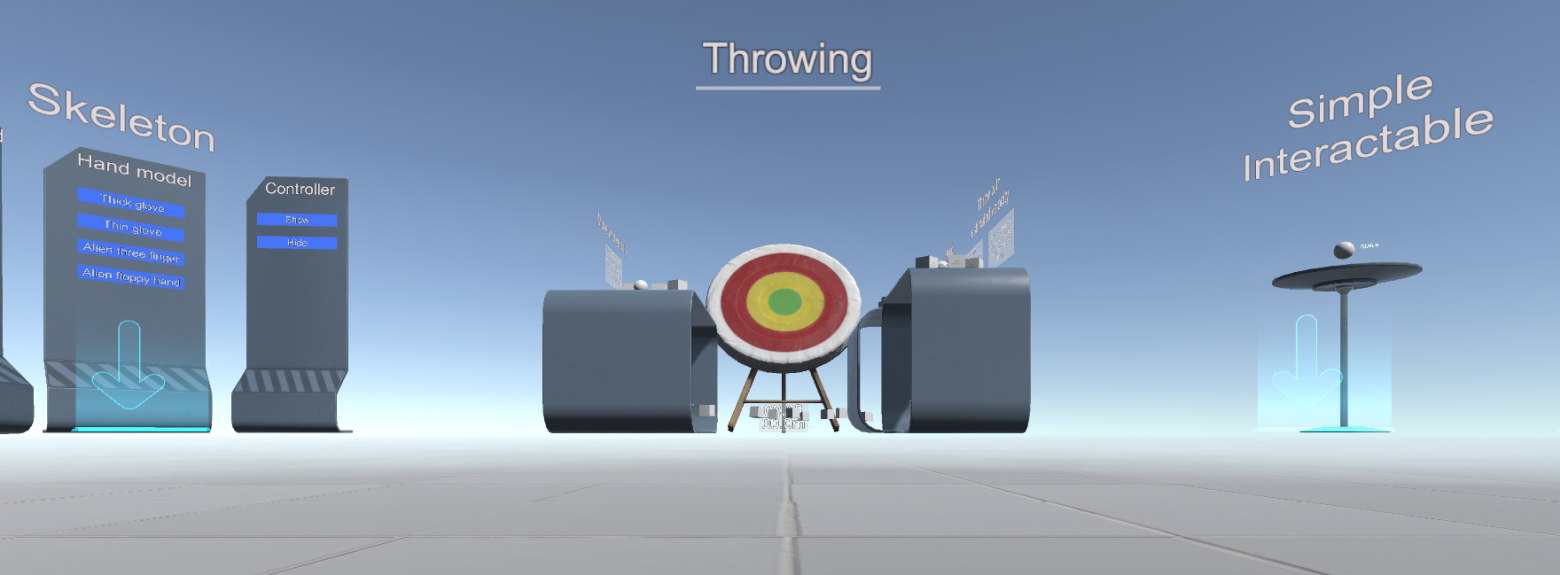
Нам понадобится Unity >= 5.4.0 и новый плагин SteamVR Plugin (GitHub)
В самом плагине есть три полезных для ознакомления pdf'ки
\Assets\SteamVR\SteamVR Unity Plugin.pdf
\Assets\SteamVR\SteamVR Unity Plugin — Input System.pdf
\Assets\SteamVR\InteractionSystem\InteractionSystem.pdf
И два примера:
\Assets\SteamVR\Simple Sample.unity
\Assets\SteamVR\InteractionSystem\Samples\Interactions_Example.unity
Плагин поддерживает режим имитации — он включается если не включен шлем
Ну а теперь по шагам;
Создадим новый проект по шаблону 3D с плагином SteamVR Plugin
Соглашаемся с настройками
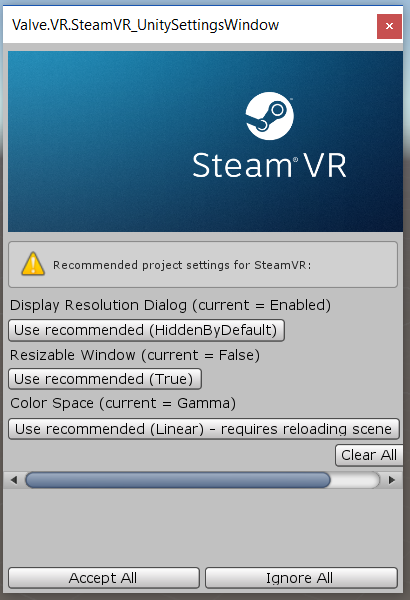
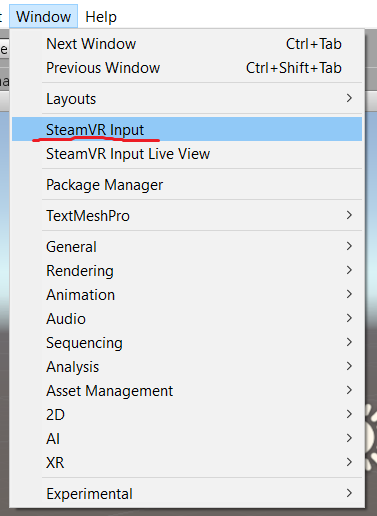
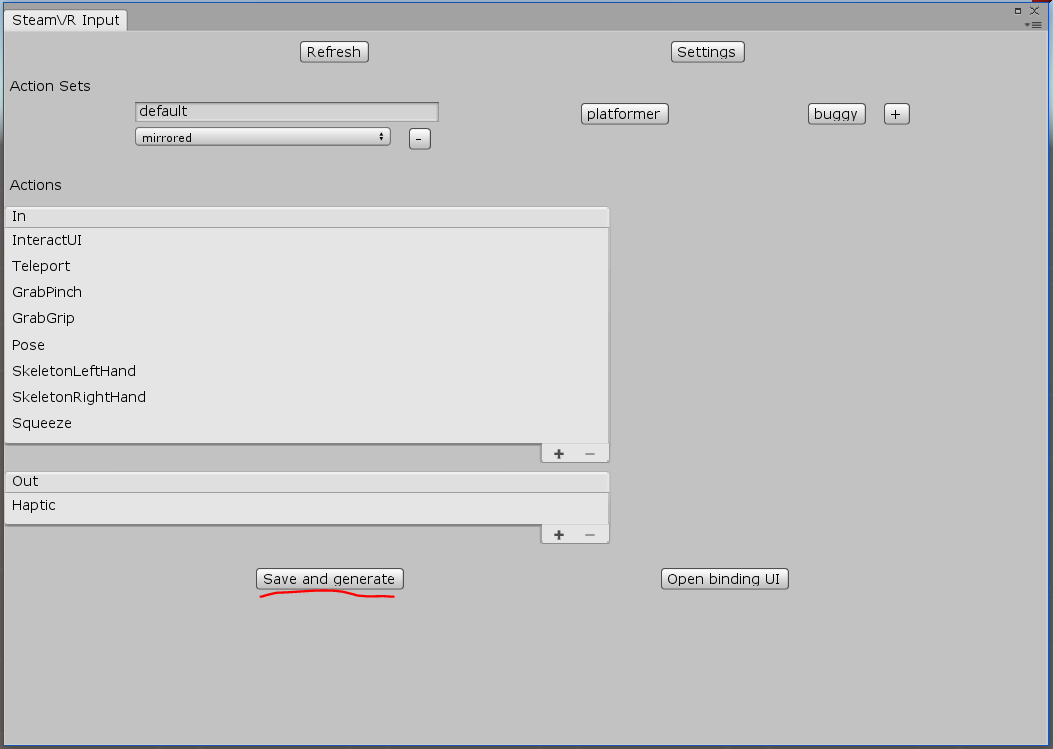
Теперь ключевой момент — нужно настроить управление. Выбираем пункт меню Window\SteamVR Imput
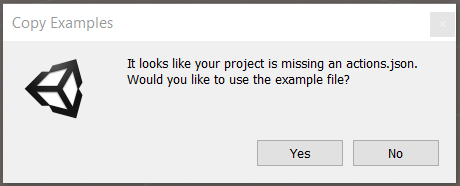
Unity спросит про отсутствующий actions.json и предложит скопировать файл примера (он лежит в \Assets\SteamVR\Input\ExampleJSON) — советую согласиться.
По json-файлам видно, что плагин рассчитан не только на Vive, но и на Oculus и Windows MR, а также новые контролеры knuckle. С этим связанны основные изменения.
В открывшемся окне достаточно нажать "Save and generate"
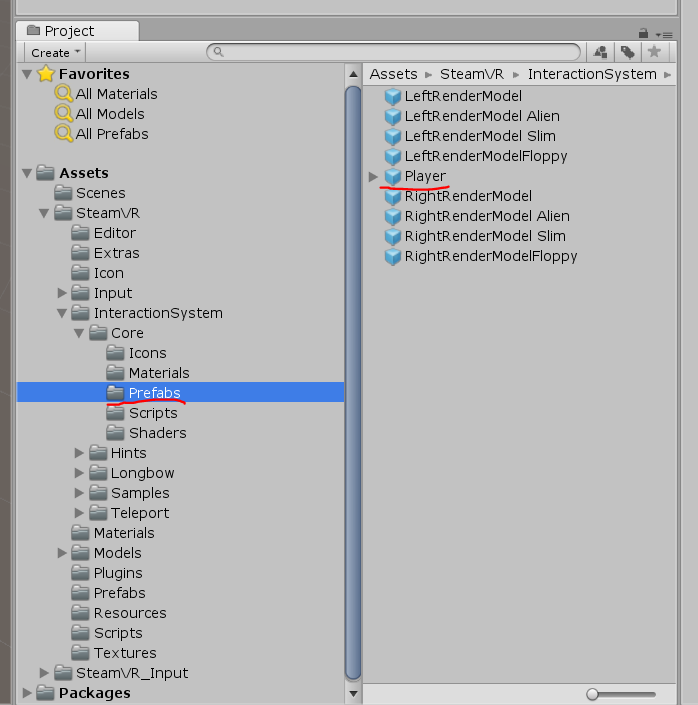
Теперь нужно добавить Игрока (Player из \Assets\SteamVR\InteractionSystem\Core\Prefabs) в Сцену и удалить Main Camera
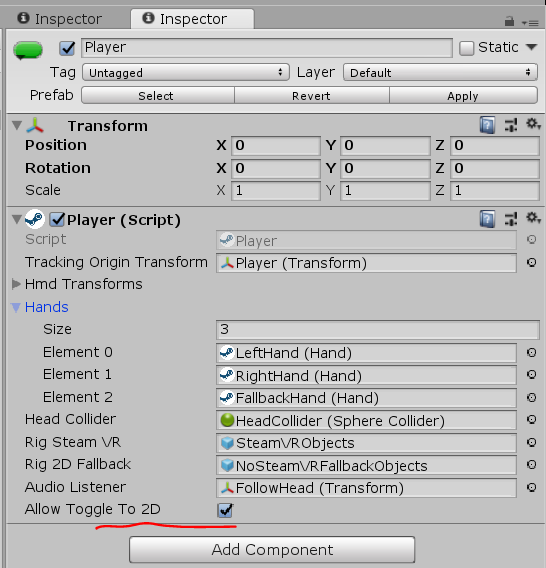
что бы работал режим имитации — он должен быть включён в свойствах Игрока
Ещё полезно скопировать папку \Assets\SteamVR\InteractionSystem\Core\Icons в \Assets и переименовать её в Gizmos
Можно нажимать Play — но только фальшивая рука в имитации работать не будет, нужно скопировать скрипт от сюда и повесить его на Player->NoSteamVRFallbackObjects->FallbackHand
using System.Collections.Generic;
using UnityEngine;
using Valve.VR;

public class VrSimulatorHandFixer156 : SteamVR_Behaviour_Pose
{
    Valve.VR.InteractionSystem.Hand _hand;
    protected override void Start()
    {

        base.Start();
        _hand = this.gameObject.GetComponent<Valve.VR.InteractionSystem.Hand>();
        _hand.handType = SteamVR_Input_Sources.RightHand;

            GameObject broHand = GameObject.Instantiate(_hand.gameObject);
            Destroy(broHand.GetComponent<VrSimulatorHandFixer156>());
            broHand.SetActive(false);
        _hand.otherHand = broHand.GetComponent<Valve.VR.InteractionSystem.Hand>();
        _hand.otherHand.handType = SteamVR_Input_Sources.LeftHand;

        var spoofMouse = new SpoofMouseAction();
        _hand.grabGripAction = spoofMouse;
        spoofMouse.InitializeDictionariesExposed(_hand.handType);

        this.poseAction = new Poser_SteamVR_Action_Pose();
    }

    protected override void OnEnable()
    {

    }

    protected override void Update()
    {
        _hand.grabGripAction.UpdateValue(SteamVR_Input_Sources.RightHand);
    }

    protected override void OnDisable()
    {
    }

    protected override void CheckDeviceIndex()
    {
    }

    //----------------------------------------------------------------------------------------------
    class SpoofMouseAction : SteamVR_Action_Boolean
    {
        public SpoofMouseAction()
        {

        }

        public void InitializeDictionariesExposed(SteamVR_Input_Sources source)
        {
            try
            {
                InitializeDictionaries(source);
            }
            catch(System.Exception e)
            {
            }
        }

        protected override void InitializeDictionaries(SteamVR_Input_Sources source)
        {
            base.InitializeDictionaries(source);

            onStateDown.Add(source, null);
            onStateUp.Add(source, null);
            actionData.Add(source, new InputDigitalActionData_t());
            lastActionData.Add(source, new InputDigitalActionData_t());
        }

        public override void UpdateValue(SteamVR_Input_Sources inputSource)
        {
            lastActionData[inputSource] = actionData[inputSource];
            tempActionData.bState = Input.GetMouseButton(0) || Input.GetMouseButtonDown(0);
            tempActionData.bChanged = Input.GetMouseButtonDown(0) || Input.GetMouseButtonUp(0);
            tempActionData.bActive = true;
            //tempActionData.fUpdateTime
            //tempActionData.act

            actionData[inputSource] = tempActionData;
            changed[inputSource] = tempActionData.bChanged;
            active[inputSource] = tempActionData.bActive;
            activeOrigin[inputSource] = tempActionData.activeOrigin;
            updateTime[inputSource] = Time.time;// tempActionData.fUpdateTime;

            if (changed[inputSource])
                lastChanged[inputSource] = Time.time;

            if (onStateDown[inputSource] != null && GetStateDown(inputSource))
                onStateDown[inputSource].Invoke(this);

            if (onStateUp[inputSource] != null && GetStateUp(inputSource))
                onStateUp[inputSource].Invoke(this);

            if (onChange[inputSource] != null && GetChanged(inputSource))
                onChange[inputSource].Invoke(this);

            if (onUpdate[inputSource] != null)
                onUpdate[inputSource].Invoke(this);

            if (onActiveChange[inputSource] != null && lastActionData[inputSource].bActive != active[inputSource])
                onActiveChange[inputSource].Invoke(this, active[inputSource]);
        }
    }
        class Poser_SteamVR_Action_Pose : SteamVR_Action_Pose
    {
        public override bool GetActive(SteamVR_Input_Sources inputSource)
        {
            return false;
        }
    }
}
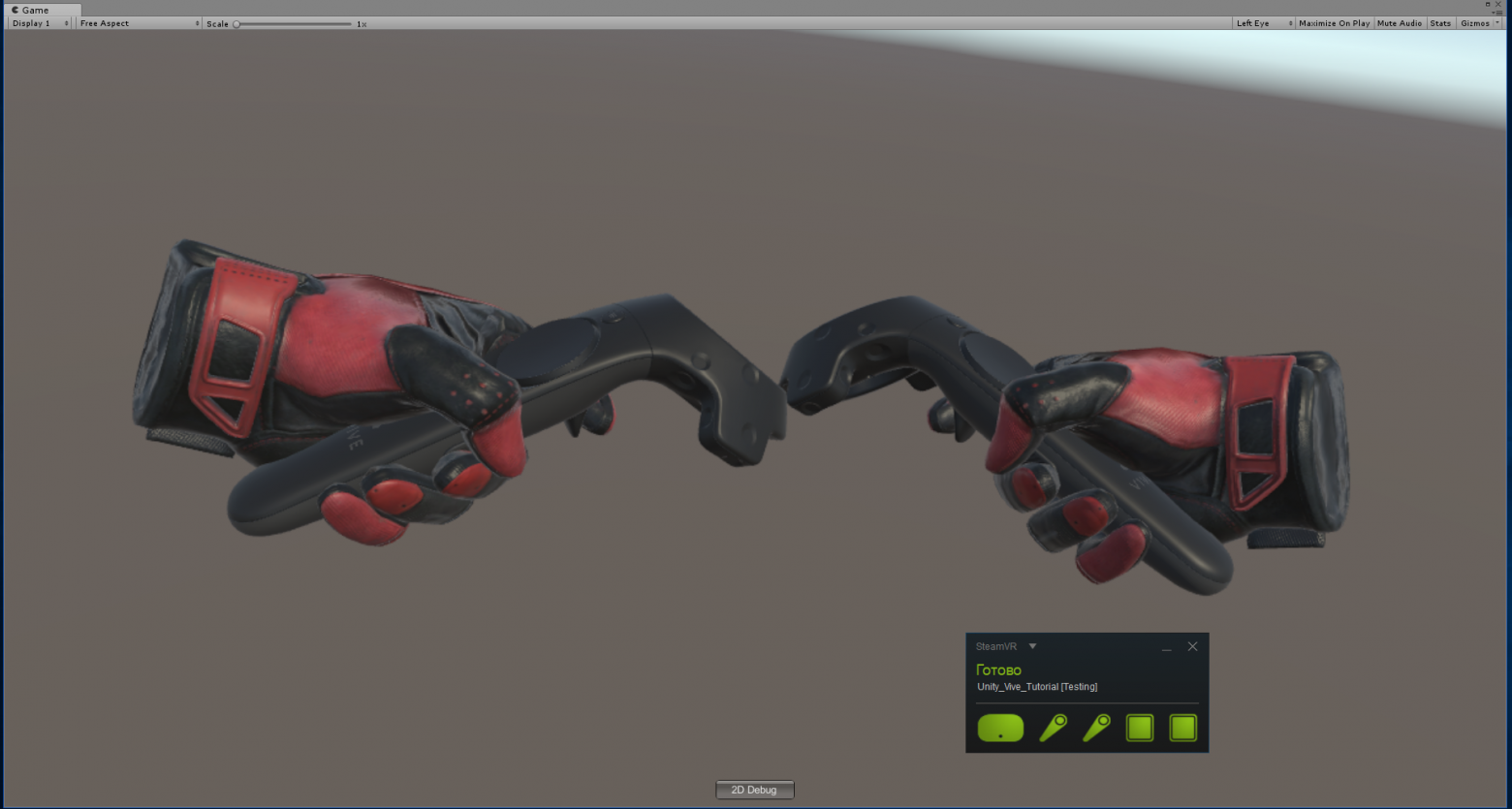
В режиме VR при включенных контролерах — они будут видны
Мы добавили VR, но даже перемещаться не можем. В плагине есть реализация телепортации
для её включения нужно добавить в сцену Teleporting из \Assets\SteamVR\InteractionSystem\Teleport\Prefabs
а также расставить TeleportPoint от туда же
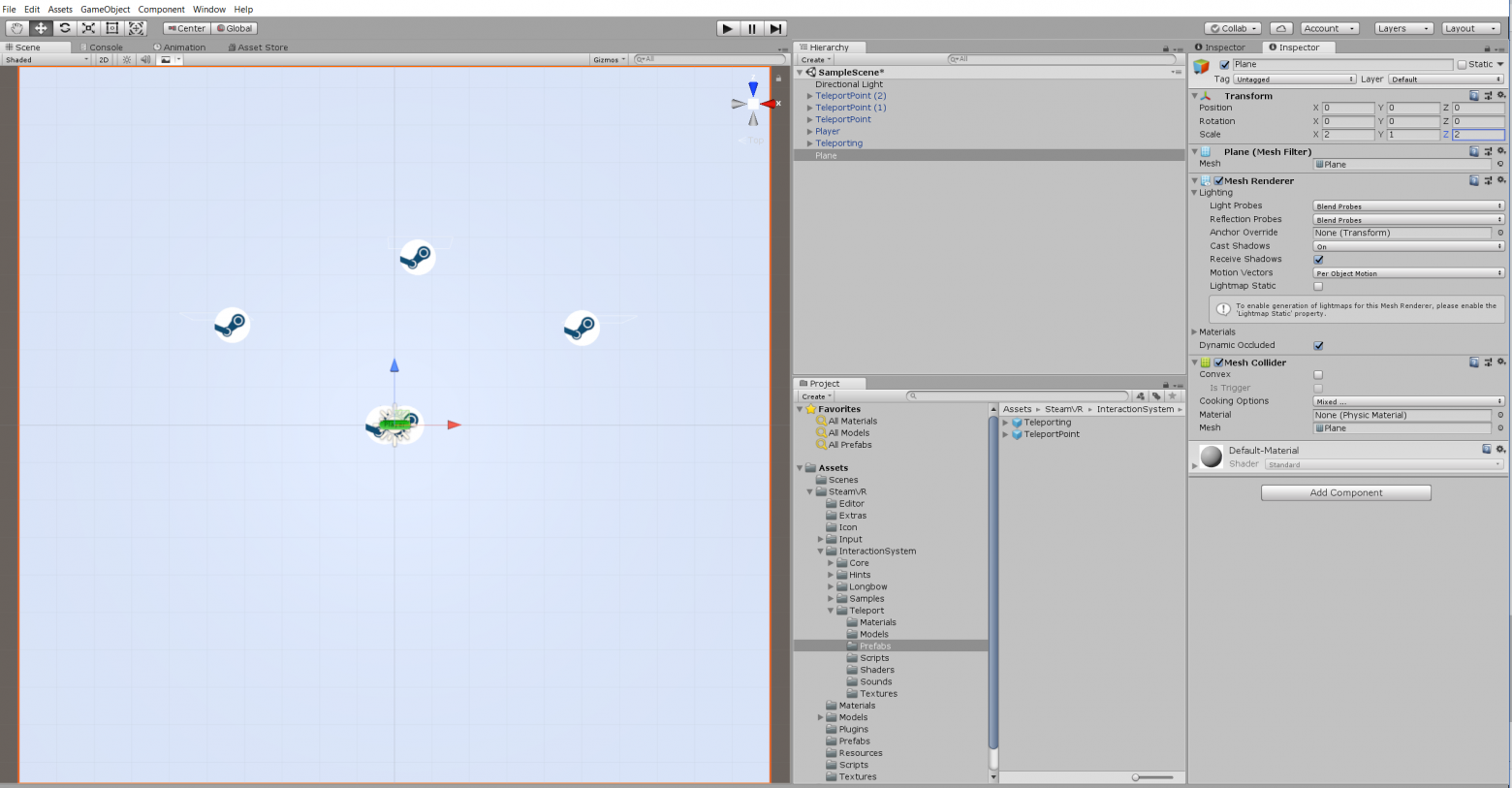
Телепортироватся можно и в имитации — клавишей T.
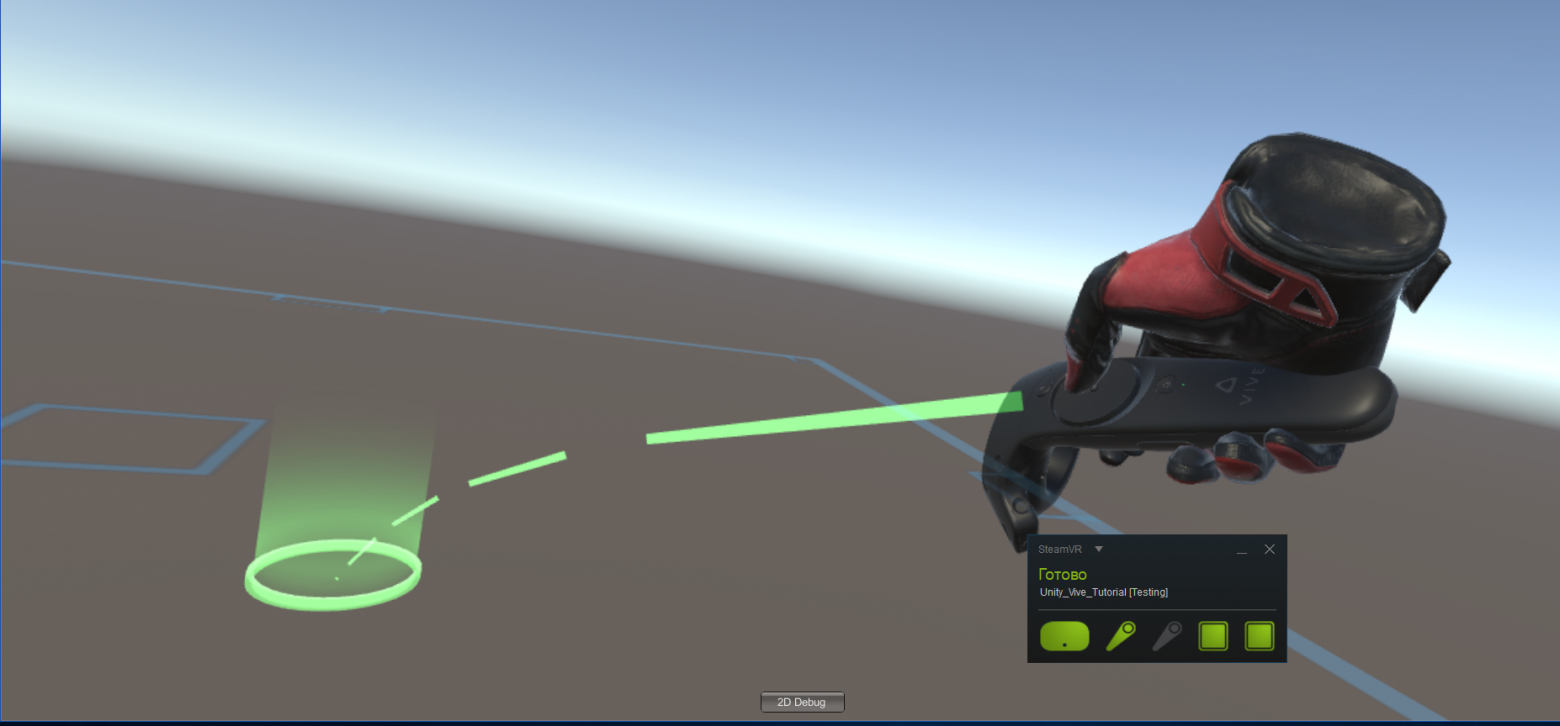
Можно создать поверхность телепортации — Создаём поверхность (plane) и вешаем на неё скрипт TeleportArea.cs из \Assets\SteamVR\InteractionSystem\Teleport\Scripts
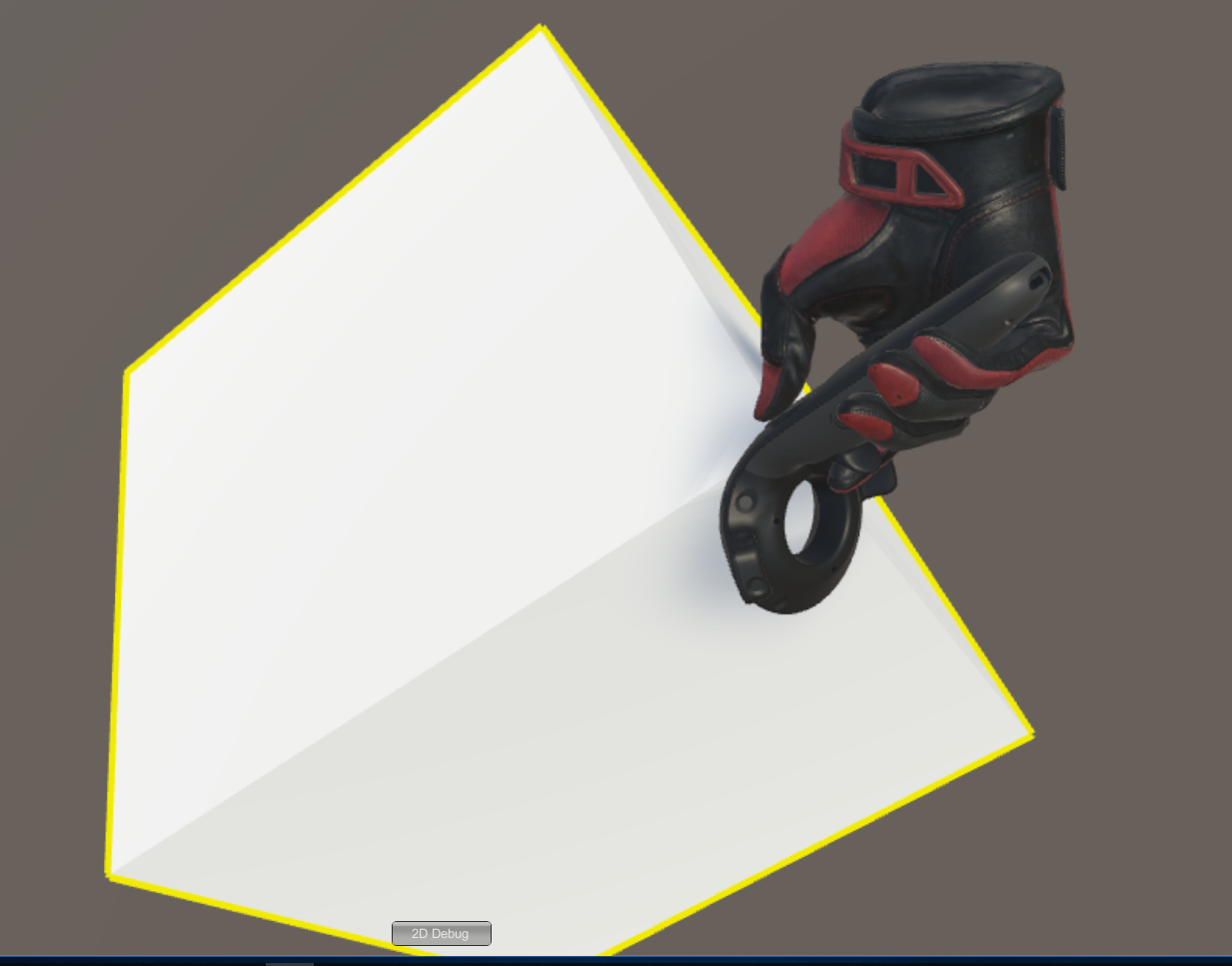
Попробуем взаимодействие с объектами — создадим Cube и повесим на него скрипт Interactable.cs из \Assets\SteamVR\InteractionSystem\Core\Scripts
теперь он подсвечивается, но с ним ничего не происходит
Нам нужно прописать взаимодействие — создадим для Cube новый скрипт
using System.Collections;
using System.Collections.Generic;
using UnityEngine;
using Valve.VR.InteractionSystem;

public class NewBehaviourScript : MonoBehaviour {

    private Hand.AttachmentFlags attachmentFlags = Hand.defaultAttachmentFlags & (~Hand.AttachmentFlags.SnapOnAttach) & (~Hand.AttachmentFlags.DetachOthers) & (~Hand.AttachmentFlags.VelocityMovement);

    private Interactable interactable;

    // Use this for initialization
    void Start () {
        interactable = this.GetComponent<Interactable>();
    }

    private void HandHoverUpdate(Hand hand)
    {
        GrabTypes startingGrabType = hand.GetGrabStarting();
        bool isGrabEnding = hand.IsGrabEnding(this.gameObject);

        if (startingGrabType != GrabTypes.None)
        {
            // Call this to continue receiving HandHoverUpdate messages,
            // and prevent the hand from hovering over anything else
            hand.HoverLock(interactable);

            // Attach this object to the hand
            hand.AttachObject(gameObject, startingGrabType, attachmentFlags);
        }
        else if (isGrabEnding)
        {
            // Detach this object from the hand
            hand.DetachObject(gameObject);

            // Call this to undo HoverLock
            hand.HoverUnlock(interactable);

        }
    }
}
Более подробно про взаимодействие можно посмотреть в примерах к плагину, в частности в \Assets\SteamVR\InteractionSystem\Samples\Scripts\InteractableExample.cs
А мы дальше попробуем сделать то, чего в примерах нет — добавить новые действия
Откроем скрипт Player.cs и добавим поля
    [SteamVR_DefaultAction("PlayerMove", "default")]
    public SteamVR_Action_Vector2 a_move;

    [SteamVR_DefaultAction("PlayerRotate", "default")]
    public SteamVR_Action_Vector2 a_rotate;

    [SteamVR_DefaultAction("MenuClick", "default")]
    public SteamVR_Action_Boolean a_menu;
Допустимые типы для возвращаемых значений можно посмотреть в \Assets\SteamVR\Input
И метод Update:
        private void Update()
        {
            bool st = a_menu.GetStateDown(SteamVR_Input_Sources.Any);
            if (st)
            {
                this.transform.position = new Vector3(0, 0, 0);
            }
            else
            {
                Camera camera = this.GetComponentInChildren<Camera>();
                Quaternion cr = Quaternion.Euler(0, 0, 0);
                if (camera != null)
                {
                    Vector2 r = a_rotate.GetAxis(SteamVR_Input_Sources.RightHand);
                    Quaternion qp = this.transform.rotation;
                    qp.eulerAngles += new Vector3(0, r.x, 0);
                    this.transform.rotation = qp;
                    cr = camera.transform.rotation;
                }
                Vector2 m = a_move.GetAxis(SteamVR_Input_Sources.LeftHand);
                m = Quaternion.Euler(0, 0, -cr.eulerAngles.y) * m;
                this.transform.position += new Vector3(m.x / 10, 0, m.y / 10);
            }
        }
//======= Copyright (c) Valve Corporation, All rights reserved. ===============
//
// Purpose: Player interface used to query HMD transforms and VR hands
//
//=============================================================================

using UnityEngine;
using System.Collections;
using System.Collections.Generic;

namespace Valve.VR.InteractionSystem
{
    //-------------------------------------------------------------------------
    // Singleton representing the local VR player/user, with methods for getting
    // the player's hands, head, tracking origin, and guesses for various properties.
    //-------------------------------------------------------------------------
    public class Player : MonoBehaviour
    {
        [Tooltip( "Virtual transform corresponding to the meatspace tracking origin. Devices are tracked relative to this." )]
        public Transform trackingOriginTransform;

        [Tooltip( "List of possible transforms for the head/HMD, including the no-SteamVR fallback camera." )]
        public Transform[] hmdTransforms;

        [Tooltip( "List of possible Hands, including no-SteamVR fallback Hands." )]
        public Hand[] hands;

        [Tooltip( "Reference to the physics collider that follows the player's HMD position." )]
        public Collider headCollider;

        [Tooltip( "These objects are enabled when SteamVR is available" )]
        public GameObject rigSteamVR;

        [Tooltip( "These objects are enabled when SteamVR is not available, or when the user toggles out of VR" )]
        public GameObject rig2DFallback;

        [Tooltip( "The audio listener for this player" )]
        public Transform audioListener;

        public bool allowToggleTo2D = true;

        [SteamVR_DefaultAction("PlayerMove", "default")]
        public SteamVR_Action_Vector2 a_move;

        [SteamVR_DefaultAction("PlayerRotate", "default")]
        public SteamVR_Action_Vector2 a_rotate;

        [SteamVR_DefaultAction("MenuClick", "default")]
        public SteamVR_Action_Boolean a_menu;

        //-------------------------------------------------
        // Singleton instance of the Player. Only one can exist at a time.
        //-------------------------------------------------
        private static Player _instance;
        public static Player instance
        {
            get
            {
                if ( _instance == null )
                {
                    _instance = FindObjectOfType<Player>();
                }
                return _instance;
            }
        }

        //-------------------------------------------------
        // Get the number of active Hands.
        //-------------------------------------------------
        public int handCount
        {
            get
            {
                int count = 0;
                for ( int i = 0; i < hands.Length; i++ )
                {
                    if ( hands[i].gameObject.activeInHierarchy )
                    {
                        count++;
                    }
                }
                return count;
            }
        }

        //-------------------------------------------------
        // Get the i-th active Hand.
        //
        // i - Zero-based index of the active Hand to get
        //-------------------------------------------------
        public Hand GetHand( int i )
        {
            for ( int j = 0; j < hands.Length; j++ )
            {
                if ( !hands[j].gameObject.activeInHierarchy )
                {
                    continue;
                }

                if ( i > 0 )
                {
                    i--;
                    continue;
                }

                return hands[j];
            }

            return null;
        }

        //-------------------------------------------------
        public Hand leftHand
        {
            get
            {
                for ( int j = 0; j < hands.Length; j++ )
                {
                    if ( !hands[j].gameObject.activeInHierarchy )
                    {
                        continue;
                    }

                    if ( hands[j].handType != SteamVR_Input_Sources.LeftHand)
                    {
                        continue;
                    }

                    return hands[j];
                }

                return null;
            }
        }

        //-------------------------------------------------
        public Hand rightHand
        {
            get
            {
                for ( int j = 0; j < hands.Length; j++ )
                {
                    if ( !hands[j].gameObject.activeInHierarchy )
                    {
                        continue;
                    }

                    if ( hands[j].handType != SteamVR_Input_Sources.RightHand)
                    {
                        continue;
                    }

                    return hands[j];
                }

                return null;
            }
        }

        //-------------------------------------------------
        // Get Player scale. Assumes it is scaled equally on all axes.
        //-------------------------------------------------

        public float scale
        {
            get
            {
                return transform.lossyScale.x;
            }
        }

        //-------------------------------------------------
        // Get the HMD transform. This might return the fallback camera transform if SteamVR is unavailable or disabled.
        //-------------------------------------------------
        public Transform hmdTransform
        {
            get
            {
                if (hmdTransforms != null)
                {
                    for (int i = 0; i < hmdTransforms.Length; i++)
                    {
                        if (hmdTransforms[i].gameObject.activeInHierarchy)
                            return hmdTransforms[i];
                    }
                }
                return null;
            }
        }

        //-------------------------------------------------
        // Height of the eyes above the ground - useful for estimating player height.
        //-------------------------------------------------
        public float eyeHeight
        {
            get
            {
                Transform hmd = hmdTransform;
                if ( hmd )
                {
                    Vector3 eyeOffset = Vector3.Project( hmd.position - trackingOriginTransform.position, trackingOriginTransform.up );
                    return eyeOffset.magnitude / trackingOriginTransform.lossyScale.x;
                }
                return 0.0f;
            }
        }

        //-------------------------------------------------
        // Guess for the world-space position of the player's feet, directly beneath the HMD.
        //-------------------------------------------------
        public Vector3 feetPositionGuess
        {
            get
            {
                Transform hmd = hmdTransform;
                if ( hmd )
                {
                    return trackingOriginTransform.position + Vector3.ProjectOnPlane( hmd.position - trackingOriginTransform.position, trackingOriginTransform.up );
                }
                return trackingOriginTransform.position;
            }
        }

        //-------------------------------------------------
        // Guess for the world-space direction of the player's hips/torso. This is effectively just the gaze direction projected onto the floor plane.
        //-------------------------------------------------
        public Vector3 bodyDirectionGuess
        {
            get
            {
                Transform hmd = hmdTransform;
                if ( hmd )
                {
                    Vector3 direction = Vector3.ProjectOnPlane( hmd.forward, trackingOriginTransform.up );
                    if ( Vector3.Dot( hmd.up, trackingOriginTransform.up ) < 0.0f )
                    {
                        // The HMD is upside-down. Either
                        // -The player is bending over backwards
                        // -The player is bent over looking through their legs
                        direction = -direction;
                    }
                    return direction;
                }
                return trackingOriginTransform.forward;
            }
        }

        //-------------------------------------------------
        void Awake()
        {
            SteamVR.Initialize(true); //force openvr

            if ( trackingOriginTransform == null )
            {
                trackingOriginTransform = this.transform;
            }
        }

        //-------------------------------------------------
        private IEnumerator Start()
        {
            _instance = this;

            while (SteamVR_Behaviour.instance.forcingInitialization)
                yield return null;

            if ( SteamVR.instance != null )
            {
                ActivateRig( rigSteamVR );
            }
            else
            {
#if !HIDE_DEBUG_UI
                ActivateRig( rig2DFallback );
#endif
            }
        }

        private void Update()
        {
            bool st = a_menu.GetStateDown(SteamVR_Input_Sources.Any);
            if (st)
            {
                this.transform.position = new Vector3(0, 0, 0);
            }
            else
            {
                Camera camera = this.GetComponentInChildren<Camera>();
                Quaternion cr = Quaternion.Euler(0, 0, 0);
                if (camera != null)
                {
                    Vector2 r = a_rotate.GetAxis(SteamVR_Input_Sources.RightHand);
                    Quaternion qp = this.transform.rotation;
                    qp.eulerAngles += new Vector3(0, r.x, 0);
                    this.transform.rotation = qp;
                    cr = camera.transform.rotation;
                }
                Vector2 m = a_move.GetAxis(SteamVR_Input_Sources.LeftHand);
                m = Quaternion.Euler(0, 0, -cr.eulerAngles.y) * m;
                this.transform.position += new Vector3(m.x / 10, 0, m.y / 10);
            }
        }

        //-------------------------------------------------
        void OnDrawGizmos()
        {
            if ( this != instance )
            {
                return;
            }

            //NOTE: These gizmo icons don't work in the plugin since the icons need to exist in a specific "Gizmos"
            //      folder in your Asset tree. These icons are included under Core/Icons. Moving them into a
            //      "Gizmos" folder should make them work again.

            Gizmos.color = Color.white;
            Gizmos.DrawIcon( feetPositionGuess, "vr_interaction_system_feet.png" );

            Gizmos.color = Color.cyan;
            Gizmos.DrawLine( feetPositionGuess, feetPositionGuess + trackingOriginTransform.up * eyeHeight );

            // Body direction arrow
            Gizmos.color = Color.blue;
            Vector3 bodyDirection = bodyDirectionGuess;
            Vector3 bodyDirectionTangent = Vector3.Cross( trackingOriginTransform.up, bodyDirection );
            Vector3 startForward = feetPositionGuess + trackingOriginTransform.up * eyeHeight * 0.75f;
            Vector3 endForward = startForward + bodyDirection * 0.33f;
            Gizmos.DrawLine( startForward, endForward );
            Gizmos.DrawLine( endForward, endForward - 0.033f * ( bodyDirection + bodyDirectionTangent ) );
            Gizmos.DrawLine( endForward, endForward - 0.033f * ( bodyDirection - bodyDirectionTangent ) );

            Gizmos.color = Color.red;
            int count = handCount;
            for ( int i = 0; i < count; i++ )
            {
                Hand hand = GetHand( i );

                if ( hand.handType == SteamVR_Input_Sources.LeftHand)
                {
                    Gizmos.DrawIcon( hand.transform.position, "vr_interaction_system_left_hand.png" );
                }
                else if ( hand.handType == SteamVR_Input_Sources.RightHand)
                {
                    Gizmos.DrawIcon( hand.transform.position, "vr_interaction_system_right_hand.png" );
                }
                else
                {
                    /*
                    Hand.HandType guessHandType = hand.currentHandType;

                    if ( guessHandType == Hand.HandType.Left )
                    {
                        Gizmos.DrawIcon( hand.transform.position, "vr_interaction_system_left_hand_question.png" );
                    }
                    else if ( guessHandType == Hand.HandType.Right )
                    {
                        Gizmos.DrawIcon( hand.transform.position, "vr_interaction_system_right_hand_question.png" );
                    }
                    else
                    {
                        Gizmos.DrawIcon( hand.transform.position, "vr_interaction_system_unknown_hand.png" );
                    }
                    */
                }
            }
        }

        //-------------------------------------------------
        public void Draw2DDebug()
        {
            if ( !allowToggleTo2D )
                return;

            if ( !SteamVR.active )
                return;

            int width = 100;
            int height = 25;
            int left = Screen.width / 2 - width / 2;
            int top = Screen.height - height - 10;

            string text = ( rigSteamVR.activeSelf ) ? "2D Debug" : "VR";

            if ( GUI.Button( new Rect( left, top, width, height ), text ) )
            {
                if ( rigSteamVR.activeSelf )
                {
                    ActivateRig( rig2DFallback );
                }
                else
                {
                    ActivateRig( rigSteamVR );
                }
            }
        }

        //-------------------------------------------------
        private void ActivateRig( GameObject rig )
        {
            rigSteamVR.SetActive( rig == rigSteamVR );
            rig2DFallback.SetActive( rig == rig2DFallback );

            if ( audioListener )
            {
                audioListener.transform.parent = hmdTransform;
                audioListener.transform.localPosition = Vector3.zero;
                audioListener.transform.localRotation = Quaternion.identity;
            }
        }

        //-------------------------------------------------
        public void PlayerShotSelf()
        {
            //Do something appropriate here
        }
    }
}
Запустим Window\SteamVR Imput, Создадим наши действия в наборе default и сохраним их, теперь выберем пункт "Open binding UI" (SteamVR должен быть запущен и как минимум один контролер включён)
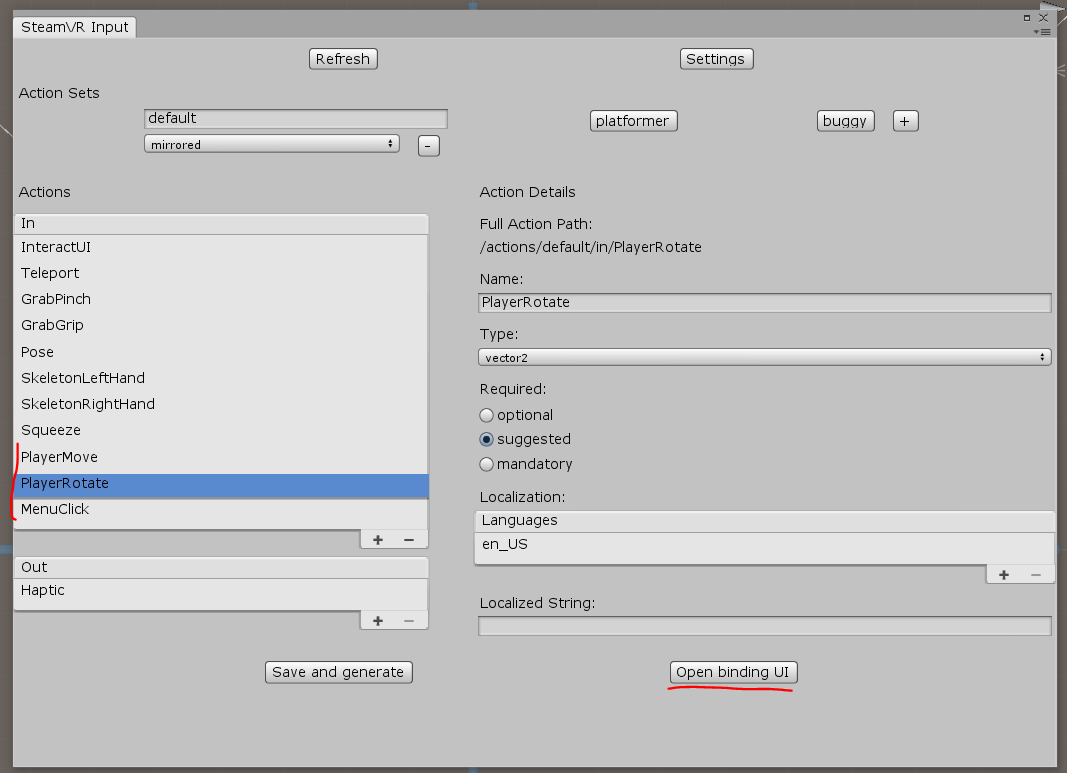
В браузере откроется вкладка Controller Binding — в ней нужно настроить связь наших действий с контролерами: PlayerMove мы повесим на левый TRACKPAD (не забудьте выключить Mirror Mode), PlayerRotate на правый TRACKPAD, а MenuClick повесим на клавиши Menu
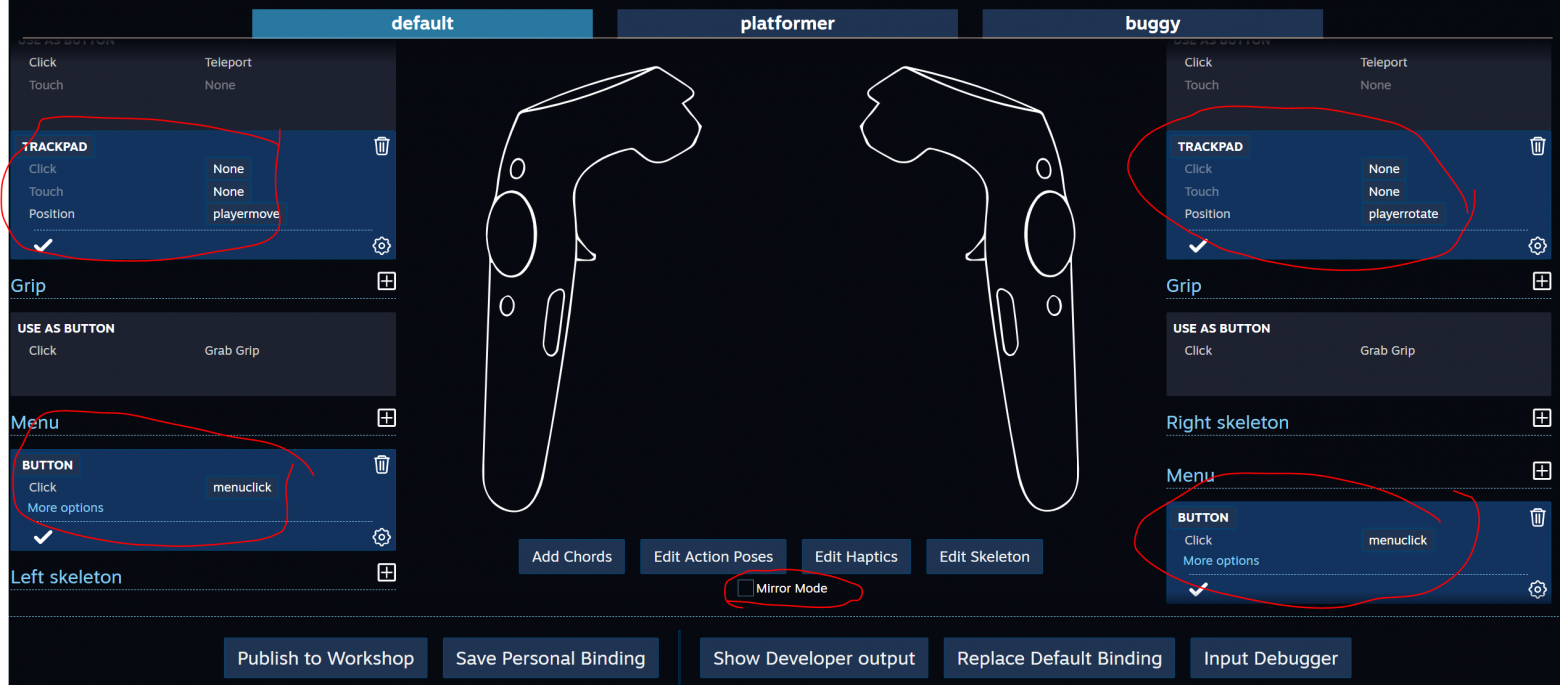
Закроем Controller Binding и сохраним изменения
В свойствах Player свяжем новые действия
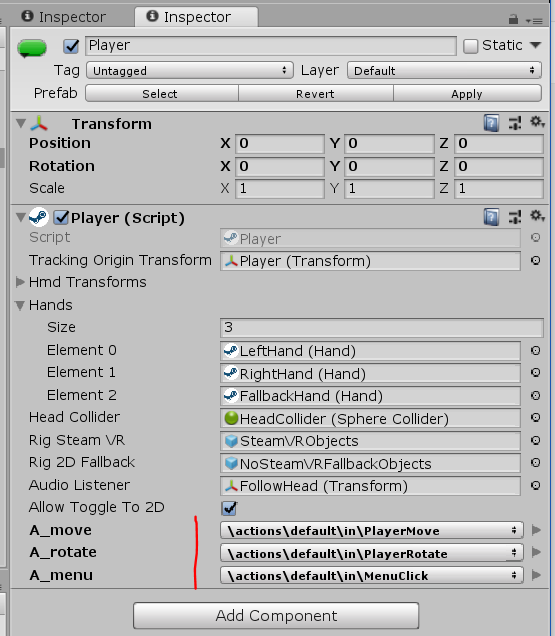
Запускаем Play
Заключение
Следует отметить несколько моментов. Некоторые действия в SteamVR Imput могут заставить Unity задуматься надолго, в принципе эти изменения можно внести самому в код, а вместо использования Controller Binding можно напрямую править json-файлы, но большой риск ошибки которые сложно будет отловить.
Для более глубокого изучения плагина — полезно подробно изучить примеры, ну и конечно — читайте документацию.
