
AmoCRM одна из самых популярных CRM, при этом ее API один из самых странных, по моему субъективному мнению. Понадобилось передавать данные формы с сайта в crm. Использовать CRM Формы вместо своих дизайнерских не хочется. Было бы здорово открыть статейку в гугле, подставить ключ и не париться особо, но на удивление не нашел ни одной статьи с актуальной инфой, где-то версия api уже не актуальна, где-то вместо использования дефолтных полей контакта, создаются кастомные. В общем решил поделиться своим решением, для тех, кому сложно/лень вникать в их API.
В этой статье я буду создавать сделку в "Неразобранном", контакт и компанию.
Создаем файлы интеграции
Создаем папку amo, например в корне сайта.
Файлы внутри:
amo.php
access.php
config.php
get.php
cookie.txt
tokens.txt
Названия могут быть произвольными.
Получение ключей
Открываем AmoCRM, заходим в Настройки > Интеграции.
Жмем "+ Создать интеграцию" и создаем внешнюю интеграцию.
Указываем ссылку на наш amo.php файл, ставим галочку предоставления доступа и вводим произвольное название и описание:
P.S. Перед сохранением прочтите этот раздел до конца
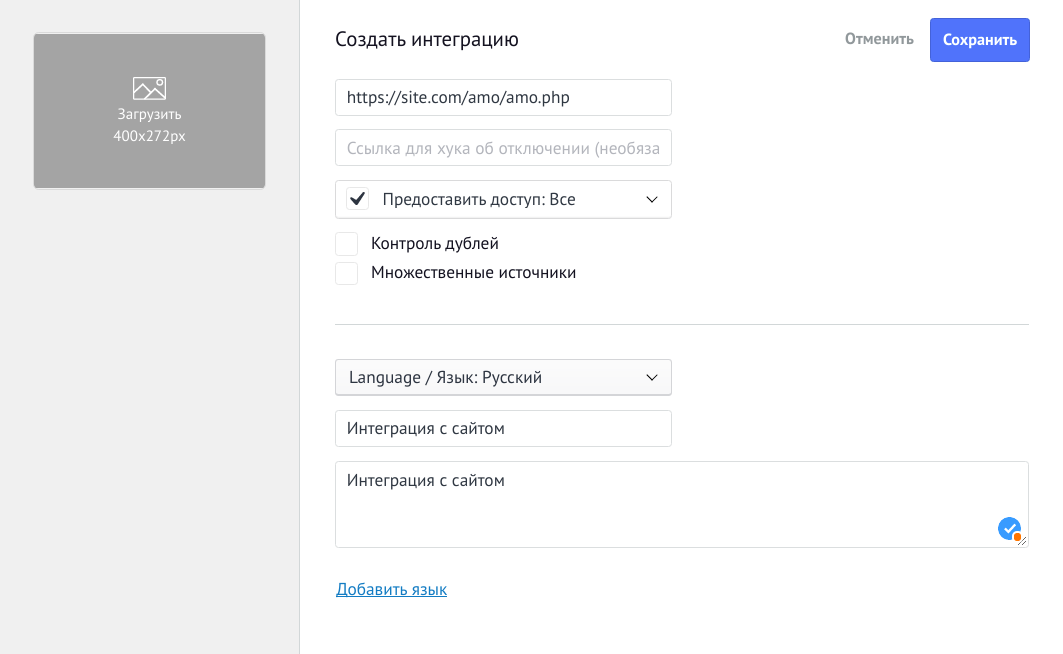
У нас появится 3 ключа и 20 минут, чтоб сделать следующее:
Открываем config.php и вписываем их туда:
<?php
$subdomain     = ''; // поддомен AmoCRM
$client_secret = ''; // Секретный ключ
$client_id     = ''; // ID интеграции
$code          = ''; // Код авторизации
$token_file    = 'tokens.txt';
$redirect_uri  = 'https://site.com/amo/amo.php';
Поддомен AmoCRM берем из url нашей CRM
В $redirect_uri не забудьте поменять свой домен сайта
Затем идем в файл auth.php и вставим следующее:
<?php
require_once 'config.php';

$link = "https://$subdomain.amocrm.ru/oauth2/access_token";

$data = [
  'client_id'     => $client_id,
  'client_secret' => $client_secret,
  'grant_type'    => 'authorization_code',
  'code'          => $code,
  'redirect_uri'  => $redirect_uri,
];

$curl = curl_init();
curl_setopt($curl,CURLOPT_RETURNTRANSFER, true);
curl_setopt($curl,CURLOPT_USERAGENT,'amoCRM-oAuth-client/1.0');
curl_setopt($curl,CURLOPT_URL, $link);
curl_setopt($curl,CURLOPT_HTTPHEADER, ['Content-Type:application/json']);
curl_setopt($curl,CURLOPT_HEADER, false);
curl_setopt($curl,CURLOPT_CUSTOMREQUEST, 'POST');
curl_setopt($curl,CURLOPT_POSTFIELDS, json_encode($data));
curl_setopt($curl,CURLOPT_SSL_VERIFYPEER, 1);
curl_setopt($curl,CURLOPT_SSL_VERIFYHOST, 2);
$out = curl_exec($curl);
$code = curl_getinfo($curl, CURLINFO_HTTP_CODE);
curl_close($curl);
$code = (int)$code;

$errors = [
	301 => 'Moved permanently.',
  400 => 'Wrong structure of the array of transmitted data, or invalid identifiers of custom fields.',
  401 => 'Not Authorized. There is no account information on the server. You need to make a request to another server on the transmitted IP.',
  403 => 'The account is blocked, for repeatedly exceeding the number of requests per second.',
  404 => 'Not found.',
  500 => 'Internal server error.',
  502 => 'Bad gateway.',
  503 => 'Service unavailable.'
];

if ($code < 200 || $code > 204) die( "Error $code. " . (isset($errors[$code]) ? $errors[$code] : 'Undefined error') );


$response = json_decode($out, true);

$arrParamsAmo = [
	"access_token"  => $response['access_token'],
	"refresh_token" => $response['refresh_token'],
	"token_type"    => $response['token_type'],
	"expires_in"    => $response['expires_in'],
	"endTokenTime"  => $response['expires_in'] + time(),
];

$arrParamsAmo = json_encode($arrParamsAmo);

$f = fopen($token_file, 'w');
fwrite($f, $arrParamsAmo);
fclose($f);

print_r($arrParamsAmo);
Тут мы отправляем запрос в AmoCRM для получения токенов. Токены сохраняются в файл (45-57 строки), вы можете сохранять их в БД.
Запустите файл, https://site.com/amo/auth.php
Как результат в файле tokens.txt должны появится данные.
Обновление токена
Access token является временным и требует обновления.
Открываем файл access.php и добавляем следующее:
<?php
require_once 'config.php';

$dataToken = file_get_contents($token_file);
$dataToken = json_decode($dataToken, true);

if ($dataToken["endTokenTime"] - 60 < time()) {

    $link = "https://$subdomain.amocrm.ru/oauth2/access_token";

    $data = [
        'client_id'     => $client_id,
        'client_secret' => $client_secret,
        'grant_type'    => 'refresh_token',
        'refresh_token' => $dataToken["refresh_token"],
        'redirect_uri'  => $redirect_uri,
    ];

    $curl = curl_init();
    curl_setopt($curl, CURLOPT_RETURNTRANSFER, true);
    curl_setopt($curl, CURLOPT_USERAGENT, 'amoCRM-oAuth-client/1.0');
    curl_setopt($curl, CURLOPT_URL, $link);
    curl_setopt($curl, CURLOPT_HTTPHEADER, ['Content-Type:application/json']);
    curl_setopt($curl, CURLOPT_HEADER, false);
    curl_setopt($curl, CURLOPT_CUSTOMREQUEST, 'POST');
    curl_setopt($curl, CURLOPT_POSTFIELDS, json_encode($data));
    curl_setopt($curl, CURLOPT_SSL_VERIFYPEER, 1);
    curl_setopt($curl, CURLOPT_SSL_VERIFYHOST, 2);
    $out = curl_exec($curl);
    $code = curl_getinfo($curl, CURLINFO_HTTP_CODE);
    curl_close($curl);

    $code = (int)$code;
    $errors = [
        301 => 'Moved permanently.',
        400 => 'Wrong structure of the array of transmitted data, or invalid identifiers of custom fields.',
        401 => 'Not Authorized. There is no account information on the server. You need to make a request to another server on the transmitted IP.',
        403 => 'The account is blocked, for repeatedly exceeding the number of requests per second.',
        404 => 'Not found.',
        500 => 'Internal server error.',
        502 => 'Bad gateway.',
        503 => 'Service unavailable.'
    ];

    if ($code < 200 || $code > 204) die( "Error $code. " . (isset($errors[$code]) ? $errors[$code] : 'Undefined error') );

    $response = json_decode($out, true);

    $arrParamsAmo = [
        "access_token"  => $response['access_token'],
        "refresh_token" => $response['refresh_token'],
        "token_type"    => $response['token_type'],
        "expires_in"    => $response['expires_in'],
        "endTokenTime"  => $response['expires_in'] + time(),
    ];

    $arrParamsAmo = json_encode($arrParamsAmo);

    $f = fopen($token_file, 'w');
    fwrite($f, $arrParamsAmo);
    fclose($f);

    $access_token = $response['access_token'];

} else {
    $access_token = $dataToken["access_token"];
}
Если вы сохраняли токены из предыдущего запроса в БД, пропишите получение их из БД (59-61 строки). Если сохранили в файл, как было в примере, переходите к след этапу.
Переходим к интеграции
Не буду приводить пример html формы, нужно обработать форму и передать в amo.php необходимые данные. Открываем amo.php и добавляем:
<?php

require_once 'access.php';

$name = 'Имя клиента';
$phone = '+380123456789';
$email = 'email@gmail.com';
$target = 'Цель';
$company = 'Название компании';

$custom_field_id = 454021;
$custom_field_value = 'тест';

$ip = '1.2.3.4';
$domain = 'site.ua';
$price = 0;
$pipeline_id = 5059931;
$user_amo = 0;

$utm_source   = '';
$utm_content  = '';
$utm_medium   = '';
$utm_campaign = '';
$utm_term     = '';
$utm_referrer = '';

$data = [
    [
        "name" => $phone,
        "price" => $price,
        "responsible_user_id" => (int) $user_amo,
        "pipeline_id" => (int) $pipeline_id,
        "_embedded" => [
            "metadata" => [
                "category" => "forms",
                "form_id" => 1,
                "form_name" => "Форма на сайте",
                "form_page" => $target,
                "form_sent_at" => strtotime(date("Y-m-d H:i:s")),
                "ip" => $ip,
                "referer" => $domain
            ],
            "contacts" => [
                [
                    "first_name" => $name,
                    "custom_fields_values" => [
                        [
                            "field_code" => "EMAIL",
                            "values" => [
                                [
                                    "enum_code" => "WORK",
                                    "value" => $email
                                ]
                            ]
                        ],
                        [
                            "field_code" => "PHONE",
                            "values" => [
                                [
                                    "enum_code" => "WORK",
                                    "value" => $phone
                                ]
                            ]
                        ],
                        [
                            "field_id" => (int) $custom_field_id,
                            "values" => [
                                [
                                    "value" => $custom_field_value
                                ]
                            ]
                        ]
                    ]
                ]
            ],
            "companies" => [
                [
                    "name" => $company
                ]
            ]
        ],
        "custom_fields_values" => [
            [
                "field_code" => 'UTM_SOURCE',
                "values" => [
                    [
                        "value" => $utm_source
                    ]
                ]
            ],
            [
                "field_code" => 'UTM_CONTENT',
                "values" => [
                    [
                        "value" => $utm_content
                    ]
                ]
            ],
            [
                "field_code" => 'UTM_MEDIUM',
                "values" => [
                    [
                        "value" => $utm_medium
                    ]
                ]
            ],
            [
                "field_code" => 'UTM_CAMPAIGN',
                "values" => [
                    [
                        "value" => $utm_campaign
                    ]
                ]
            ],
            [
                "field_code" => 'UTM_TERM',
                "values" => [
                    [
                        "value" => $utm_term
                    ]
                ]
            ],
            [
                "field_code" => 'UTM_REFERRER',
                "values" => [
                    [
                        "value" => $utm_referrer
                    ]
                ]
            ],
        ],
    ]
];

$method = "/api/v4/leads/complex";

$headers = [
    'Content-Type: application/json',
    'Authorization: Bearer ' . $access_token,
];

$curl = curl_init();
curl_setopt($curl, CURLOPT_RETURNTRANSFER, true);
curl_setopt($curl, CURLOPT_USERAGENT, 'amoCRM-API-client/1.0');
curl_setopt($curl, CURLOPT_URL, "https://$subdomain.amocrm.ru".$method);
curl_setopt($curl, CURLOPT_CUSTOMREQUEST, 'POST');
curl_setopt($curl, CURLOPT_POSTFIELDS, json_encode($data));
curl_setopt($curl, CURLOPT_HTTPHEADER, $headers);
curl_setopt($curl, CURLOPT_HEADER, false);
curl_setopt($curl, CURLOPT_COOKIEFILE, 'amo/cookie.txt');
curl_setopt($curl, CURLOPT_COOKIEJAR, 'amo/cookie.txt');
curl_setopt($curl, CURLOPT_SSL_VERIFYPEER, 0);
curl_setopt($curl, CURLOPT_SSL_VERIFYHOST, 0);
$out = curl_exec($curl);
$code = curl_getinfo($curl, CURLINFO_HTTP_CODE);
$code = (int) $code;
$errors = [
    301 => 'Moved permanently.',
    400 => 'Wrong structure of the array of transmitted data, or invalid identifiers of custom fields.',
    401 => 'Not Authorized. There is no account information on the server. You need to make a request to another server on the transmitted IP.',
    403 => 'The account is blocked, for repeatedly exceeding the number of requests per second.',
    404 => 'Not found.',
    500 => 'Internal server error.',
    502 => 'Bad gateway.',
    503 => 'Service unavailable.'
];

if ($code < 200 || $code > 204) die( "Error $code. " . (isset($errors[$code]) ? $errors[$code] : 'Undefined error') );


$Response = json_decode($out, true);
$Response = $Response['_embedded']['items'];
$output = 'ID добавленных элементов списков:' . PHP_EOL;
foreach ($Response as $v)
    if (is_array($v))
        $output .= $v['id'] . PHP_EOL;
return $output;
В самом начале у нас список переменных, куда необходимо передать данные из формы, например: $name = $_POST['name'];
В $pipeline_id необходимо записать id воронки, его можно получить из url crm:
Открываем раздел "Сделки", берем id открывшейся воронки (число в конце url), либо переключаемся на другую.
К $user_amo вернемся чуть позже. Заполняем остальные переменные.
Массив $data заполните информацией на свое усмотрение, согласно документации.
Если вы не используете дополнительные поля, удалите:[
"field_id" => (int) $custom_field_id,
"values" => [
[
"value" => $custom_field_value
]
]
]
Получение id полей
Получение идентификаторов полей, пользователей и всего остального реализовано через GET запросы. Подробнее можно ознакомиться в документации, а для наших целей я подготовил отдельный файл, нужные эти данные. Открываем файл get.php и добавляем в него:
<?php
require_once 'config.php';

function printLink($method, $title, $subdomain) {
    echo '<br>';
    echo "<a href='https://$subdomain.amocrm.ru/$method' target='_blank'>$title</a>";
    echo '<br>';
}

printLink('api/v4/leads/custom_fields', 'Список utm меток', $subdomain);
printLink('api/v4/users', 'Список пользователей', $subdomain);
printLink('api/v4/contacts/custom_fields', 'Список полей контакта', $subdomain);

echo '<br>';
echo "<a href='https://www.amocrm.ru/developers/content/crm_platform/custom-fields' target='_blank'>Документация</a>";
echo '<br>';
Запустите файл: https://site.com/amo/get.php
Вы увидите перечень ссылок, перейдя по которым получаете список id и других параметров полей для utm меток, пользователей, контактов. По аналогии можно просмотреть остальное.
Вернемся к переменной $user_amo. Сюда нужно вписать id пользователя, ответственного за сделку.
Вывод
На этом все, если все сделано правильно, лиды будут приходить в неразобранное, создаваться контакт, подтягиваться в него имя, телефон, а также кастомные поля, utm метки, которые были указаны в $data и название компании.
