
MessageBox — useful window for different GUI frameworks, but you can't find it in AvaloniaUI.
Let's try to do it.
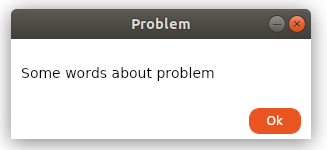
Solution, which I wanna improve and support, you can find on nuget and on gitlab. It'll be glad, if somebody bring new ideas with his/her pull requests.
I wanna create my lib as easy and useful as WPF's messagebox is.
Call this method:
and get window with header, content(text) and two buttons. (Windows 10, Ubuntu 18.04)

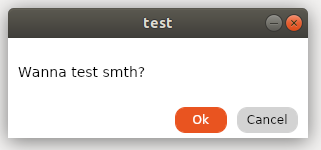
Class MessageBox contains public 4 methods:
ShowForResult — return result of button's click.
ShowDialog — return result of button's click and set this window as dialog window for chosen parent.
Show — show window with one «ok» button, which ignore result of click (return void).
ShowNative — try to call native window for platform, if failed, call ShowForResult.
API
In every method create window,
and set content for each.
Content is a grid, which include rows, one for textbox:
other for grid with buttons:
The functionality of the buttons is given by the method:
The method accepts a window which be manipulated by buttons, and result returned by them.
And, the last thing to consider is a code fragment that provides the result of a button click:
As a result, we get simple windows with buttons, which will allow us to create cross-platform MessageBox.
Grateful for user worldbeater.
Let's try to do it.
Solution, which I wanna improve and support, you can find on nuget and on gitlab. It'll be glad, if somebody bring new ideas with his/her pull requests.
I wanna create my lib as easy and useful as WPF's messagebox is.
Let's start
Call this method:
MessageBox.ShowForResult("test","Wanna test smth?",MessageBox.MessageBoxButtons.OkCancel);
and get window with header, content(text) and two buttons. (Windows 10, Ubuntu 18.04)
Class MessageBox contains public 4 methods:
ShowForResult — return result of button's click.
ShowDialog — return result of button's click and set this window as dialog window for chosen parent.
Show — show window with one «ok» button, which ignore result of click (return void).
ShowNative — try to call native window for platform, if failed, call ShowForResult.
API
How it works:
In every method create window,
var messageBox = new MessageBox();
and set content for each.
messageBox.Content = CreateBaseMsgBox(text, buttons, messageBox);
Content is a grid, which include rows, one for textbox:
 var textBlock = new TextBlock();
 textBlock.Text = text;
 textBlock.TextAlignment = TextAlignment.Center;
 textBlock.TextWrapping = TextWrapping.Wrap;
 Grid.SetRow(textBlock,0);
 grid.Children.Add(textBlock);
other for grid with buttons:
var btnGrid = GetButtonGrid(GetButton(window, MessageBoxResult.Yes),
 GetButton(window,MessageBoxResult.No));
 Grid.SetRow(btnGrid,1);
 grid.Children.Add(btnGrid);
Full listing for GetButtonGrid.
private static Grid GetButtonGrid(params Button[] buttons)
        {
            var grid = new Grid();
            List<ColumnDefinition> definitions = new List<ColumnDefinition>();
            for (int i = 0; i < buttons.Length; i++)
            {
                definitions.Add(new ColumnDefinition{Width = new GridLength(5)});
                definitions.Add(new ColumnDefinition{Width = new GridLength(1,GridUnitType.Star)});
            }
            definitions.Add(new ColumnDefinition{Width = new GridLength(5)});
            grid.ColumnDefinitions.AddRange(definitions);
             var j = 1;
            foreach (var btn in buttons)
            {
                Grid.SetColumn(btn,j);
                j += 2;
                grid.Children.Add(btn);
            }
            return grid;
        }
The functionality of the buttons is given by the method:
GetButton(MessageBox window,MessageBoxResult result)
Read more
private static Button GetButton(MessageBox window,MessageBoxResult result)
        {
           var btn = new Button();
           btn.Content = result.ToString();
           btn.Click += (_, __) =>
           {
               window.Res = result;
               window.Close();
           };
           return btn;
        }
The method accepts a window which be manipulated by buttons, and result returned by them.
And, the last thing to consider is a code fragment that provides the result of a button click:
var tcs = new TaskCompletionSource<MessageBoxResult>();
messageBox.Closed += delegate { tcs.TrySetResult(messageBox.Res); };
...
return tcs.Task;
As a result, we get simple windows with buttons, which will allow us to create cross-platform MessageBox.
Grateful for user worldbeater.

