In Axia 0.1.0, a user allowed to edit accounts and move OUs could reset an administrator’s password in four requests. None of the four broke the rule written to prevent exactly that.
Axia is an open-source web console and REST API for Active Directory and OpenLDAP (.NET 10, React). It exists for a routine every company with a directory knows: create an account, reset a password, add someone to a group, disable a leaver. That work belongs with helpdesk, but helpdesk must not be able to promote itself, and every action must leave a trace.
This is not a feature tour. It is five places where the obvious implementation turned out to be a hole or a bug, and what fixed each one. Most of them have nothing to do with Axia: anyone who builds access control on top of LDAP will run into them. The code is linked at the end.
Why not directory ACLs
The textbook way to let helpdesk reset passwords is delegation: OU permissions in AD, olcAccess rules in OpenLDAP. The directory itself decides who may do what, and no middleman needs broad rights.
In practice this has two problems. The first is complexity. “Support resets passwords in ou=people, except for members of cn=admins” can be written in OpenLDAP, but such rules are hard to read and maintain, and a mistake in their order silently grants more than intended. The second is that the rules live on the directory tree while the questions are about people: “what can Peters do?” has to be pieced together from the ACLs of several OUs.
Axia takes the other route, and its price is worth naming up front. The application binds to the directory with a service account that has broad rights, and decides on its own who may do what: directory groups map to roles, and roles to a set of 17 permissions.
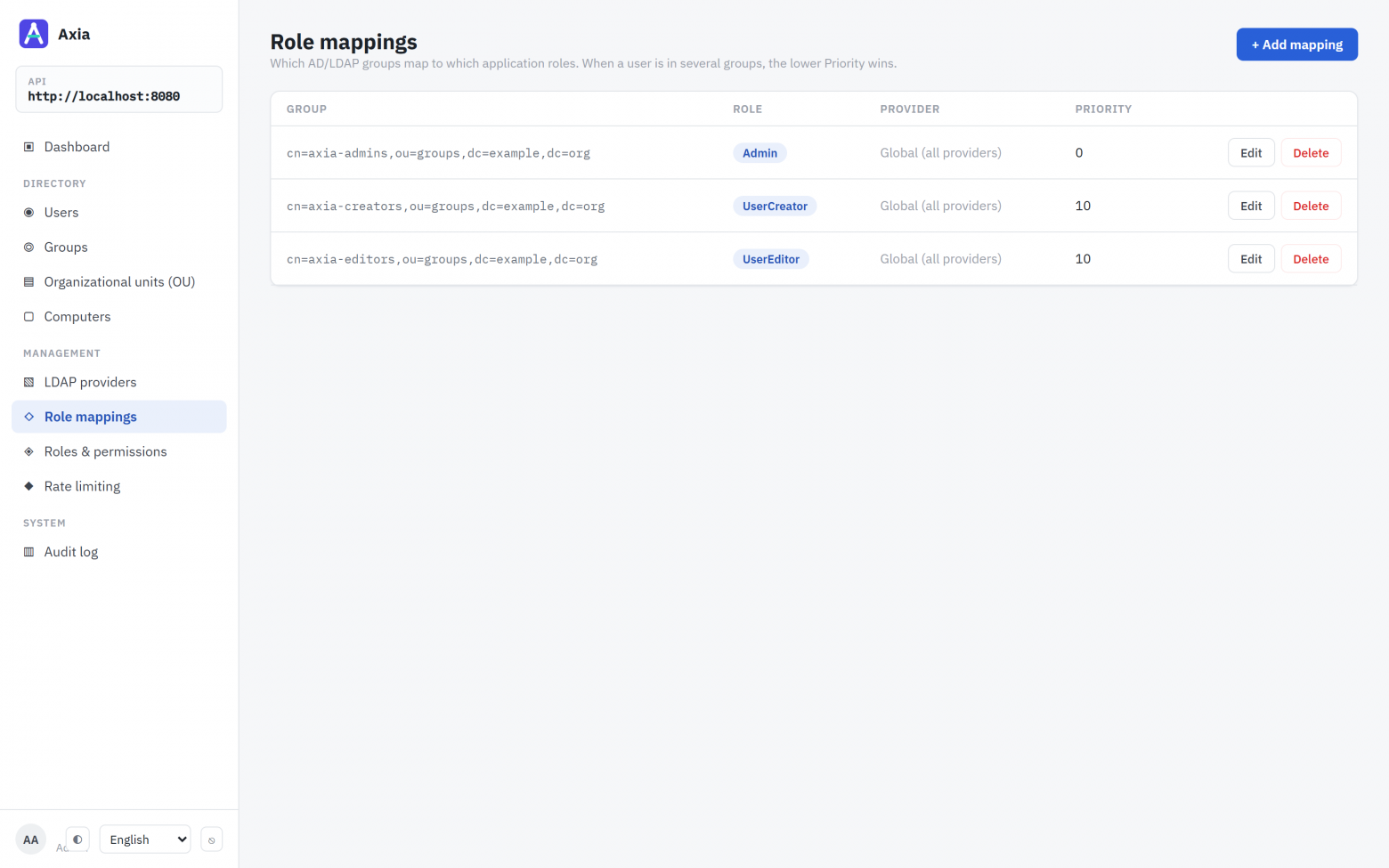
Permissions are evaluated on every request from the account’s current groups, with a 30-second cache. Take someone out of a group, and half a minute later the rights are gone, even if their token is still valid.
The more important consequence is another one. Since the service account makes every change, the directory no longer protects against privilege escalation. That is now the application’s job, and nearly every trap below is about it. And whoever breaks into the application gets the directory, as far as the service account’s rights reach. Weigh that before choosing the approach.
How it compares
It makes more sense to compare approaches than products: where permissions are checked and what you pay for it. Axia is one option here, and not the best one everywhere.
Delegation in AD + RSAT | phpLDAPadmin, LAM | Adaxes, ADManager Plus | Axia | |
|---|---|---|---|---|
Who checks permissions | the directory (ACLs) | the directory (ACLs) | the application | the application |
The tool itself holds broad rights | no | no, signs in as the user | yes, a service account | yes, a service account |
Directories | AD | any LDAP | AD, Microsoft 365 | AD, OpenLDAP, eDirectory |
Admins protected from password resets | AdminSDHolder, built in | if your ACLs say so | its own delegation model | adminCount, protected groups, “no one above yourself” |
Change log | DC security log, if auditing is on | OpenLDAP accesslog, if configured | yes | yes, refusals included |
What it runs on | Windows with RSAT | a web server with PHP | a server and a licence | Docker or .NET |
Maturity | years | years | years, vendor support | MVP, version 0.2 |
When you don’t need Axia:
AD only, administrators live in RSAT, delegation is in place. Nothing to change: AdminSDHolder already strips delegated rights from privileged accounts.
OpenLDAP, and you write
olcAccesswith confidence. LAM gives you a web interface with no privileged middleman. That is strictly safer than Axia’s model.You need request approval, workflows, auditor reports and vendor support. That is Adaxes and ADManager Plus territory.
Axia makes sense when there are several directories or OpenLDAP is among them, when you want to grant rights through groups rather than ACLs, and when you need a log that shows refusals too. And when you need an API, not just a UI.
Trap 1: moving an OU to become admin
The users.update permission says what change you may make, but not to whom. And every change reaches the directory as the service account, which can modify anyone. In an early version that was enough for the UserEditor role to reset an administrator’s password and sign in as them, for users.delete to remove every administrator, and for groups.manage to add oneself to the group mapped to the Admin role.
Hence the rule: you cannot act on anyone who holds more than you do. “More” is measured in two places:
In the application. The target’s permissions must be a subset of the caller’s.
In the directory. Accounts and groups the directory itself treats as privileged (
adminCountin AD, and the groups listed underDirectoryProtection) can be changed only by someone who holds every permission in the application. Without this, a domain admin whose groups mapped to no role was a plain User to Axia, and any editor outranked them.
Nobody may change the service account: resetting its password through the application breaks the application at best, and at worst hands its rights to whoever chose the new password.
The rule was there, and so were its tests. Then a hole turned up beside it. Roles are mapped to groups by DN: cn=axia-admins,ou=groups,dc=example,dc=org → Admin. But a DN is an address, not an identifier. A user with orgunits.manage and users.update needed four steps:
Move the OU that holds the administrators’ group. The group’s DN changes, and the mapping to Admin stops matching.
On the next request, the administrator is a plain User to the application and can be outranked.
Reset their password.
Move the OU back. Everything looks as before, except that the administrator’s password is now known.
No single step broke the rule. The hole was in the first public release, 0.1.0, and closed in 0.2.0. The fix is to judge an OU by what it contains. Renaming or moving an OU changes the address of its whole subtree, so everything in that subtree is checked:
var subtree = await _ldapService.InspectSubtreeAsync(unit.Value);
if (subtree.HoldsServiceAccount)
    throw Refuse(unit.Value, "it holds the service account", ...);

var held = await CallerPermissionsAsync(cancellationToken);
if ((subtree.HoldsPrivileged || holdsProtectedGroup) && !HoldsEverything(held))
    throw Refuse(unit.Value, "it holds entries privileged in the directory", ...);

// Mappings by DN only: a mapping by name matches wherever the group is, so moving it
// changes nothing about it.
var roles = (await _roleMappings.GetEffectiveMappingsAsync(_actingUser.ProviderId))
    .Where(mapping => !mapping.IdentifiesGroupByNameOnly
                      && DistinguishedName.TryCreate(mapping.GroupName, out var group)
                      && group!.IsWithin(unit))
    .Select(mapping => mapping.RoleName)
    .ToHashSet(StringComparer.OrdinalIgnoreCase);

var conferred = await _rolePermissions.GetPermissionsForRolesAsync(roles, cancellationToken);
EnsureCallerHolds(held, conferred, unit.Value);
Deleting an OU needs no such check: the directory will not delete one that isn’t empty. Computer accounts follow the same rules, and only a full administrator can change a domain controller’s account.
Every refusal is written to the audit log together with who tried:
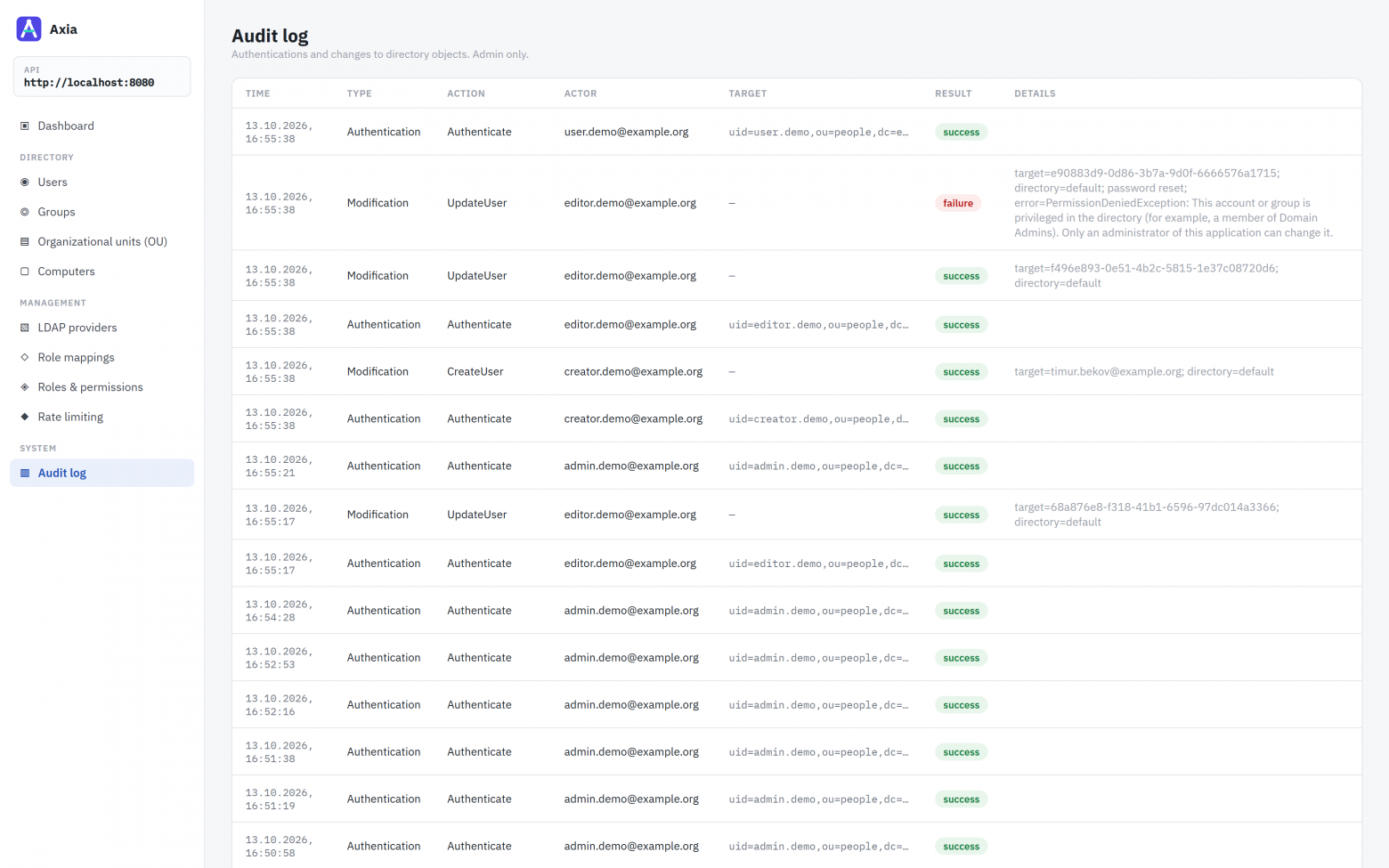
Before 0.2.0 the log missed the most common refusal of all: a request with no permission for the action at all, turned away at the API’s entrance before any business logic ran. That one is recorded now too.
The lesson holds without Axia: if permissions hang on DNs, any operation that changes a DN, a rename or a move, is an operation on permissions. It deserves the same scrutiny as a change to group membership.
Trap 2: the memberOf that isn’t there
To check permissions you need the account’s groups. The simplest source is the memberOf attribute, and at first Axia read nothing else. In AD that works: memberOf is computed there and always present. OpenLDAP has no memberOf until the memberof overlay is enabled. A default installation doesn’t load it, and where it is loaded it is often configured for groupOfNames and blind to groupOfUniqueNames.
The consequences were asymmetric. The administrator signed in as a plain User: a safe failure that gets noticed on day one. But the same empty list meant nobody was in a protected group. The “don’t touch the privileged” rule fired for no one, and anyone allowed to reset passwords could reset the administrator’s. That half goes unnoticed until someone uses it.
Now groups are searched from the other side, as the groups that name the account, in all three forms directories use to store membership:
internal static string GroupMembershipFilter(string distinguishedName, string? uid)
{
    var dn = EscapeLdapFilterValue(distinguishedName);
    return "(|"
        + $"(&(objectClass=groupOfNames)(member={dn}))"
        + $"(&(objectClass=group)(member={dn}))"
        + $"(&(objectClass=groupOfUniqueNames)(uniqueMember={dn}))"
        + (string.IsNullOrWhiteSpace(uid)
            ? string.Empty
            : $"(&(objectClass=posixGroup)(memberUid={EscapeLdapFilterValue(uid)}))")
        + ")";
}
The result is merged with memberOf, not substituted for it. The DN is escaped: an entry’s name can contain parentheses or an asterisk, and unescaped they would end the filter early or widen it to other people’s groups. Nested groups are not expanded, just as memberOf doesn’t expand them.
The story has a sequel. Searching for groups is one more query per account. That is fine for sign-in and permission checks, but not for a list of thousands of users, so the list reads memberOf only. The list is cached, and the user’s detail page was served from the same cache. So in a directory without memberOf, the page said “not a member of any group” for people who were. Permissions were unaffected, since the check takes its own path, but the administrator was shown something untrue. In 0.2.0 the detail page re-reads the account by DN the same way sign-in does.
The lesson: when the same data can be fetched cheaply or correctly, the cheap way will sooner or later end up where the correct one was needed. Especially through a cache.
Trap 3: pass-back, or how to steal the service account’s password
Directory connections are kept in the database: host, port, encryption mode, the service account’s DN and password. The password is encrypted with AES-GCM and never returned by the API, not even to an administrator. It would seem there is no way to steal it through the application.
There is. Change the connection’s host to your own and leave the password untouched. On the next request the server connects to the new address and performs a simple bind, sending the service account’s password as it is. This is the well-known LDAP pass-back attack. It is usually demonstrated on printers with an LDAP address book, and a web console is no better.
Why does it matter, if only an administrator can edit connections anyway? Because an administrator’s token lives for an hour, while the service account’s password lives for years and carries more rights. A stolen token must not become lasting access to the directory.
The rule came out simple: if a connection is about to go somewhere it has never gone, the password has to be entered again. And only someone who already knows it can enter it.
var keepsStoredPassword = string.IsNullOrEmpty(request.AdminPassword)
                          && !existing.EncryptedAdminPassword.IsEmpty;

if (keepsStoredPassword && existing.WouldReachNewEndpoint(request.Host, port, request.FailoverHosts))
    throw new DomainValidationException(ApplicationMessages.BindPasswordRequiredForNewEndpoint());

// The same password to the same host, but readable on the way: whoever can watch the
// network gets it as surely as a host of the caller's choosing would.
if (keepsStoredPassword && existing.WouldDropEncryption(security))
    throw new DomainValidationException(ApplicationMessages.BindPasswordRequiredForPlainLdap());
Any host, primary or failover, that wasn’t there before counts as new, and so does any new port on an existing host. Removing a failover host or reordering hosts needs no password. The second condition is the same pass-back from the other side: the host stays, but encryption is turned off, and the password crosses the network in plain text to anyone listening.
Trap 4: account lockout as a DoS
An Axia session is a JWT valid for 60 minutes. So that a dismissed employee can’t keep working for another hour, every request checks whether the account has been switched off in the directory, with a 30-second cache. Each directory records “switched off” its own way: the ACCOUNTDISABLE bit in userAccountControl or an expired accountExpires in AD, pwdAccountLockedTime in OpenLDAP with the ppolicy overlay, loginDisabled in eDirectory.
The interesting part is what deliberately does not count: a lockout after failed sign-ins. Anyone can trigger one by entering a wrong password for someone else’s login a few times. If a lockout ended sessions, any employee could kick an administrator out of the console mid-task. So a lockout blocks new sign-ins, since the directory refuses the bind, but leaves a live session alone. In OpenLDAP both kinds of lock live in the same attribute and are told apart by its value:
// The value OpenLDAP's password policy writes to pwdAccountLockedTime for a lock that only an
// administrator lifts, as opposed to the time of a lockout that expires on its own.
private const string PermanentLockTime = "000001010000Z";

if (string.Equals(Get(attrs, "pwdAccountLockedTime").Trim(), PermanentLockTime, StringComparison.Ordinal))
    return true;
The same reasoning led to a per-account sign-in limit. A per-IP limit of 5 attempts a minute does nothing against guessing from many addresses, and every attempt the API lets through to the directory is a bind that brings the account closer to a lockout in the directory itself. Now, after 5 failed sign-ins within 15 minutes, attempts for that login are refused with a 429 and never reach the directory. With the threshold below the directory’s own, guessing through Axia cannot lock the account there.
A fair caveat: this limit is a small DoS in its own right. For fifteen minutes an attacker can keep someone out of the console. But only out of the console, only for 15 minutes, with no lockout in the directory and no live session cut. The response is the same for logins that exist and logins that don’t, so it reveals nothing about who is in the directory.
Trap 5: a password is not an attribute
In an early version the password was written as an ordinary userPassword attribute. It looks logical, and both directories accept the request without an error. The result is bad in both:
In AD,
userPasswordis by default an ordinary string attribute (unlessdSHeuristicssays otherwise). The account’s real password stayed the same, and the new one sat next to it in plain text, visible to everyone allowed to read the entry.In OpenLDAP without a hashing policy, what you write is exactly what is stored. Every password set through the application sat in the directory unhashed.
The right way is to let the directory accept the password itself, hash it and check it against its own policy:
AD: the
unicodePwdattribute, whose value is the password in double quotes, encoded as UTF-16LE. It is accepted only over an encrypted connection; over a plain one AD answersunwillingToPerform.OpenLDAP and the rest: the Password Modify extended operation (RFC 3062).
public static byte[] ActiveDirectoryValue(string password) =>
    Encoding.Unicode.GetBytes($"\"{password}\"");
Which path to take is decided from the root DSE, not from configuration: AD announces itself with the capability 1.2.840.113556.1.4.800, and Password Modify support shows up in supportedExtension. If neither is there, the password is not written at all: an error is better than a password in plain text. Both directories answer a password that is too simple the same way, with constraintViolation, and that becomes a clear 400 error rather than “directory unavailable”.
Bonus: a directory that accepted the connection and went silent
LDAP operations had timeouts, but one call ignored them. While LdapConnection.StartTls() in Novell.Directory.Ldap waits for an answer, it holds the connection’s write lock, and both the timeout and closing the connection wait for that same lock. A directory that accepted the TCP connection and stayed silent held the request thread forever. LDAPS and plain LDAP in the same test gave up within a second.
The workaround: before StartTLS, ask the directory something harmless that does respect the timeout, and read the root DSE with no attributes. Any answer will do, even a refusal: it shows someone is there. No answer means LdapTimeout while the lock is free, and the connection is closed normally. No credentials go anywhere in the process; they are sent only after TLS.
private static void StartTlsWithinLimit(LdapConnection conn)
{
    try
    {
        var rootDse = conn.Search(string.Empty, LdapConnection.ScopeBase, "(objectClass=*)", ["1.1"], false);
        while (rootDse.HasMore())
            rootDse.Next();
    }
    catch (LdapException ex) when (ex.ResultCode != LdapException.LdapTimeout)
    {
        // An answer, if not the one asked for.
    }

    conn.StartTls();
}
It is not a guarantee: a server can answer the read and then hang on StartTLS. But it covers the common case of an address with the wrong service behind it, or a half-dead directory.
What came out of it
Traps aside, Axia is a web console and REST API (OpenAPI) for users, groups, OUs and computer accounts: bulk operations, a login generator with transliteration, an audit log. The server runs on .NET 10, the console on React 19; one installation serves several directories, and the interface comes in nine languages, of which English and Russian have been proofread. The current release is 0.2.1, with container images for amd64 and arm64. PostgreSQL support and a Windows installer are on main and will ship in 0.3.
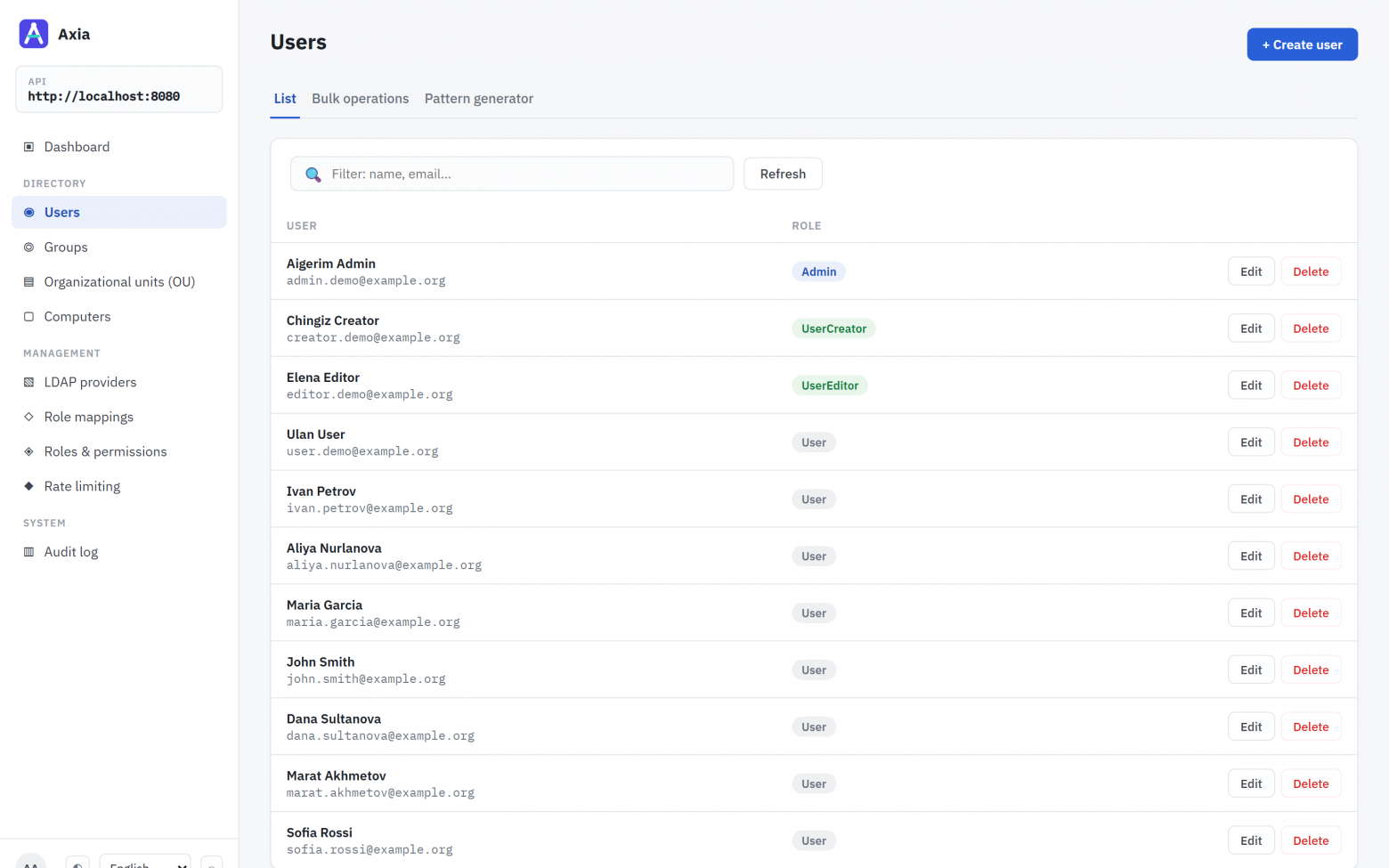
You can try it in a couple of minutes; all it needs is Docker with Compose v2:
git clone https://github.com/Nelsar/Axia.git
cd Axia
docker compose up
This starts the API, the console at http://localhost:8080 and an OpenLDAP with demo accounts; every password is Axia-Demo-1. The most interesting thing to try is signing in as editor.demo and resetting admin.demo’s password. The demo is put together the way a production setup should be: LDAPS with certificate verification, keys generated on first start, nothing exposed beyond localhost.
What it doesn’t have yet, which is better known before you deploy:
Sign-out and token revocation. Switching an account off ends its session within 30 seconds, but a stolen token stays valid until it expires, 60 minutes by default.
Two-factor authentication and sign-in through OpenID Connect. These are next on the roadmap.
Revocation checks for directory certificates (CRL, OCSP).
Running more than one instance. Bulk jobs and the sign-in counters live in memory.
Nested groups. Only direct membership counts.
The common thread
Nearly every story above is the same story. Once a middleman with broad rights stands between people and the directory, the directory stops protecting against escalation, and each of its guarantees has to be rebuilt in the application. And what breaks is usually not the main rule but whatever quietly changes its inputs: a group’s DN, the list of groups, the address of the directory.
The code is on GitHub: github.com/Nelsar/Axia, Apache-2.0, version 0.2.1. I’d especially like to know how Axia behaves with unusual schemas and on eDirectory. Please report vulnerabilities privately through the Security tab, and leave questions and criticism in the comments. The Russian version of this article is here.