


Прим. перев.: автор статьи — Erkan Erol, инженер из SAP — делится своим изучением механизмов функционирования команды

В одну из пятниц ко мне подошел коллега и поинтересовался, как выполнить команду в pod'е с помощью client-go. Я не смог ему ответить и внезапно осознал, что ничего не знаю о механизме работы
Чтобы создать кластер на MacBook'е, я склонировал ecomm-integration-ballerina/kubernetes-cluster. Затем поправил IP-адреса узлов в конфиге kubelet’а, поскольку настройки по умолчанию не позволяли выполнять
Создаем pod в пространстве имен
Затем выполняем команду exec и ждем 5000 секунд для дальнейших наблюдений:
Появляется процесс kubectl (с pid=8507 в нашем случае):
Если проверить сетевую активность процесса, мы обнаружим, что у него есть подключения к api-server'у (192.168.205.10.6443):
Давайте посмотрим на код. Kubectl создает POST-запрос с субресурсом exec и посылает REST-запрос:
(kubectl/pkg/cmd/exec/exec.go)
Мы также можем наблюдать запрос на стороне api-server'а:
Обратите внимание, что HTTP-запрос включает запрос на изменение протокола. SPDY позволяет мультиплексировать отдельные «потоки» stdin/stdout/stderr/spdy-error через единое TCP-соединение.
API-сервер получает запрос и преобразует его в
(pkg/apis/core/types.go)
Чтобы выполнить требуемые действия, api-server должен знать, с каким pod'ом ему необходимо связаться:
(pkg/registry/core/pod/strategy.go)
Конечно, данные об endpoint'е берутся из информации об узле:
(pkg/registry/core/pod/strategy.go)
Ура! У kubelet'а теперь есть порт (
(pkg/kubelet/client/kubelet_client.go)
Теперь API-сервер знает endpoint и устанавливает соединение:
(pkg/registry/core/pod/rest/subresources.go)
Давайте посмотрим, что происходит на мастер-узле.
Сначала узнаем IP рабочего узла. В нашем случае это 192.168.205.11:
Затем установим порт kubelet'а (10250 в нашем случае):
Теперь пора проверить сеть. Есть ли подключение к рабочему узлу (192.168.205.11)? Оно есть! Если «убить» процесс
Соединение между kubectl'ом и api-server'ом по-прежнему открыто. Кроме того, есть еще одно соединение, связывающее api-server и kubelet.
Теперь давайте подключимся к worker-узлу и посмотрим, что происходит на нем.
Прежде всего мы видим, что соединение с ним также установлено (вторая строка); 192.168.205.10 — это IP master-узла:
А как насчет нашей команды
Но постойте: как kubelet провернул это? В kubelet есть демон, который открывает доступ к API через порт для запросов api-server'а:
(pkg/kubelet/server/streaming/server.go)
Kubelet вычисляет ответный endpoint для exec-запросов:
(pkg/kubelet/server/streaming/server.go)
Не перепутайте. Он возвращает не результат команды, а endpoint для связи:
(cri-api/pkg/apis/runtime/v1alpha2/api.pb.go)
Kubelet реализует интерфейс
Он просто использует gRPC для вызова метода через Container Runtime Interface:
(cri-api/pkg/apis/runtime/v1alpha2/api.pb.go)
(cri-api/pkg/apis/runtime/v1alpha2/api.pb.go)
Container Runtime отвечает за реализацию
Если это так, мы должны видеть соединение между kubelet'ом и исполняемой средой контейнера, правильно? Давайте проверим.
Выполните эту команду до и после exec-команды и посмотрите на отличия. В моем случае разница такова:
Хм-м-м… Новое соединение через unix-сокеты между kubelet'ом (pid=5714) и чем-то неизвестным. Что же это может быть? Правильно, это Docker (pid=1186)!
Как вы помните, это процесс docker-демона (pid=1186), который выполняет нашу команду:
Давайте изучим исходный код CRI-O, чтобы понять, что происходит. В Docker'е логика аналогичная.
Имеется сервер, отвечающий за реализацию
(cri-o/server/server.go)
(cri-o/erver/container_exec.go)
В конце цепочки исполняемая среда контейнера выполняет команду на рабочем узле:
(cri-o/internal/oci/runtime_oci.go)
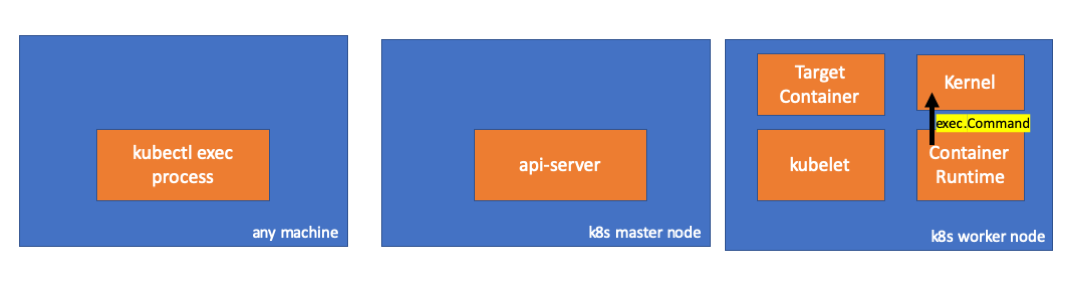
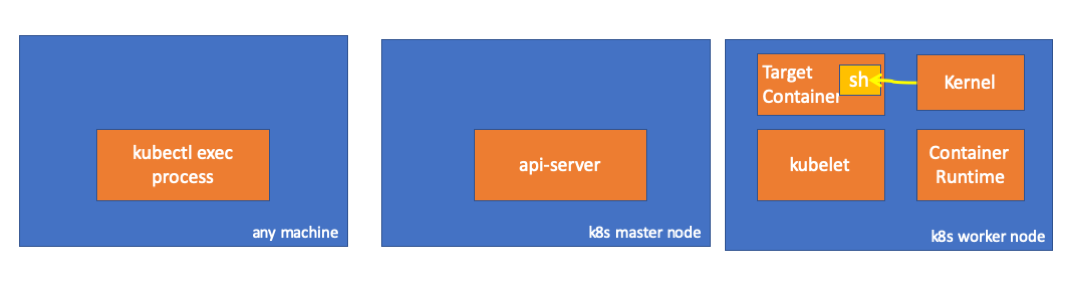
Наконец, ядро выполняет команды:
Читайте также в нашем блоге:
kubectl exec, столь привычной для всех, кто работает с Kubernetes. Весь алгоритм он сопровождает листингами исходного кода Kubernetes (и связанных проектов), которые позволяют разобраться в теме настолько глубоко, насколько это требуется.В одну из пятниц ко мне подошел коллега и поинтересовался, как выполнить команду в pod'е с помощью client-go. Я не смог ему ответить и внезапно осознал, что ничего не знаю о механизме работы
kubectl exec. Да, у меня были определенные представления о его устройстве, однако я не был уверен на 100% в их правильности и потому решил заняться этим вопросом. Проштудировав блоги, документацию и исходный код, узнал много нового, и в этой статье хочу поделиться своими открытиями и пониманием. Если что-то не так, пожалуйста, свяжитесь со мной в Twitter.Подготовка
Чтобы создать кластер на MacBook'е, я склонировал ecomm-integration-ballerina/kubernetes-cluster. Затем поправил IP-адреса узлов в конфиге kubelet’а, поскольку настройки по умолчанию не позволяли выполнять
kubectl exec. Подробнее об основной причине тому можно прочитать здесь.- Любая машина = мой MacBook
- IP master-узла = 192.168.205.10
- IP worker-узла = 192.168.205.11
- порт API-сервера = 6443
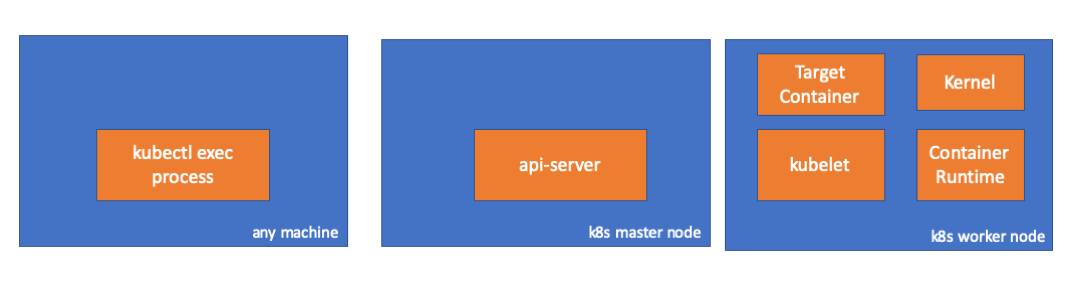
Компоненты
- kubectl exec process: когда мы выполняем «kubectl exec …», запускается процесс. Делать это можно на любой машине с доступом к API-серверу K8s. Прим. перев.: Далее в консольных листингах автор использует комментарий «any machine», подразумевая, что последующие команды можно выполнять на любых таких машинах с доступом к Kubernetes.
- api server: компонент на мастер-узле, предоставляющий доступ к API Kubernetes. Это фронтенд для control plane в Kubernetes.
- kubelet: агент, который работает на каждом узле в кластере. Он обеспечивает работу контейнеров в pod'е.
- container runtime (исполняемая среда контейнера): программное обеспечение, отвечающее за работу контейнеров. Примеры: Docker, CRI-O, containerd…
- kernel: ядро ОС на рабочем узле; отвечает за управление процессами.
- target (целевой) container: контейнер, являющийся частью pod'а и функционирующий на одном из рабочих узлов.
Что я обнаружил
1. Активность на стороне клиента
Создаем pod в пространстве имен
default:// any machine $ kubectl run exec-test-nginx --image=nginx
Затем выполняем команду exec и ждем 5000 секунд для дальнейших наблюдений:
// any machine
$ kubectl exec -it exec-test-nginx-6558988d5-fgxgg -- sh
# sleep 5000
Появляется процесс kubectl (с pid=8507 в нашем случае):
// any machine
$ ps -ef |grep kubectl
501  8507  8409   0  7:19PM ttys000    0:00.13 kubectl exec -it exec-test-nginx-6558988d5-fgxgg -- sh
Если проверить сетевую активность процесса, мы обнаружим, что у него есть подключения к api-server'у (192.168.205.10.6443):
// any machine
$ netstat -atnv |grep 8507
tcp4       0      0  192.168.205.1.51673    192.168.205.10.6443    ESTABLISHED 131072 131768   8507      0 0x0102 0x00000020
tcp4       0      0  192.168.205.1.51672    192.168.205.10.6443    ESTABLISHED 131072 131768   8507      0 0x0102 0x00000028
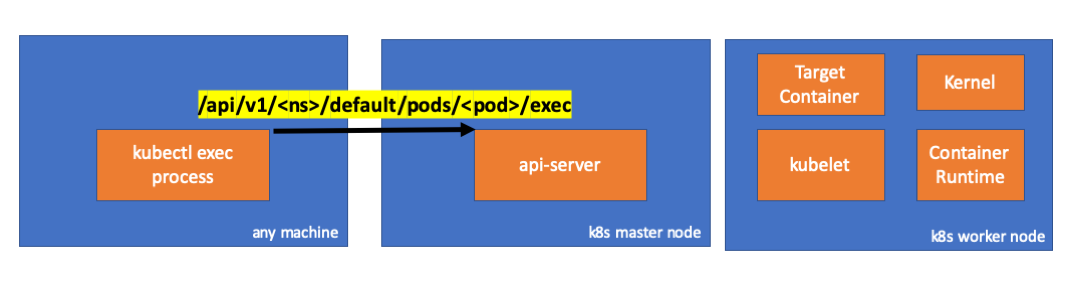
Давайте посмотрим на код. Kubectl создает POST-запрос с субресурсом exec и посылает REST-запрос:
              req := restClient.Post().
                        Resource("pods").
                        Name(pod.Name).
                        Namespace(pod.Namespace).
                        SubResource("exec")
                req.VersionedParams(&corev1.PodExecOptions{
                        Container: containerName,
                        Command:   p.Command,
                        Stdin:     p.Stdin,
                        Stdout:    p.Out != nil,
                        Stderr:    p.ErrOut != nil,
                        TTY:       t.Raw,
                }, scheme.ParameterCodec)

                return p.Executor.Execute("POST", req.URL(), p.Config, p.In, p.Out, p.ErrOut, t.Raw, sizeQueue)
(kubectl/pkg/cmd/exec/exec.go)
2. Активность на стороне мастер-узла
Мы также можем наблюдать запрос на стороне api-server'а:
handler.go:143] kube-apiserver: POST "/api/v1/namespaces/default/pods/exec-test-nginx-6558988d5-fgxgg/exec" satisfied by gorestful with webservice /api/v1
upgradeaware.go:261] Connecting to backend proxy (intercepting redirects) https://192.168.205.11:10250/exec/default/exec-test-nginx-6558988d5-fgxgg/exec-test-nginx?command=sh&input=1&output=1&tty=1
Headers: map[Connection:[Upgrade] Content-Length:[0] Upgrade:[SPDY/3.1] User-Agent:[kubectl/v1.12.10 (darwin/amd64) kubernetes/e3c1340] X-Forwarded-For:[192.168.205.1] X-Stream-Protocol-Version:[v4.channel.k8s.io v3.channel.k8s.io v2.channel.k8s.io channel.k8s.io]]
Обратите внимание, что HTTP-запрос включает запрос на изменение протокола. SPDY позволяет мультиплексировать отдельные «потоки» stdin/stdout/stderr/spdy-error через единое TCP-соединение.
API-сервер получает запрос и преобразует его в
PodExecOptions:// PodExecOptions is the query options to a Pod's remote exec call type PodExecOptions struct { metav1.TypeMeta // Stdin if true indicates that stdin is to be redirected for the exec call Stdin bool // Stdout if true indicates that stdout is to be redirected for the exec call Stdout bool // Stderr if true indicates that stderr is to be redirected for the exec call Stderr bool // TTY if true indicates that a tty will be allocated for the exec call TTY bool // Container in which to execute the command. Container string // Command is the remote command to execute; argv array; not executed within a shell. Command []string }
(pkg/apis/core/types.go)
Чтобы выполнить требуемые действия, api-server должен знать, с каким pod'ом ему необходимо связаться:
// ExecLocation returns the exec URL for a pod container. If opts.Container is blank
// and only one container is present in the pod, that container is used.
func ExecLocation(
        getter ResourceGetter,
        connInfo client.ConnectionInfoGetter,
        ctx context.Context,
        name string,
        opts *api.PodExecOptions,
) (*url.URL, http.RoundTripper, error) {
        return streamLocation(getter, connInfo, ctx, name, opts, opts.Container, "exec")
}
(pkg/registry/core/pod/strategy.go)
Конечно, данные об endpoint'е берутся из информации об узле:
        nodeName := types.NodeName(pod.Spec.NodeName)
        if len(nodeName) == 0 {
                // If pod has not been assigned a host, return an empty location
                return nil, nil, errors.NewBadRequest(fmt.Sprintf("pod %s does not have a host assigned", name))
        }
        nodeInfo, err := connInfo.GetConnectionInfo(ctx, nodeName)
(pkg/registry/core/pod/strategy.go)
Ура! У kubelet'а теперь есть порт (
node.Status.DaemonEndpoints.KubeletEndpoint.Port), к которому может подключиться API-сервер:// GetConnectionInfo retrieves connection info from the status of a Node API object. func (k *NodeConnectionInfoGetter) GetConnectionInfo(ctx context.Context, nodeName types.NodeName) (*ConnectionInfo, error) { node, err := k.nodes.Get(ctx, string(nodeName), metav1.GetOptions{}) if err != nil { return nil, err } // Find a kubelet-reported address, using preferred address type host, err := nodeutil.GetPreferredNodeAddress(node, k.preferredAddressTypes) if err != nil { return nil, err } // Use the kubelet-reported port, if present port := int(node.Status.DaemonEndpoints.KubeletEndpoint.Port) if port <= 0 { port = k.defaultPort } return &ConnectionInfo{ Scheme: k.scheme, Hostname: host, Port: strconv.Itoa(port), Transport: k.transport, }, nil }
(pkg/kubelet/client/kubelet_client.go)
Из документации Master-Node Communication > Master to Cluster > apiserver to kubelet:
Эти подключения замыкаются на HTTPS endpoint'е kubelet'а. По умолчанию, apiserver не проверяет сертификат kubelet'а, что делает соединение уязвимым к «атакам посредника» (MITM) и небезопасным для работы в ненадежных и/или публичных сетях.
Теперь API-сервер знает endpoint и устанавливает соединение:
// Connect returns a handler for the pod exec proxy
func (r *ExecREST) Connect(ctx context.Context, name string, opts runtime.Object, responder rest.Responder) (http.Handler, error) {
        execOpts, ok := opts.(*api.PodExecOptions)
        if !ok {
                return nil, fmt.Errorf("invalid options object: %#v", opts)
        }
        location, transport, err := pod.ExecLocation(r.Store, r.KubeletConn, ctx, name, execOpts)
        if err != nil {
                return nil, err
        }
        return newThrottledUpgradeAwareProxyHandler(location, transport, false, true, true, responder), nil
}
(pkg/registry/core/pod/rest/subresources.go)
Давайте посмотрим, что происходит на мастер-узле.
Сначала узнаем IP рабочего узла. В нашем случае это 192.168.205.11:
// any machine
$ kubectl get nodes k8s-node-1 -o wide
NAME         STATUS   ROLES    AGE   VERSION   INTERNAL-IP      EXTERNAL-IP   OS-IMAGE             KERNEL-VERSION      CONTAINER-RUNTIME
k8s-node-1   Ready    <none>   9h    v1.15.3   192.168.205.11   <none>        Ubuntu 16.04.6 LTS   4.4.0-159-generic   docker://17.3.3
Затем установим порт kubelet'а (10250 в нашем случае):
// any machine
$ kubectl get nodes k8s-node-1 -o jsonpath='{.status.daemonEndpoints.kubeletEndpoint}'
map[Port:10250]
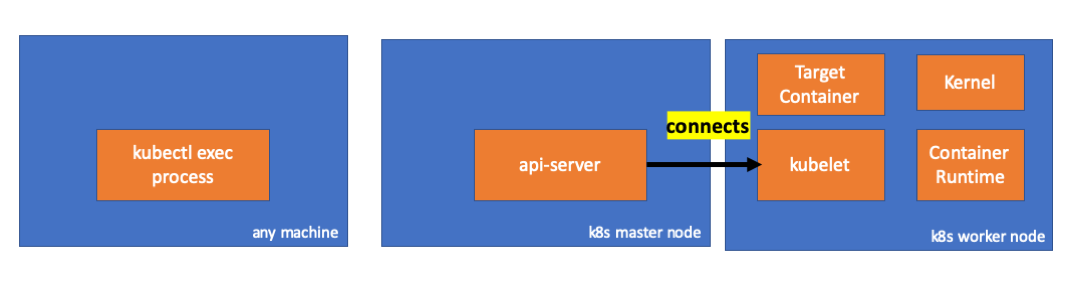
Теперь пора проверить сеть. Есть ли подключение к рабочему узлу (192.168.205.11)? Оно есть! Если «убить» процесс
exec, оно исчезнет, поэтому я знаю, что подключение установлено api-server'ом как следствие выполненной exec-команды.// master node $ netstat -atn |grep 192.168.205.11 tcp 0 0 192.168.205.10:37870 192.168.205.11:10250 ESTABLISHED …
Соединение между kubectl'ом и api-server'ом по-прежнему открыто. Кроме того, есть еще одно соединение, связывающее api-server и kubelet.
3. Активность на рабочем узле
Теперь давайте подключимся к worker-узлу и посмотрим, что происходит на нем.
Прежде всего мы видим, что соединение с ним также установлено (вторая строка); 192.168.205.10 — это IP master-узла:
 // worker node
  $ netstat -atn |grep 10250
  tcp6       0      0 :::10250                :::*                    LISTEN
  tcp6       0      0 192.168.205.11:10250    192.168.205.10:37870    ESTABLISHED
А как насчет нашей команды
sleep? Ура, она тоже присутствует!// worker node $ ps -afx ... 31463 ? Sl 0:00 \_ docker-containerd-shim 7d974065bbb3107074ce31c51f5ef40aea8dcd535ae11a7b8f2dd180b8ed583a /var/run/docker/libcontainerd/7d974065bbb3107074ce31c51 31478 pts/0 Ss 0:00 \_ sh 31485 pts/0 S+ 0:00 \_ sleep 5000 …
Но постойте: как kubelet провернул это? В kubelet есть демон, который открывает доступ к API через порт для запросов api-server'а:
// Server is the library interface to serve the stream requests.
type Server interface {
        http.Handler

        // Get the serving URL for the requests.
        // Requests must not be nil. Responses may be nil iff an error is returned.
        GetExec(*runtimeapi.ExecRequest) (*runtimeapi.ExecResponse, error)
        GetAttach(req *runtimeapi.AttachRequest) (*runtimeapi.AttachResponse, error)
        GetPortForward(*runtimeapi.PortForwardRequest) (*runtimeapi.PortForwardResponse, error)

        // Start the server.
        // addr is the address to serve on (address:port) stayUp indicates whether the server should
        // listen until Stop() is called, or automatically stop after all expected connections are
        // closed. Calling Get{Exec,Attach,PortForward} increments the expected connection count.
        // Function does not return until the server is stopped.
        Start(stayUp bool) error
        // Stop the server, and terminate any open connections.
        Stop() error
}
(pkg/kubelet/server/streaming/server.go)
Kubelet вычисляет ответный endpoint для exec-запросов:
func (s *server) GetExec(req *runtimeapi.ExecRequest) (*runtimeapi.ExecResponse, error) {
        if err := validateExecRequest(req); err != nil {
                return nil, err
        }
        token, err := s.cache.Insert(req)
        if err != nil {
                return nil, err
        }
        return &runtimeapi.ExecResponse{
                Url: s.buildURL("exec", token),
        }, nil
}
(pkg/kubelet/server/streaming/server.go)
Не перепутайте. Он возвращает не результат команды, а endpoint для связи:
type ExecResponse struct {
        // Fully qualified URL of the exec streaming server.
        Url                  string   `protobuf:"bytes,1,opt,name=url,proto3" json:"url,omitempty"`
        XXX_NoUnkeyedLiteral struct{} `json:"-"`
        XXX_sizecache        int32    `json:"-"`
}
(cri-api/pkg/apis/runtime/v1alpha2/api.pb.go)
Kubelet реализует интерфейс
RuntimeServiceClient, являющийся частью Container Runtime Interface (подробнее о нём мы писали, например, здесь — прим. перев.):Длинный листинг из cri-api в kubernetes/kubernetes
(cri-api/pkg/apis/runtime/v1alpha2/api.pb.go)
// For semantics around ctx use and closing/ending streaming RPCs, please refer to https://godoc.org/google.golang.org/grpc#ClientConn.NewStream.
type RuntimeServiceClient interface {
        // Version returns the runtime name, runtime version, and runtime API version.
        Version(ctx context.Context, in *VersionRequest, opts ...grpc.CallOption) (*VersionResponse, error)
        // RunPodSandbox creates and starts a pod-level sandbox. Runtimes must ensure
        // the sandbox is in the ready state on success.
        RunPodSandbox(ctx context.Context, in *RunPodSandboxRequest, opts ...grpc.CallOption) (*RunPodSandboxResponse, error)
        // StopPodSandbox stops any running process that is part of the sandbox and
        // reclaims network resources (e.g., IP addresses) allocated to the sandbox.
        // If there are any running containers in the sandbox, they must be forcibly
        // terminated.
        // This call is idempotent, and must not return an error if all relevant
        // resources have already been reclaimed. kubelet will call StopPodSandbox
        // at least once before calling RemovePodSandbox. It will also attempt to
        // reclaim resources eagerly, as soon as a sandbox is not needed. Hence,
        // multiple StopPodSandbox calls are expected.
        StopPodSandbox(ctx context.Context, in *StopPodSandboxRequest, opts ...grpc.CallOption) (*StopPodSandboxResponse, error)
        // RemovePodSandbox removes the sandbox. If there are any running containers
        // in the sandbox, they must be forcibly terminated and removed.
        // This call is idempotent, and must not return an error if the sandbox has
        // already been removed.
        RemovePodSandbox(ctx context.Context, in *RemovePodSandboxRequest, opts ...grpc.CallOption) (*RemovePodSandboxResponse, error)
        // PodSandboxStatus returns the status of the PodSandbox. If the PodSandbox is not
        // present, returns an error.
        PodSandboxStatus(ctx context.Context, in *PodSandboxStatusRequest, opts ...grpc.CallOption) (*PodSandboxStatusResponse, error)
        // ListPodSandbox returns a list of PodSandboxes.
        ListPodSandbox(ctx context.Context, in *ListPodSandboxRequest, opts ...grpc.CallOption) (*ListPodSandboxResponse, error)
        // CreateContainer creates a new container in specified PodSandbox
        CreateContainer(ctx context.Context, in *CreateContainerRequest, opts ...grpc.CallOption) (*CreateContainerResponse, error)
        // StartContainer starts the container.
        StartContainer(ctx context.Context, in *StartContainerRequest, opts ...grpc.CallOption) (*StartContainerResponse, error)
        // StopContainer stops a running container with a grace period (i.e., timeout).
        // This call is idempotent, and must not return an error if the container has
        // already been stopped.
        // TODO: what must the runtime do after the grace period is reached?
        StopContainer(ctx context.Context, in *StopContainerRequest, opts ...grpc.CallOption) (*StopContainerResponse, error)
        // RemoveContainer removes the container. If the container is running, the
        // container must be forcibly removed.
        // This call is idempotent, and must not return an error if the container has
        // already been removed.
        RemoveContainer(ctx context.Context, in *RemoveContainerRequest, opts ...grpc.CallOption) (*RemoveContainerResponse, error)
        // ListContainers lists all containers by filters.
        ListContainers(ctx context.Context, in *ListContainersRequest, opts ...grpc.CallOption) (*ListContainersResponse, error)
        // ContainerStatus returns status of the container. If the container is not
        // present, returns an error.
        ContainerStatus(ctx context.Context, in *ContainerStatusRequest, opts ...grpc.CallOption) (*ContainerStatusResponse, error)
        // UpdateContainerResources updates ContainerConfig of the container.
        UpdateContainerResources(ctx context.Context, in *UpdateContainerResourcesRequest, opts ...grpc.CallOption) (*UpdateContainerResourcesResponse, error)
        // ReopenContainerLog asks runtime to reopen the stdout/stderr log file
        // for the container. This is often called after the log file has been
        // rotated. If the container is not running, container runtime can choose
        // to either create a new log file and return nil, or return an error.
        // Once it returns error, new container log file MUST NOT be created.
        ReopenContainerLog(ctx context.Context, in *ReopenContainerLogRequest, opts ...grpc.CallOption) (*ReopenContainerLogResponse, error)
        // ExecSync runs a command in a container synchronously.
        ExecSync(ctx context.Context, in *ExecSyncRequest, opts ...grpc.CallOption) (*ExecSyncResponse, error)
        // Exec prepares a streaming endpoint to execute a command in the container.
        Exec(ctx context.Context, in *ExecRequest, opts ...grpc.CallOption) (*ExecResponse, error)
        // Attach prepares a streaming endpoint to attach to a running container.
        Attach(ctx context.Context, in *AttachRequest, opts ...grpc.CallOption) (*AttachResponse, error)
        // PortForward prepares a streaming endpoint to forward ports from a PodSandbox.
        PortForward(ctx context.Context, in *PortForwardRequest, opts ...grpc.CallOption) (*PortForwardResponse, error)
        // ContainerStats returns stats of the container. If the container does not
        // exist, the call returns an error.
        ContainerStats(ctx context.Context, in *ContainerStatsRequest, opts ...grpc.CallOption) (*ContainerStatsResponse, error)
        // ListContainerStats returns stats of all running containers.
        ListContainerStats(ctx context.Context, in *ListContainerStatsRequest, opts ...grpc.CallOption) (*ListContainerStatsResponse, error)
        // UpdateRuntimeConfig updates the runtime configuration based on the given request.
        UpdateRuntimeConfig(ctx context.Context, in *UpdateRuntimeConfigRequest, opts ...grpc.CallOption) (*UpdateRuntimeConfigResponse, error)
        // Status returns the status of the runtime.
        Status(ctx context.Context, in *StatusRequest, opts ...grpc.CallOption) (*StatusResponse, error)
}
(cri-api/pkg/apis/runtime/v1alpha2/api.pb.go)
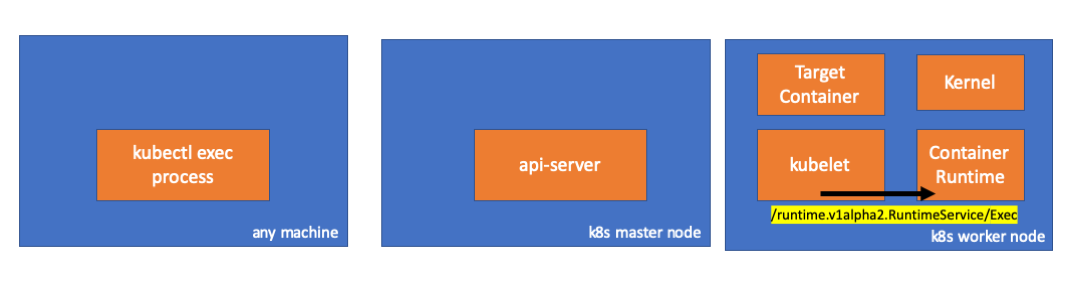
Он просто использует gRPC для вызова метода через Container Runtime Interface:
type runtimeServiceClient struct {
        cc *grpc.ClientConn
}
(cri-api/pkg/apis/runtime/v1alpha2/api.pb.go)
func (c *runtimeServiceClient) Exec(ctx context.Context, in *ExecRequest, opts ...grpc.CallOption) (*ExecResponse, error) {
        out := new(ExecResponse)
        err := c.cc.Invoke(ctx, "/runtime.v1alpha2.RuntimeService/Exec", in, out, opts...)
        if err != nil {
                return nil, err
        }
        return out, nil
}
(cri-api/pkg/apis/runtime/v1alpha2/api.pb.go)
Container Runtime отвечает за реализацию
RuntimeServiceServer:Длинный листинг из cri-api в kubernetes/kubernetes
(cri-api/pkg/apis/runtime/v1alpha2/api.pb.go)
// RuntimeServiceServer is the server API for RuntimeService service.
type RuntimeServiceServer interface {
        // Version returns the runtime name, runtime version, and runtime API version.
        Version(context.Context, *VersionRequest) (*VersionResponse, error)
        // RunPodSandbox creates and starts a pod-level sandbox. Runtimes must ensure
        // the sandbox is in the ready state on success.
        RunPodSandbox(context.Context, *RunPodSandboxRequest) (*RunPodSandboxResponse, error)
        // StopPodSandbox stops any running process that is part of the sandbox and
        // reclaims network resources (e.g., IP addresses) allocated to the sandbox.
        // If there are any running containers in the sandbox, they must be forcibly
        // terminated.
        // This call is idempotent, and must not return an error if all relevant
        // resources have already been reclaimed. kubelet will call StopPodSandbox
        // at least once before calling RemovePodSandbox. It will also attempt to
        // reclaim resources eagerly, as soon as a sandbox is not needed. Hence,
        // multiple StopPodSandbox calls are expected.
        StopPodSandbox(context.Context, *StopPodSandboxRequest) (*StopPodSandboxResponse, error)
        // RemovePodSandbox removes the sandbox. If there are any running containers
        // in the sandbox, they must be forcibly terminated and removed.
        // This call is idempotent, and must not return an error if the sandbox has
        // already been removed.
        RemovePodSandbox(context.Context, *RemovePodSandboxRequest) (*RemovePodSandboxResponse, error)
        // PodSandboxStatus returns the status of the PodSandbox. If the PodSandbox is not
        // present, returns an error.
        PodSandboxStatus(context.Context, *PodSandboxStatusRequest) (*PodSandboxStatusResponse, error)
        // ListPodSandbox returns a list of PodSandboxes.
        ListPodSandbox(context.Context, *ListPodSandboxRequest) (*ListPodSandboxResponse, error)
        // CreateContainer creates a new container in specified PodSandbox
        CreateContainer(context.Context, *CreateContainerRequest) (*CreateContainerResponse, error)
        // StartContainer starts the container.
        StartContainer(context.Context, *StartContainerRequest) (*StartContainerResponse, error)
        // StopContainer stops a running container with a grace period (i.e., timeout).
        // This call is idempotent, and must not return an error if the container has
        // already been stopped.
        // TODO: what must the runtime do after the grace period is reached?
        StopContainer(context.Context, *StopContainerRequest) (*StopContainerResponse, error)
        // RemoveContainer removes the container. If the container is running, the
        // container must be forcibly removed.
        // This call is idempotent, and must not return an error if the container has
        // already been removed.
        RemoveContainer(context.Context, *RemoveContainerRequest) (*RemoveContainerResponse, error)
        // ListContainers lists all containers by filters.
        ListContainers(context.Context, *ListContainersRequest) (*ListContainersResponse, error)
        // ContainerStatus returns status of the container. If the container is not
        // present, returns an error.
        ContainerStatus(context.Context, *ContainerStatusRequest) (*ContainerStatusResponse, error)
        // UpdateContainerResources updates ContainerConfig of the container.
        UpdateContainerResources(context.Context, *UpdateContainerResourcesRequest) (*UpdateContainerResourcesResponse, error)
        // ReopenContainerLog asks runtime to reopen the stdout/stderr log file
        // for the container. This is often called after the log file has been
        // rotated. If the container is not running, container runtime can choose
        // to either create a new log file and return nil, or return an error.
        // Once it returns error, new container log file MUST NOT be created.
        ReopenContainerLog(context.Context, *ReopenContainerLogRequest) (*ReopenContainerLogResponse, error)
        // ExecSync runs a command in a container synchronously.
        ExecSync(context.Context, *ExecSyncRequest) (*ExecSyncResponse, error)
        // Exec prepares a streaming endpoint to execute a command in the container.
        Exec(context.Context, *ExecRequest) (*ExecResponse, error)
        // Attach prepares a streaming endpoint to attach to a running container.
        Attach(context.Context, *AttachRequest) (*AttachResponse, error)
        // PortForward prepares a streaming endpoint to forward ports from a PodSandbox.
        PortForward(context.Context, *PortForwardRequest) (*PortForwardResponse, error)
        // ContainerStats returns stats of the container. If the container does not
        // exist, the call returns an error.
        ContainerStats(context.Context, *ContainerStatsRequest) (*ContainerStatsResponse, error)
        // ListContainerStats returns stats of all running containers.
        ListContainerStats(context.Context, *ListContainerStatsRequest) (*ListContainerStatsResponse, error)
        // UpdateRuntimeConfig updates the runtime configuration based on the given request.
        UpdateRuntimeConfig(context.Context, *UpdateRuntimeConfigRequest) (*UpdateRuntimeConfigResponse, error)
        // Status returns the status of the runtime.
        Status(context.Context, *StatusRequest) (*StatusResponse, error)
}
(cri-api/pkg/apis/runtime/v1alpha2/api.pb.go)
Если это так, мы должны видеть соединение между kubelet'ом и исполняемой средой контейнера, правильно? Давайте проверим.
Выполните эту команду до и после exec-команды и посмотрите на отличия. В моем случае разница такова:
// worker node
$ ss -a -p |grep kubelet
...
u_str  ESTAB      0      0       * 157937                * 157387                users:(("kubelet",pid=5714,fd=33))
...
Хм-м-м… Новое соединение через unix-сокеты между kubelet'ом (pid=5714) и чем-то неизвестным. Что же это может быть? Правильно, это Docker (pid=1186)!
// worker node
$ ss -a -p |grep 157387
...
u_str  ESTAB      0      0       * 157937                * 157387                users:(("kubelet",pid=5714,fd=33))
u_str  ESTAB      0      0      /var/run/docker.sock 157387                * 157937                users:(("dockerd",pid=1186,fd=14))
...
Как вы помните, это процесс docker-демона (pid=1186), который выполняет нашу команду:
// worker node
$ ps -afx
...
 1186 ?        Ssl    0:55 /usr/bin/dockerd -H fd://
17784 ?        Sl     0:00      \_ docker-containerd-shim 53a0a08547b2f95986402d7f3b3e78702516244df049ba6c5aa012e81264aa3c /var/run/docker/libcontainerd/53a0a08547b2f95986402d7f3
17801 pts/2    Ss     0:00          \_ sh
17827 pts/2    S+     0:00              \_ sleep 5000
...
4. Активность в исполняемой среде контейнера
Давайте изучим исходный код CRI-O, чтобы понять, что происходит. В Docker'е логика аналогичная.
Имеется сервер, отвечающий за реализацию
RuntimeServiceServer:// Server implements the RuntimeService and ImageService type Server struct { config libconfig.Config seccompProfile *seccomp.Seccomp stream StreamService netPlugin ocicni.CNIPlugin hostportManager hostport.HostPortManager appArmorProfile string hostIP string bindAddress string *lib.ContainerServer monitorsChan chan struct{} defaultIDMappings *idtools.IDMappings systemContext *types.SystemContext // Never nil updateLock sync.RWMutex seccompEnabled bool appArmorEnabled bool }
(cri-o/server/server.go)
// Exec prepares a streaming endpoint to execute a command in the container.
func (s *Server) Exec(ctx context.Context, req *pb.ExecRequest) (resp *pb.ExecResponse, err error) {
        const operation = "exec"
        defer func() {
                recordOperation(operation, time.Now())
                recordError(operation, err)
        }()

        resp, err = s.getExec(req)
        if err != nil {
                return nil, fmt.Errorf("unable to prepare exec endpoint: %v", err)
        }

        return resp, nil
}
(cri-o/erver/container_exec.go)
В конце цепочки исполняемая среда контейнера выполняет команду на рабочем узле:
// ExecContainer prepares a streaming endpoint to execute a command in the container.
func (r *runtimeOCI) ExecContainer(c *Container, cmd []string, stdin io.Reader, stdout, stderr io.WriteCloser, tty bool, resize <-chan remotecommand.TerminalSize) error {
        processFile, err := prepareProcessExec(c, cmd, tty)
        if err != nil {
                return err
        }
        defer os.RemoveAll(processFile.Name())

        args := []string{rootFlag, r.root, "exec"}
        args = append(args, "--process", processFile.Name(), c.ID())
        execCmd := exec.Command(r.path, args...)
        if v, found := os.LookupEnv("XDG_RUNTIME_DIR"); found {
                execCmd.Env = append(execCmd.Env, fmt.Sprintf("XDG_RUNTIME_DIR=%s", v))
        }
        var cmdErr, copyError error
        if tty {
                cmdErr = ttyCmd(execCmd, stdin, stdout, resize)
        } else {
                if stdin != nil {
                        // Use an os.Pipe here as it returns true *os.File objects.
                        // This way, if you run 'kubectl exec <pod> -i bash' (no tty) and type 'exit',
                        // the call below to execCmd.Run() can unblock because its Stdin is the read half
                        // of the pipe.
                        r, w, err := os.Pipe()
                        if err != nil {
                                return err
                        }
                        go func() { _, copyError = pools.Copy(w, stdin) }()

                        execCmd.Stdin = r
                }
                if stdout != nil {
                        execCmd.Stdout = stdout
                }
                if stderr != nil {
                        execCmd.Stderr = stderr
                }

                cmdErr = execCmd.Run()
        }

        if copyError != nil {
                return copyError
        }
        if exitErr, ok := cmdErr.(*exec.ExitError); ok {
                return &utilexec.ExitErrorWrapper{ExitError: exitErr}
        }
        return cmdErr
}
(cri-o/internal/oci/runtime_oci.go)
Наконец, ядро выполняет команды:
Напоминания
- API Server также может инициализировать соединение с kubelet'ом.
- Следующие соединения сохраняются до окончания интерактивного exec-сеанса:
- между kubectl и api-server'ом;
- между api-server'ом и kubectl;
- между kubelet'ом и исполняемой средой контейнера.
- Kubectl или api-server не могут ничего запускать на рабочих узлах. Kubelet может запускать, но для этих действий он также взаимодействует с исполняемой средой контейнера.
Ресурсы
- Обсуждение «How does «kubectl exec» work» в kubernetes-dev;
- Статья «Playing with kubeadm in Vagrant Machines, Part 2»;
- Обсуждение «How to find other end of unix socket connection?» на Server Fault.
P.S. от переводчика
Читайте также в нашем блоге:
- «Что происходит в Kubernetes при запуске kubectl run?» Часть 1 и часть 2;
- «Так что же такое pod в Kubernetes?»;
- «Как на самом деле работает планировщик Kubernetes?»;
- «Как обеспечивается высокая доступность в Kubernetes».
