


Доброго времени суток! С вами Анна Жаркова, ведущий разработчик компании Usetech, и мы продолжаем нашу серию статей, посвященных работе с технологией GraphQL при разработке мобильных приложений.
В предыдущих частях мы говорили о подготовке облачного GraphQL бекенда на Hasura и подключении GraphQL API к Android клиенту. Теперь настал черед iOS мобильного приложения.
Для работы нам понадобится библиотека Apollo GraphQL для iOS:
www.apollographql.com/docs/ios
github.com/apollographql/apollo-ios
Наше приложение абсолютно аналогичное Android и включает в себя такие же по функционалу экраны:
— вход
— регистрация
— лента постов
— экран создания и редактирования поста
— экран с информацией о текущем пользователе.


Начнем с установки Apollo GraphQL. Данная библиотека доступна для установки через SPM с github github.com/apollographql/apollo-ios

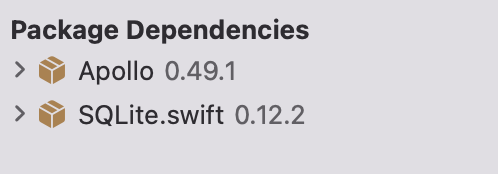
Достаточно будет выбрать Apollo и ApolloWebSocket библиотеки:

Последняя актуальная версия пакетов 0.49.1:
Также нам понадобится выкачать схему. Для начала поставим через npm apollo-codegen:
npm i apollo-codegen
Теперь запустим выгрузку, указав путь к API, путь для итогового файла и дополнительные заголовки:
apollo-codegen download-schema "<host>.hasura.app/v1/graphql"
--output schema.json --header "x-hasura-admin-secret: <key>"
Полученный schema.json добавим на верхний уровень нашего проекта:

Теперь нам нужно добавить конфигурацию. Идем в настройки нашего проекта на вкладку Build Phase и добавляем скрипт для исполнения через New Run Script Phase:

Назовем эту фазу, например, CLI и перетащим на 2ю строку, чтобы она шла сразу после зависимостей.
Заменим текстовую заглушку следующим контентом:
# Go to the build root and search up the chain to find the Derived Data Path where the source packages are checked out.
DERIVED_DATA_CANDIDATE="${BUILD_ROOT}"

while ! [ -d "${DERIVED_DATA_CANDIDATE}/SourcePackages" ]; do
  if [ "${DERIVED_DATA_CANDIDATE}" = / ]; then
    echo >&2 "error: Unable to locate SourcePackages directory from BUILD_ROOT: '${BUILD_ROOT}'"
    exit 1
  fi

  DERIVED_DATA_CANDIDATE="$(dirname "${DERIVED_DATA_CANDIDATE}")"
done

# Grab a reference to the directory where scripts are checked out
SCRIPT_PATH="${DERIVED_DATA_CANDIDATE}/SourcePackages/checkouts/apollo-ios/scripts"

if [ -z "${SCRIPT_PATH}" ]; then
    echo >&2 "error: Couldn't find the CLI script in your checked out SPM packages; make sure to add the framework to your project."
    exit 1
fi

cd "${SRCROOT}/${TARGET_NAME}"
"${SCRIPT_PATH}"/run-bundled-codegen.sh codegen:generate
--target=swift --includes=./**/*.graphql --localSchemaFile="schema.json" API.swift
В скрипте указываем путь к схеме и файлу API, который будет генерироваться на ее основе.
Попробуем сбилдить наш проект. Первая сборка выдаст нам ошибку компиляции. Это потому, что мы не добавили скрипты запросов graphql для генерации нашего API.
Добавим файл с расширением .graphql на тот же уровень, где у нас лежит схема. После компиляции мы получим файл API.swift, который нужно подключить на тот же уровень, где у нас лежат запросы.
Рассмотрим код наших query и mutation:
query PostsQuery {
    posts {
            post_id, post_text, user_id, user_name, likes, date, image_link
    }
}

mutation AddPostMutation($postId: uuid, $text: String, $image: String, $user: String, $userId: uuid, $date: date) {
    insert_posts_one(object: {date: $date, image_link: $image, post_id: $postId, post_text: $text, user_id: $userId, user_name: $user}) {
       ... Post
    }
}

mutation DeletePost($postId: uuid!) {
    delete_posts_by_pk(post_id: $postId){
        post_id
    }
    delete_comments(where: {post_id: {_eq: $postId}}) {
        returning {
            comment_id
        }
    }
}

query Users {
    users {
       user_email, user_id, user_name
    }
}

query GetPostQuery($postId: uuid) {
    posts(where: {post_id: {_eq: $postId}}) {
           post_id, post_text, user_id, user_name, likes, date, image_link
    }
    likes(where: {post_id: {_eq: $postId}}){
            post_id, user_id
    }
    comments(where: {post_id: {_eq: $postId}}){
            comment_id, comment_text, user_id, post_id, user_name
    }
}

mutation CreateUserMutation($name: String, $id: uuid, $email: String, $password: String) {
    insert_users_one(object: {user_email: $email, user_id: $id, user_name: $name, password: $password}) {
        ... User
    }
}

query GetUser($email: String, $password: String) {
    users(where: {password: {_eq: $password}, user_email: {_eq: $email}}) {
           user_email, user_id, user_name
    }
}

query Likes($postId: uuid) {
    likes(where: {post_id: {_eq: $postId}}){
           post_id, user_id
    }
}

query Comments($commentId: uuid) {
    comments(where: {post_id: {_eq: $commentId}}) {
            comment_id, comment_text, user_id, post_id, user_name
    }
}

mutation  ChangeLikeMutation($postId: uuid, $likes: String) {
    update_posts(where: {post_id: {_eq: $postId}} _set: {likes: $likes}) {
        __typename
    }
}

mutation  ChangePostMutation($postId: uuid!, $postText: String, $imageLink: String) {
    update_posts(where: {post_id: {_eq: $postId}} _set: {post_text: $postText, image_link: $imageLink}) {
        __typename
    }
}

mutation CreateComment($postId: uuid, $commentText: String, $id: uuid, $userId: uuid, $userName: String) {
    insert_comments_one(object: {post_id: $postId, comment_text: $commentText, comment_id: $id, user_id: $userId, user_name: $userName }) {
        ... Comment
    }
}


fragment User on users {
    user_email, user_id, user_name, likes
}

fragment Comment on comments {
    comment_id, comment_text, user_id, post_id, user_name
}

fragment Post on posts {
    post_id, post_text, user_id, user_name, likes, date, image_link
}

fragment LikeForPost on likes {
    post_id, user_id
}
В принципе наши запросы аналогичны тем, что мы использовали для Android приложения. За исключением того, что для Query мы не используем фрагменты. Только для Mutation.
Попробуем сделать тестовый query с фрагментом в ответе:
query GetUserFr($email: String, $password: String) {
    users(where: {password: {_eq: $password}, user_email: {_eq: $email}}) {
                   ... User
    }
}
Но при компиляции такого запроса мы получим ошибку:

Так же, как в android приложении, у каждого Query и Mutation свой тип из комбинации вложенных классов. Тип, используемый для фрагмента, мы можем безопасно использовать только для Mutation. Фрагмент оперирует не вложенным типом, поэтому для всех Mutation, которые его используют в graphql, это будет считаться одним и тем же типом.
Это автогенерируемый код, поэтому наши исправления здесь бесполезны.
Будем использовать в коде Query явное указание нужных нам полей:
query GetUser($email: String, $password: String) {
    users(where: {password: {_eq: $password}, user_email: {_eq: $email}}) {
           user_email, user_id, user_name
    }
}
Теперь все компилируется.
В отличие от Android все наши типы и поля для работы с GraphQL с маппингом запишутся в один единственный файл:
// Примерное содержание API.swift

import Apollo
import Foundation

public final class PostsQueryQuery: GraphQLQuery {
  /// The raw GraphQL definition of this operation.
  public let operationDefinition: String =
    """
    query PostsQuery {
      posts {
        __typename
        post_id
        post_text
        user_id
        user_name
        likes
        date
        image_link
      }
    }
    """

  public let operationName: String = "PostsQuery"

  public init() {
  }

  public struct Data: GraphQLSelectionSet {
    public static let possibleTypes: [String] = ["query_root"]

    public static var selections: [GraphQLSelection] {
      return [
        GraphQLField("posts", type: .nonNull(.list(.nonNull(.object(Post.selections))))),
      ]
    }

    public private(set) var resultMap: ResultMap

    public init(unsafeResultMap: ResultMap) {
      self.resultMap = unsafeResultMap
    }

    public init(posts: [Post]) {
      self.init(unsafeResultMap: ["__typename": "query_root", "posts": posts.map { (value: Post) -> ResultMap in value.resultMap }])
    }

    /// fetch data from the table: "posts"
    public var posts: [Post] {
      get {
        return (resultMap["posts"] as! [ResultMap]).map { (value: ResultMap) -> Post in Post(unsafeResultMap: value) }
      }
      set {
        resultMap.updateValue(newValue.map { (value: Post) -> ResultMap in value.resultMap }, forKey: "posts")
      }
    }

    public struct Post: GraphQLSelectionSet {
      public static let possibleTypes: [String] = ["posts"]

      public static var selections: [GraphQLSelection] {
        return [
          GraphQLField("__typename", type: .nonNull(.scalar(String.self))),
          GraphQLField("post_id", type: .nonNull(.scalar(String.self))),
          GraphQLField("post_text", type: .scalar(String.self)),
          GraphQLField("user_id", type: .scalar(String.self)),
          GraphQLField("user_name", type: .scalar(String.self)),
          GraphQLField("likes", type: .scalar(String.self)),
          GraphQLField("date", type: .scalar(String.self)),
          GraphQLField("image_link", type: .scalar(String.self)),
        ]
      }

      public private(set) var resultMap: ResultMap

      public init(unsafeResultMap: ResultMap) {
        self.resultMap = unsafeResultMap
      }

      public init(postId: String, postText: String? = nil, userId: String? = nil, userName: String? = nil, likes: String? = nil, date: String? = nil, imageLink: String? = nil) {
        self.init(unsafeResultMap: ["__typename": "posts", "post_id": postId, "post_text": postText, "user_id": userId, "user_name": userName, "likes": likes, "date": date, "image_link": imageLink])
      }
Обратите внимание, что при именовании Query и Mutation соответствующие постфиксы добавляются автоматически.
Теперь займемся маппингом полученных типов в наши используемые структуры данных. Для каждого из типов добавим инициализаторы, куда будем передавать параметры типов Query. Для всех Mutation, использующий определенный фрагмент, можно просто передавать один тип.
struct PostItem : Codable, Equatable  {
//. . .
    init(data: Post) {
        self.uuid = data.postId
        self.postText = data.postText ?? ""
        self.id = data.postId
        self.imageLink = data.imageLink ?? ""
        self.userId = data.userId ?? ""
        self.userName = data.userName ?? ""
        self.likeItems = data.likes?.split(separator: ",").map{LikeItem(userId: String($0), postId: data.postId)} ?? [LikeItem]()
        self.dateString = data.date
    }

    init(data: PostsQueryQuery.Data.Post) {
        self.postText = data.postText ?? ""
        self.id = data.postId
        self.uuid = data.postId
        self.imageLink = data.imageLink ?? ""
        self.userId = data.userId ?? ""
        self.userName = data.userName ?? ""
        self.likeItems = data.likes?.split(separator: ",").map{LikeItem(userId: String($0), postId: data.postId)} ?? [LikeItem]()
        self.dateString = data.date
    }

    init(data: GetPostQueryQuery.Data.Post) {
        self.postText = data.postText ?? ""
        self.id = data.postId
        self.uuid = data.postId
        self.imageLink = data.imageLink ?? ""
        self.userId = data.userId ?? ""
        self.userName = data.userName ?? ""
        self.likeItems = data.likes?.split(separator: ",").map{LikeItem(userId: String($0), postId: data.postId)} ?? [LikeItem]()
        self.dateString = data.date
    }
}

struct UserData : Codable {
  //. . .
    init(user: User) {
        self.uid = user.userId
        self.name = user.userName
        self.email = user.userEmail
    }

    init(user: GetUserQuery.Data.User) {
        self.uid = user.userId
        self.name = user.userName
        self.email = user.userEmail
    }
}

struct CommentItem : Codable {
//. . .

   init(comment: Comment) {
        self.userId = comment.userId
        self.postId = comment.postId
        self.userName = comment.userName ?? ""
        self.text = comment.commentText
        self.uuid = comment.commentId
    }

    init(comment: CommentsQuery.Data.Comment) {
         self.userId = comment.userId
         self.postId = comment.postId
         self.userName = comment.userName ?? ""
         self.text = comment.commentText
         self.uuid = comment.commentId
     }

}
Можно переходить к созданию адаптера для наших типов запросов.
class QueryAdapter {
    static let shared = QueryAdapter()
    func loginUserQuery(email: String, password: String)-> GetUserQuery {
        return GetUserQuery(email: email, password: password)
    }

    func loginUserQuery(userData: UserData)-> GetUserQuery {
        return GetUserQuery(email: userData.email, password: userData.password)
    }

    func createUser(userData: UserData)->CreateUserMutationMutation {
        return CreateUserMutationMutation(name: userData.name,id: UUID().uuidString, email: userData.email, password: userData.password)
    }


    func createPost(postItem: PostItem)->AddPostMutationMutation {
        return AddPostMutationMutation(
            postId: UUID().uuidString,
            text: postItem.postText,
            image: postItem.imageLink , user: postItem.userName,
            userId: postItem.userId,
            date: "\(Date())")
    }

    func changeLike(postItem: PostItem)->ChangeLikeMutationMutation {
        let likes = postItem.likeItems.map{$0.userId}.joined(separator: ",")
        return  ChangeLikeMutationMutation(postId: postItem.uuid, likes: likes)
    }

    func changePost(postItem: PostItem)->ChangePostMutationMutation {
        return ChangePostMutationMutation(postId: postItem.uuid, postText: postItem.postText,imageLink: postItem.imageLink)
    }
    func deletePost(postItem: PostItem)-> DeletePostMutation {
        return DeletePostMutation(postId: postItem.uuid)
    }

    func deletePostBy(postId: String)-> DeletePostMutation {
        return DeletePostMutation(postId: postId)
    }

    func createComment(commentItem: CommentItem)->CreateCommentMutation {
        return CreateCommentMutation(postId: commentItem.postId, commentText: commentItem.text, id: UUID().uuidString, userId: commentItem.userId,userName: commentItem.userName)
    }
}
Теперь с помощью расширения типов добавим удобный вызов данных методов адаптера:
extension PostItem {
    func createPost()->AddPostMutationMutation {
        return QueryAdapter.shared.createPost(postItem: self)
    }

    func changeLike()->ChangeLikeMutationMutation {
        return QueryAdapter.shared.changeLike(postItem: self)
    }

    func changePost()->ChangePostMutationMutation {
        return QueryAdapter.shared.changePost(postItem: self)
    }
    func deletePost()-> DeletePostMutation {
        return QueryAdapter.shared.deletePost(postItem: self)
    }

    func deletePostById()-> DeletePostMutation {
        return QueryAdapter.shared.deletePostBy(postId: self.uuid ?? "")
    }
}


extension UserData {
    func createUser(userData: UserData)->CreateUserMutationMutation {
        return QueryAdapter.shared.createUser(userData: self)
    }
}

extension CommentItem {
    func createComment()->CreateCommentMutation {
        return QueryAdapter.shared.createComment(commentItem: self)
    }
}
Кажется, мы кое-что забыли. А именно сетевой клиент для запросов.
Согласно документации, для обращений к API без каких-либо заголовок и настроек нам было бы достаточно такого кода:
import Foundation
import Apollo

class Network {
  static let shared = Network()

  private(set) lazy var apollo = ApolloClient(url: URL(string: "http://host/graphql")!)
}
Но у нас обязательно должен быть заголовок с ключом доступа для Hasura.
Для осуществления запросов с заголовками авторизации наш клиент будет иметь такой вид:
struct NetworkInterceptorProvider: InterceptorProvider {

    // These properties will remain the same throughout the life of the `InterceptorProvider`, even though they
    // will be handed to different interceptors.
    private let store: ApolloStore
    private let client: URLSessionClient

    init(store: ApolloStore,
         client: URLSessionClient) {
        self.store = store
        self.client = client
    }

    func interceptors<Operation: GraphQLOperation>(for operation: Operation) -> [ApolloInterceptor] {
        return [
            MaxRetryInterceptor(),
            CacheReadInterceptor(store: self.store),
            UserManagementInterceptor(),
            RequestLoggingInterceptor(),
            NetworkFetchInterceptor(client: self.client),
            ResponseLoggingInterceptor(),
            ResponseCodeInterceptor(),
            JSONResponseParsingInterceptor(cacheKeyForObject: self.store.cacheKeyForObject),
            AutomaticPersistedQueryInterceptor(),
            CacheWriteInterceptor(store: self.store)
        ]
    }
}

class HasuraClient {
  static let shared = HasuraClient()

  private(set) lazy var apollo: ApolloClient = {
      // The cache is necessary to set up the store, which we're going to hand to the provider
      let cache = InMemoryNormalizedCache()
      let store = ApolloStore(cache: cache)

      let client = URLSessionClient()
      let provider = NetworkInterceptorProvider(store: store, client: client)
      let url = URL(string: "https://host.hasura.app/v1/graphql")!
    let headers =  ["x-hasura-admin-secret": "your key"]

      let requestChainTransport = RequestChainNetworkTransport(interceptorProvider: provider,
                                                               endpointURL: url, additionalHeaders: headers)


      // Remember to give the store you already created to the client so it
      // doesn't create one on its own
      return ApolloClient(networkTransport: requestChainTransport,
                          store: store)
  }()
}
Да, нам потребуется по умолчанию очень много интерсептеров, без которых наш код работать не будет. Это сложнее, чем в Android, поэтому оптимальным будет скопировать код интерсептеров из документации, немного адаптировав под нашу задачу:
import Apollo

class UserManagementInterceptor: ApolloInterceptor {

    enum UserError: Error {
        case noUserLoggedIn
    }

    private let headers = ["x-hasura-admin-secret": "your key"]

    /// Helper function to add the token then move on to the next step
    private func addTokenAndProceed<Operation: GraphQLOperation>(
        to request: HTTPRequest<Operation>,
        chain: RequestChain,
        response: HTTPResponse<Operation>?,
        completion: @escaping (Result<GraphQLResult<Operation.Data>, Error>) -> Void) {
            for header in headers {
                request.addHeader(name: header.key, value: header.value)
            }
        chain.proceedAsync(request: request,
                           response: response,
                           completion: completion)
    }

    func interceptAsync<Operation: GraphQLOperation>(
        chain: RequestChain,
        request: HTTPRequest<Operation>,
        response: HTTPResponse<Operation>?,
        completion: @escaping (Result<GraphQLResult<Operation.Data>, Error>) -> Void) {

            self.addTokenAndProceed(
                                    to: request,
                                    chain: chain,
                                    response: response,
                                    completion: completion)
    }
}

class RequestLoggingInterceptor: ApolloInterceptor {

    func interceptAsync<Operation: GraphQLOperation>(
        chain: RequestChain,
        request: HTTPRequest<Operation>,
        response: HTTPResponse<Operation>?,
        completion: @escaping (Result<GraphQLResult<Operation.Data>, Error>) -> Void) {

        chain.proceedAsync(request: request,
                           response: response,
                           completion: completion)
    }
}

class ResponseLoggingInterceptor: ApolloInterceptor {

    enum ResponseLoggingError: Error {
        case notYetReceived
    }

    func interceptAsync<Operation: GraphQLOperation>(
        chain: RequestChain,
        request: HTTPRequest<Operation>,
        response: HTTPResponse<Operation>?,
        completion: @escaping (Result<GraphQLResult<Operation.Data>, Error>) -> Void) {

        defer {
            // Even if we can't log, we still want to keep going.
            chain.proceedAsync(request: request,
                               response: response,
                               completion: completion)
        }

        guard let receivedResponse = response else {
            chain.handleErrorAsync(ResponseLoggingError.notYetReceived,
                                   request: request,
                                   response: response,
                                   completion: completion)
            return
        }

    }
}
Подключаем их в нужное место и переходим к работе над запросами.
Напоминаем, что UI и остальная логика у нас готова.
class AuthHelper {
    static let shared = AuthHelper()
    private let apollo = HasuraClient.shared.apollo
    private weak var userStorage = DI.dataContainer.userStorage

    var currentUser: UserData? = nil

    //MARK: check authorization
    func checkAuth()->Bool {
        return currentUser != nil || userStorage?.getUser() != nil
    }

    func isAuthorized()->Bool {
        //Load session and check with saved
        return currentUser != nil || userStorage?.getUser() != nil
    }

    //MARK: Login
    func login(email: String, password: String, completion: @escaping(Result<UserData,Error>)->Void) {
        apollo.fetch(query:  QueryAdapter.shared.loginUserQuery(email: email, password: password)) { (result:Result<GraphQLResult<GetUserQuery.Data>,Error>) in
            switch result {
            case .failure(let error):
                print(error)
            case .success(let userData):
                if let user = userData.data?.users.first {
                    let u = UserData(user: user)
                    self.userStorage?.saveUser(data: u)
                    completion(.success(u))

                }
            }
        }
    }

    //MARK: registation
    func register(name: String, email: String, password: String, completion: @escaping(Result<UserData,Error>)->Void) {
        let query = QueryAdapter.shared.createUser(userData: UserData(uid: UUID().uuidString, name: name, email: email, password: password))
        apollo.perform(mutation: query){
            (result: Result<GraphQLResult<CreateUserMutationMutation.Data>,Error>) in
            switch result {
            case .failure(let error):
                print(error)
                completion(.failure( error))
            case .success(let data):
                if let user = data.data?.insertUsersOne?.fragments.user {
                    self.currentUser = UserData(user: user)
                    self.userStorage?.saveUser(data: self.currentUser!)
                    completion(.success(self.currentUser!))
                }
            }
        }
    }
}
Это код, который нам нужен для входа и регистрации.
Мы обращаемся к нашему apollo ApolooClient и с помощью команды fetch для query или perform для Mutation обращаемся к API, передавая в качестве параметра соответствующий тип запроса или изменения, полученный из нашего адаптера.
В качестве результата нам приходит Result<T,Error>, где T – это GraphQLResult<K.Data> с данными Data класса, вложенного в наш Mutation или Query. Внутри Data будет либо фрагмент для Mutation, либо набор полей нашего Query.
Теперь пропишем наши запросы на работу с постами, лайками и комментариями:
class PostService {
    private let apollo = HasuraClient.shared.apollo
    static let shared = PostService()
    private weak var userStorage = DI.dataContainer.userStorage
    var currentPosts: [PostItem] = [PostItem]()

    //MARK: post
    func publishPost(item: PostItem, completion: @escaping(Result<Bool, Error>)->Void) {
        guard let user = userStorage?.getUser() else {
            return
        }
        var postItem = item
        postItem.userId = user.uid
        postItem.userName = user.name
        apollo.perform(mutation: QueryAdapter.shared.createPost(postItem: postItem)) {
            (result: Result<GraphQLResult<AddPostMutationMutation.Data>,Error>) in
            switch result {
            case .failure(let error):
                completion(.failure(error))
            case .success(_):
                completion(.success(true))
            }
        }
    }

    func updatePost(item: PostItem, completion: @escaping(Result<Bool, Error>)->Void) {
        guard let user = userStorage?.getUser(), item.userId == user.uid else {
            return
        }

        let mutation = QueryAdapter.shared.changePost(postItem: item)
        apollo.perform(mutation: mutation) {
            (result: Result<GraphQLResult<ChangePostMutationMutation.Data>,Error>) in
            switch result {
            case .failure(let error):
                completion(.failure(error))
            case .success(_):
                completion(.success(true))
            }
        }
    }

    func deletePost(postId: String,completion: @escaping(Result<Bool, Error>)->Void) {
        let mutation = QueryAdapter.shared.deletePostBy(postId: postId)
        apollo.perform(mutation: mutation) {
            (result: Result<GraphQLResult<DeletePostMutation.Data>,Error>) in
            switch result {
            case .failure(let error):
                completion(.failure(error))
            case .success(_):
                completion(.success(true))
            }
        }
    }

    //MARK: posts
    func loadPosts(completion: @escaping([PostItem])->Void) {
        apollo.fetch(query: PostsQueryQuery()){ [weak self]
            (result:Result<GraphQLResult<PostsQueryQuery.Data>,Error>) in
            guard let self = self else {return}
            switch result {
            case .failure(let error):
               print(error)
            case .success(let data):
                let posts =   data.data?.posts.map{PostItem(data: $0)} ?? [PostItem]()
                completion(self.checkLiked(posts: posts))
            }
        }
    }

    private func checkLiked(posts: [PostItem])->[PostItem] {
        var tempPosts = posts
        guard let userId = userStorage?.getUser()?.uid.lowercased() else {
            return posts
        }
        for i in 0..<tempPosts.count {
            let postLikes  = tempPosts[i].likeItems
            tempPosts[i].isLiked = (postLikes .filter{$0.userId.lowercased() == userId}).count > 0
        }
        return tempPosts
    }


    func changeLike(postItem: PostItem, completion: @escaping(Result<[PostItem],Error>)->Void) {
        guard let userId  = userStorage?.getUser()?.uid else {
            return
        }
        var likeItems = postItem.likeItems
            if let found = likeItems.filter({$0.userId == userId}).first {
                likeItems.remove(item: found)
            } else {
            likeItems.append(LikeItem(userId: userId, postId: postItem.uuid))
        }
        let mutation = ChangeLikeMutationMutation(postId: postItem.uuid.lowercased(), likes: likeItems.map{$0.userId}.joined(separator: ","))
        apollo.perform(mutation: mutation) {
            (result: Result< GraphQLResult<ChangeLikeMutationMutation.Data>,Error>) in
            switch result {
            case .failure(let error):
                completion(.failure(error))
            case .success(_):
                self.loadPosts { items in
                    completion(.success(items))
                }
            }
        }
    }

    //MARK: comments
    func publishComment(item: CommentItem, completion: @escaping(Result<Bool, Error>)->Void) {
        var comment = item
        guard let user = userStorage?.getUser() else {
            return
        }
        comment.userId = user.uid
        comment.userName = user.name
        let mutation = item.createComment()
        apollo.perform(mutation: mutation) {
            (result: Result<GraphQLResult<CreateCommentMutation.Data>,Error>) in
            switch result {
            case .failure(let error):
                completion(.failure(error))
            case .success(_):
                completion(.success(true))

            }
        }
    }

    func loadComments(postId: String, completion: @escaping(Result<[CommentItem], Error>)->Void) {
        let query = CommentsQuery(commentId: postId)
        apollo.fetch(query: query) {
            (result: Result<GraphQLResult<CommentsQuery.Data>,Error>) in
            switch result {
            case .failure(let error):
                print(error)
            case .success(let data):
                let comments = data.data?.comments.map{
                    CommentItem(comment: $0)
                } ?? [CommentItem]()
                completion(.success(comments))
            }
        }
    }
}
Получаем готовое приложение:
github.com/anioutkazharkova/graphql_ios_postoram
Подведем итог.
Итак, за 3 статьи мы с вами рассмотрели, как можно сделать небольшое и несложное мобильное приложение с собственным бекендом на GraphQL Hasura. Некоторые моменты работы с данной технологией весьма спорны. Если отвлечься от особенностей реализаций решений Apollo и Hasura, на мой взгляд, самый проблемный момент – это вынужденное и весьма избыточное дублирование типов из-за вложенности в Query или Mutation. В остальном, что выбрать Rest или GraphQL – уже дело вкуса и предпочтений.
Bonus.
Мы с вами использовали Apollo для совершения запросов к нашему API GraphQL У решения есть свои недостатки. Для iOS даже нет еще версии 1.0, и версионность не особенно стабильна.
Мы можем это делать с помощью обычных сетевых запросов. Для этого нам потребуется отправить наш запрос в качестве json body POST. Cделаем специальную структуру Payload для корректного кодирование body.
Например, чтобы получить список постов:
 let query = """
query Posts {
  posts {
       user_name
      user_id
      post_text
      post_id
      post_date
      likes
      image_link
  }
}
"""


class NetworkClient {
    lazy var urlSession: URLSession? = {
        return URLSession(configuration: URLSessionConfiguration.default)
    }()

    var urlSessionDataTask: URLSessionDataTask? = nil

    struct Payload: Encodable {
        let query: String
    }

    private let headers = ["x-hasura-admin-secret": "your key"]

    func doQuery() {
        guard let url = URL(string: "https://host.hasura.app/v1/graphql") else {
            return
        }
        var urlRequest = URLRequest(url: url)
        for header in headers {
            urlRequest.addValue(header.value, forHTTPHeaderField: header.key)
        }
        urlRequest.httpMethod = "POST"
        urlRequest.httpBody = try? JSONEncoder().encode(Payload(query: query))
        let task = self.urlSession?.dataTask(with: urlRequest, completionHandler: { data, response, error in
            if let data = data {
                let json = String(data: data, encoding: .utf8)
                print(json) //Результат получили сюда
            }
        })
        task?.resume()
    }
}
Результат нам вернет json c корневым элементом data:
"{
"data": {
"posts": [
{
"user_name": "...",
"user_id": "...",
"post_text": "...",
"post_id": "...",
//...
}
]
}
}"
Можно написать собственный парсер и использовать его без Apollo.
Дерзайте)
www.apollographql.com/docs/ios
github.com/apollographql/apollo-ios
github.com/anioutkazharkova/graphql_ios_postoram


