
I want to say. This is the most necessary thing in the Universe. The most profound. And now, in my entire life, I finally started writing code and did it. Quite complex. And the most beautiful. Download and see! It's an executable file, on GitHub.
github: Download Latest Version Windows And Source code
True 32-bit BGRA
Migrated to full 32-bit BGRA color output, enabling smooth gradients and millions of unique shades. By utilizing a native 32-bit BGRA pipeline, the engine can render millions of intermediate colors.
Synchronization with DwmFlush
The engine achieves perfect visual smoothness by synchronizing directly with the Windows Desktop Window Manager (DWM):
Adaptive Refresh Rate: The application uses DwmFlush(). This pauses code execution until the DWM has finished compositing the screen.
Monitor-Dependent FPS:
If your monitor is set to 60 Hz, you get 60 FPS.
If you are using a gaming monitor at 144 Hz, the function triggers 144 times per second, delivering 144 FPS.
On high-end 240 Hz displays, you will see a buttery-smooth 240 FPS.
High-Precision Rendering (80-bit)
Most Mandelbrot explorers use standard 64-bit double precision, which leads to "pixelation" at zoom levels around 10 14. This project leverages 80-bit Extended Precision Arithmetic (long double) to push the boundaries of the fractal:
My Implementation (80-bit): Provides 4 extra decimal digits of precision, allowing you to explore 10,000x deeper (10 18 range).
Hardware Optimized: Directly utilizes the x87 FPU registers for maximum mathematical depth.
OpenMP
OpenMP is a standard that tells the compiler, "Take this loop and distribute the iterations among the different processor cores." Yes, using OpenMP you are doing parallel programming at the Multithreading level. Everything is powered by OpenMP parallel loops for maximum performance. OpenMP - Scalability: Your code will run equally efficiently on a 4-core laptop and a 128-core server.
True SSAA 2x2 (4 independent samples per pixel) direct RGB-space integration
Implemented 'true' 2x2 Supersampling Anti-Aliasing (SSAA). Each screen pixel is computed from four independent fractal coordinate points. High-fidelity per-channel RGB accumulation. The engine calculates the color for each sub-pixel first, then performs a weighted average of their intensities. Unlike standard renderers that average raw iteration counts (leading to 'chromatic noise' and loss of detail), this engine performs direct RGB-space integration. Averaging iterations produces visual noise and artifacts. By accumulating 32-bit color values first, we eliminate this noise entirely. The result is a clean, sharp image where high-frequency details are perfectly reconstructed, not blurred away. True SSAA 2x2 (4 independent samples per pixel) allows for the reconstruction of micro-filaments smaller than a single screen pixel. Technical Note:
Standard Way: Color( (iter1 + iter2 + iter3 + iter4) / 4 ) - Gives Noise/Artifacts.
Your Way: (Color(iter1) + Color(iter2) + Color(iter3) + Color(iter4)) / 4 - Gives Pure Detail.
Averaging iteration counts (indices) is mathematically incorrect because fractal palettes are non-linear. Averaging index A and B often points to a completely unrelated color C, creating high-frequency chromatic noise. Our solution performs integration in the RGB color space. By calculating the specific RGB components for each sub-pixel before downsampling, we ensure that the resulting color is a true optical blend. This eliminates artifacts and reveals the true structural geometry of the Mandelbrot set that is otherwise masked by noise.
Why is there noise without Supersampling?
It is a great question! As it turns out, noise without supersampling isn't a CPU error - it is a fundamental phenomenon in digital graphics known as Aliasing. The Mandelbrot set is infinitely complex. At its boundaries, there are "filaments" and details millions of times smaller than a single pixel on your monitor.
Without Supersampling: The processor acts like a "needle," sampling only one single point at the exact center of a pixel. If it hits a microscopic filament, the pixel turns red. If it misses by even a micron, the pixel stays black.
The Result: Neighboring pixels "grab" random fragments of micro-details. This creates mathematical noise (aliasing artifacts), which looks like grain or dirt on the image.
How SSAA 2x2 "Heals" the Image Instead of guessing what lies within a pixel, this engine takes 4 independent samples at different corners of the pixel area.
True Color Computation: The engine calculates 4 real colors for each sample point.
RGB Blending: These colors are blended together in a 32-bit color space.
The Magic of Precision: If a thin filament falls within a pixel, it no longer "screams" with a single harsh color or disappears entirely. Instead, it becomes a clean, semi-transparent line that accurately represents the true fractal geometry.
Visual Aesthetics. Color rotation
The Red, Green, and Blue channels are calculated using sine and cosine waves to create smooth color transitions: 127 + 127 cos(2 PI a / 255) and 127 + 127 sin(2 PI a / 255).
Controls & Hotkeys
The application provides intuitive mouse and keyboard controls for exploring the fractal:
Mouse Controls
Left Click (WM_LBUTTONDOWN): Zoom in (2x) and center the view around the clicked point.
Right Click (WM_RBUTTONDOWN): Zoom out (2x) from the current view.
Keyboard Navigation
1 - 8 Keys: Instantly jump to 8 predefined iconic locations within the Mandelbrot set.
const long double PRESETS[8][3] = {
    {-0.550345905862346513L, 0.625931416301985337L, 0.0000000000000029L},
    {-0.88380294401099034L, -0.23531813998049201L, 0.0000000000000019L},
    {-0.691488093510181825L, -0.465680729473216972L, 0.0000000000000016L},
    {-1.26392609056234794L, -0.17578764215262827L, 0.000000000000023L},
    {-0.77781161182303603L, 0.13164688997878032L, 0.000000000000032L},
    {0.36053464666960874L, 0.64131558138012431L, 0.0000000000000035L},
    {-1.18963036804118707L, 0.30427573376836223L, 0.0000000000000014L},
    {-0.5503493176297569L, 0.6259309572825709L, 0.00000000000031L}
};
LEFT / RIGHT Arrows: Fine-tuned zoom in/out by a factor of 1.1x.
Data Management
ENTER (VK_RETURN): Export current coordinates. The program saves the exact
absc,ordi, andsize_valto Mandelbrot.txt.
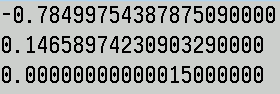
BACKSPACE (VK_BACK): Import coordinates. Reads the three values from Mandelbrot.txt and instantly renders that location.
