
Hello everyone!
I want to note right away that this article is written exclusively for people who are just starting their journey in learning SQL and window functions. It may not cover complex applications of functions or use complicated definitions—everything is written in the simplest language possible for a basic understanding.
P.S. If the author didn't cover or write about something, it means they considered it non-essential for this article)))
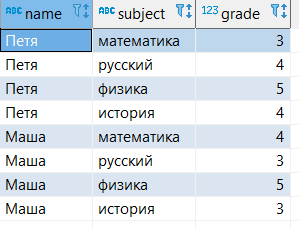
For the examples, we will use a small table that shows student grades in different subjects. In the database, the table looks like this:
--создание таблицы
create table student_grades (
name varchar,
subject varchar,
grade int);

-- наполнение таблицы данными
insert into student_grades (
values
('Петя', 'русский', 4),
('Петя', 'физика', 5),
('Петя', 'история', 4),
('Маша', 'математика', 4),
('Маша', 'русский', 3),
('Маша', 'физика', 5),
('Маша', 'история', 3));

--запрос всех данных из таблицы
select *
from student_grades;
SQL is often used to calculate various metrics or aggregate values across dimensions in data. In addition to aggregate functions, window functions are widely used for this purpose.
Window Function in SQL - a function that operates on a specific set of rows (a window or partition) and performs a calculation for that set of rows in a separate column.
Partitions (windows of a set of rows) - a set of rows specified for a window function based on one or more columns of a table. The partitions for each window function in a query can be divided by different table columns.

What is the main difference between window functions and aggregate functions with grouping?
When using aggregate functions, the GROUP BY clause reduces the number of rows in the query by grouping them.
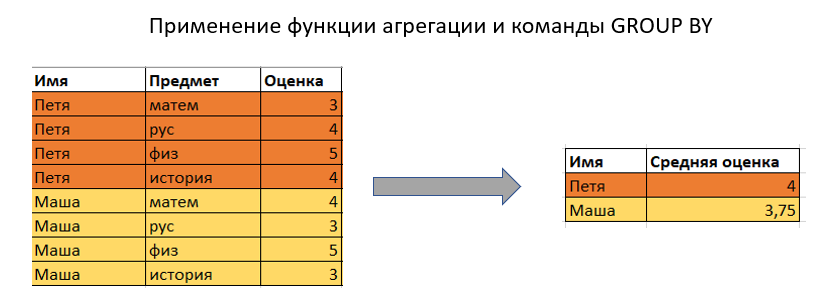
When using window functions, the number of rows in the query is not reduced compared to the original table.

Order of Calculation for Window Functions in an SQL Query
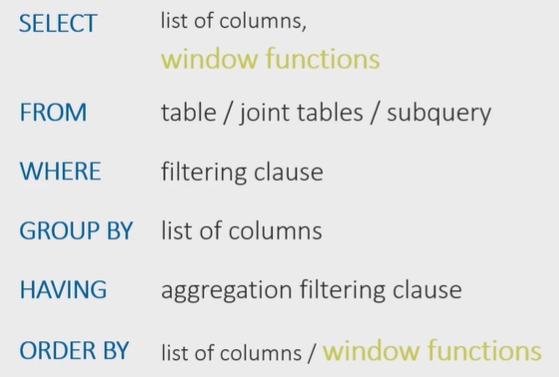
First, the command for selecting tables, their joins, and any possible subqueries under the FROM clause is executed.
Next, the WHERE filtering conditions, GROUP BY grouping, and any possible HAVING filtering are executed.
Only then is the SELECT column selection command applied, and the window functions under the selection are calculated.
After that comes the ORDER BY sorting condition, where you can also specify the calculated window function column for sorting.
It's important to clarify here that the partitions or windows for window functions are created after the table has been divided into groups using the GROUP BY command, if that command is used in the query.
Window Function Syntax
The syntax of window functions, regardless of their class, will more or less consist of identical commands.
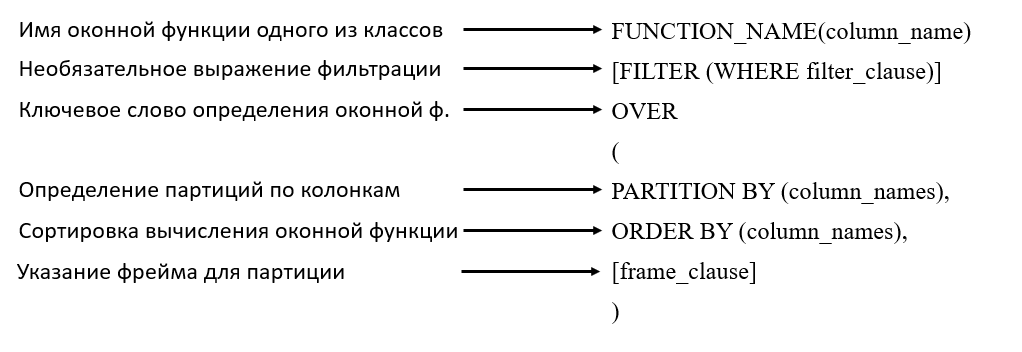
Window functions can be written either under the SELECT command or in a separate WINDOW keyword, where the window is given an alias that can be referenced in the SELECT statement.

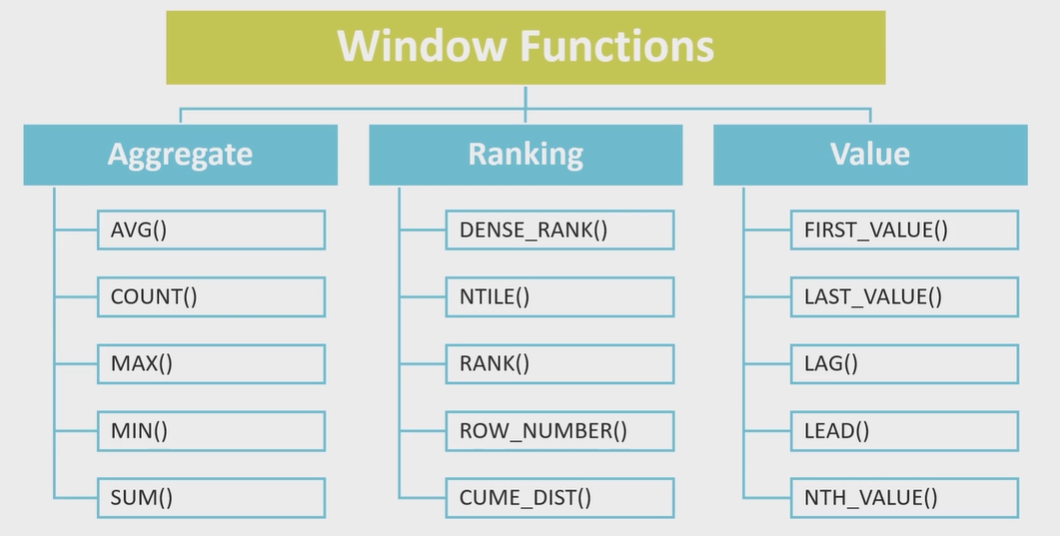
Classes of Window Functions
The set of window functions can be divided into 3 classes:
Aggregate
Ranking
Offset functions (Value)
Aggregate:
You can use any of the aggregate functions - SUM, AVG, COUNT, MIN, MAX
select name, subject, grade,
sum(grade) over (partition by name) as sum_grade,
avg(grade) over (partition by name) as avg_grade,
count(grade) over (partition by name) as count_grade,
min(grade) over (partition by name) as min_grade,
max(grade) over (partition by name) as max_grade
from student_grades;

Ranking:
In ranking functions, specifying an ORDER BY condition under the OVER keyword is mandatory, as it determines the sorting for the ranking.
ROW_NUMBER() - this function calculates a sequential rank (ordinal number) for rows within a partition, REGARDLESS of whether there are duplicate values in the rows or not.
RANK() - this function calculates the rank of each row within a partition. If there are duplicate values, the function returns the same rank for those rows, skipping the next numerical rank.
DENSE_RANK() - the same as RANK, but in the case of duplicate values, DENSE_RANK does not skip the next numerical rank and proceeds sequentially.
select name, subject, grade,
row_number() over (partition by name order by grade desc),
rank() over (partition by name order by grade desc),
dense_rank() over (partition by name order by grade desc)
from student_grades;

About NULL in ranking:
In SQL, null values will be assigned the same rank.
Offset functions:
These are functions that allow you to access the previous row's value or the extreme values of rows within a partition while moving through it.
LAG() - a function that returns the previous value of a column according to the sort order.
LEAD() - a function that returns the next value of a column according to the sort order.
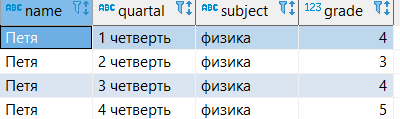
A simple example shows how you can get Petya's current, previous, and next grades for the quarters in a single row.
--создание таблицы
create table grades_quartal (
name varchar,
quartal varchar,
subject varchar,
grade int);

--наполнение таблицы данными
insert into grades_quartal (
values
('Петя', '1 четверть', 'физика', 4),
('Петя', '2 четверть', 'физика', 3),
('Петя', '3 четверть', 'физика', 4),
('Петя', '4 четверть', 'физика', 5)
);

--запрос всех данных из таблицы
select *
from grades_quartal;
select name, quartal, subject, grade,
lag(grade) over (order by quartal) as previous_grade,
lead(grade) over (order by quartal) as next_grade
from grades_quartal;

FIRST_VALUE()/LAST_VALUE() - functions that return the first or last value of a column in the specified partition. The argument specifies the column whose value should be returned. In the window function, under the OVER keyword, an ORDER BY condition is mandatory.
In the next article, we will separately discuss the concept of a window frame and look at simple examples of how it is used.