C# *
Multi-paradigm programming language encompassing strong typing, imperative, declarative, functional, generic, object-oriented (class-based), and component-oriented programming disciplines
How static code analysis helps in the GameDev industry

The gaming industry is constantly evolving and is developing faster than a speeding bullet. Along with the growth of the industry, the complexity of development also increases: the code base is getting larger and the number of bugs is growing as well. Therefore, modern game projects need to pay special attention to the code quality. Today we will cover one of the ways to make your code more decent, which is static analysis, as well as how PVS-Studio in practice helps in the game project development of various sizes.
Analyzing the Code Quality of Microsoft's Open XML SDK

My first encounter with Open XML SDK took place when I was looking for a library that I could use to create some accounting documents in Word. After more than 7 years of working with Word API, I wanted to try something new and easier-to-use. That's how I learned that Microsoft offered an alternative solution. As tradition has it, before our team adopts any program or library, we check them with the PVS-Studio analyzer.
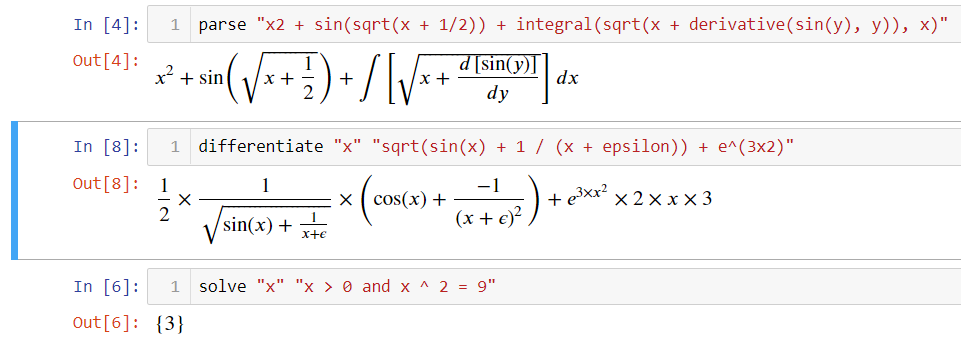
Jupyter for .NET. «Like Python»
Entity class from a symbolic algebra library:
Looks awesome. Is simple. Very enjoyable. Let's see more!
Check how you remember nullable value types. Let's peek under the hood

Recently nullable reference types have become trendy. Meanwhile, the good old nullable value types are still here and actively used. How well do you remember the nuances of working with them? Let's jog your memory or test your knowledge by reading this article. Examples of C# and IL code, references to the CLI specification, and CoreCLR code are provided. Let's start with an interesting case.
Nullable Reference will not protect you, and here is the proof

Have you ever wanted to get rid of the problem with dereferencing null references? If so, using Nullable Reference types is not your choice. Do you want to know why? This will be our topic today.
Aspect-Oriented Programming (AOP) by source-level weaving

Aspect-oriented programming is a very appealing concept for simplifying your codebase, creating clean code, improving modularity, structure of code and minimizing copy-paste errors.
Today, in most cases, weaving aspect's advices is implemented at the bytecode level, i.e. after compilation, a certain tool «weave» an additional byte code with the support of the required logic.
Our approach (as well as the approach of some other tools) is modifying the source code to implement aspect logic. With introduction of the .NET Compiler Platform (aka Roslyn), it is quite easy to achieve this goal, and the result gives certain advantages over the modification of the byte code itself.
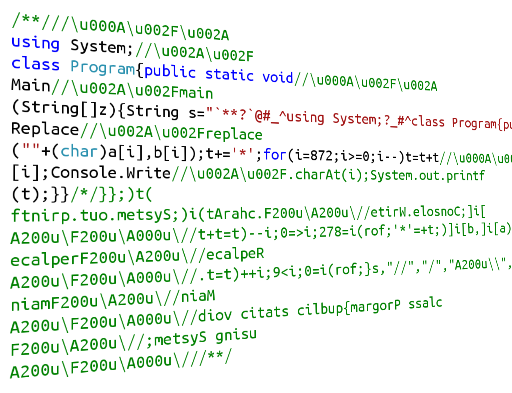
How to write Palindrome Polyglot Quines

I offer a solution to one beautiful task — writing code that outputs its text is valid for interpreters and compilers of different languages and is correctly executed when reversing its sources.
Not so long ago I learned about code that can be both interpreted in PHP and compiled to Java: PhpJava.java. As it turned out, this idea is not new: code which is valid for several compilers or interpreters is called a polyglot. It is possible to write such code because of the peculiarities of processing strings and comments in different interpreters or compilers.
Tree Structure in EF Core: How to configure a self-referencing table and use it
One of the very common questions I am getting from .NET community is how to configure and use the tree structures in EF Core. This story is one of the possible ways to do it.
The common tree structures are file tree, categories hierarchy, and so on. Let it be folders tree for example. The entity class will be a Folder:
public class Folder
{
public Guid Id { get; set; }
public string Name { get; set; }
public Folder Parent { get; set; }
public Guid? ParentId { get; set; }
public ICollection<Folder> SubFolders { get; } = new List<Folder>();
}Unicorns break into RTS: analyzing the OpenRA source code

This article is about the check of the OpenRA project using the static PVS-Studio analyzer. What is OpenRA? It is an open source game engine designed to create real-time strategies. The article describes the analysis process, project features, and warnings that PVS-Studio has issued. And, of course, here we will discuss some features of the analyzer that made the project checking process more comfortable.
Analysis of merge requests in GitLab using PVS-Studio for C#

Do you like GitLab and don't like bugs? Do you want to improve the quality of your source code? Then you've come to the right place. Today we will tell you how to configure the PVS-Studio C# analyzer for checking merge requests. Enjoy the reading and have a nice unicorn mood.
How the PVS-Studio analyzer began to find even more errors in Unity projects

When developing the PVS-Studio static analyzer, we try to develop it in various directions. Thus, our team is working on plugins for the IDE (Visual Studio, Rider), improving integration with CI, and so on. Increasing the efficiency of project analysis under Unity is also one of our priority goals. We believe that static analysis will allow programmers using this game engine to improve the quality of their source code and simplify work on any projects. Therefore, we would like to increase the popularity of PVS-Studio among companies that develop under Unity. One of the first steps in implementing this idea was to write annotations for the methods defined in the engine. This allows a developer to control the correctness of the code related to calls of annotated methods.
How to find errors in a C# project working under Linux and macOS

PVS-Studio is a well-known static code analyzer that allows you to find a lot of tricky errors hidden in the source code. Beta testing of the new version has recently finished. It provides the possibility to analyze C# projects under Linux and macOS. The tool can also be integrated into the cross-platform IDE from JetBrains — Rider. This article will help you to get acquainted with these features using the example of checking the open source RavenDB project.
Single line code or check of Nethermind using PVS-Studio C# for Linux

This article coincides with the beta testing start of PVS-Studio C# for Linux, as well as the plugin for Rider. For such a wonderful reason, we checked the source code of the Nethermind product using these tools. This article will cover some distinguished and, in some cases, funny errors.
How does strange code hide errors? TensorFlow.NET Analysis

Static analysis is an extremely useful tool for any developer, as it helps to find in time not only errors, but also suspicious and strange code fragments that may cause bewilderment of programmers who will have to work with it in the future. This idea will be demonstrated by the analysis of the TensorFlow.NET open C# project, developed for working with the popular TensorFlow machine learning library.
Continuous integration and deployment for desktop apps with GitHub Actions
- Catch bugs early in the development cycle
- Improve software quality and reliability
- Ensure consistent quality of builds
- Deploy new features quickly and safely, improving release cadence
- Fix issues quickly in production by rolling forward new deployments
That’s why we created a sample application in GitHub to showcase DevOps for your applications using the recently released GitHub Actions.

Beta testing of the PVS-Studio C# analyzer on Linux and macOS

More and more users of the PVS-Studio C# analyzer get interested in the possibility to utilize it for checking C# code on Linux and macOS. Today we have some good news.
.NET Interactive is here! | .NET Notebooks Preview 2

In November 2019, we announced .NET support for Jupyter notebooks with both C# and F# support. Today we are excited to announce Preview 2 of the .NET Notebook experience. In this article you can find all the major new features of this release. Join us!
Zero, one, two, Freddy's coming for you

This post continues the series of articles, which can well be called «horrors for developers». This time it will also touch upon a typical pattern of typos related to the usage of numbers 0, 1, 2. The language you're writing in doesn't really matter: it can be C, C++, C#, or Java. If you're using constants 0, 1, 2 or variables' names contain these numbers, most likely, Freddie will come to visit you at night. Go on, read and don't say we didn't warn you.
Authors' contribution
sidristij 1681.2SergVasiliev 1163.0olegchir 1001.8n0mo 667.0sahsAGU 656.0marshinov 654.6tguev 652.6kekekeks 623.4Andrey2008 589.0