

Надеюсь, данный пост не станет причиной ночных кошмаров у особо чувствительных хабрачитателей. В этом посте я постараюсь рассказать о простом способе увеличения ГРИП. Это весьма актуальная проблема для тех, кто работает с микроскопом и занимается макрофотографией. Суть проблемы в том, что на больших увеличениях размытие удаленных от точки фокуса предметов становится большой проблемой. Это в традиционной портретной съемке размытие фона позволяет подчеркнуть объект. В научной микрофотографии это чаще всего негативный эффект. Радует, что есть методика focus-stacking, которая позволяет сшить в единую резкую картинку стопку фотографий с разной точкой фокусировки. Но хватит рассуждать об абстрактном. Внесите клеща в студию!
Если его не видно, это не значит, что он не ест тебя прямо сейчас
Все началось достаточно тривиально. Моя любимая фатсхедера начала стремительно чахнуть и всячески пытаться умереть несмотря на уход. Так как я работаю в
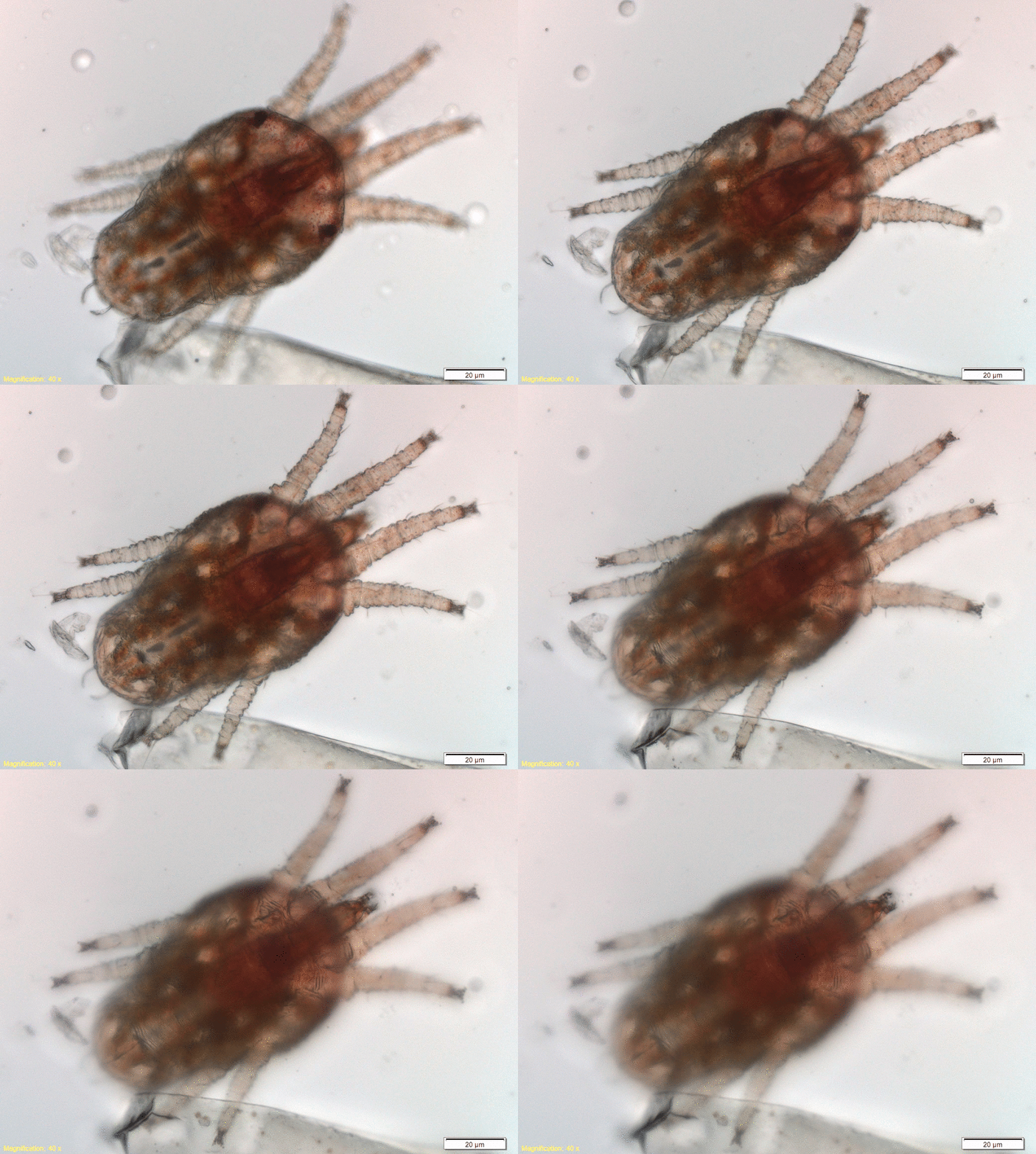
Надо было что-то придумывать для получения резкой картинки.
Z-stacking
Я обратился к традиционной методике сшивания серии фотографий, но был неприятно удивлен ценам на коммерческие продукты. Особенно, если это ПО от производителя микроскопа. Там вообще тихий ужас. Но так как мы не зря линуксоиды и иконку Столлмана регулярно протираем от пыли, то будем искать свободные программы. Сразу нашлись Hugin и Enfuse, которые позволяют делать все красиво и из консоли, что крайне удобно при массовой обработке фотографий.
Основных этапа у нас два:
- (Hugin) Выравнивание фотографий по контрольным общим точкам
- (Enfuse) Собственно сшивка всего этого воедино
Для Enfuse доступен GUI, но мы будем работать из консоли. Устанавливаем нужные пакеты под Ubuntu (они доступны и для Windows, будет отличаться синтаксис немного):
sudo apt-get update && sudo apt-get install enfuse hugin hugin-tools -y
На первом этапе складываем все наши изображения в отдельный каталог. При необходимости проводим доводку баланса белого и экспозиции с помощью того же RawTherapee. После это выравниваем, чтобы нивелировать дрожание камеры или в данном случае легкое шевеление пациента:
align_image_stack -v -m --gpu -a aligned -C *.jpg
Обратите внимание, что мы пробуем использовать GPU через OpenCL для расчетов, что значительно быстрее, но не всегда работает. Если будет падать — уберите опцию --gpu. Далее, -a aligned создает новые файлы с соответствующим префиксом. *.jpg — маска для выбора файлов, которые будут выравниваться.
В результате консоль дает нам такой вывод:
Вывод консоли
meklon@RegenLab-LinuxDesktop-1:~/ownCloud/Temp/2016.04 Клещ хабр/converted$ align_image_stack -v -m -a aligned -C *.jpg Creating control points between Image_299.jpg and Image_300.jpg
Trying to find 8 corners...
Number of good matches: 0, bad matches: 40
Number of good matches: 1, bad matches: 39
Number of good matches: 2, bad matches: 38
Number of good matches: 4, bad matches: 36
Number of good matches: 5, bad matches: 35
Number of good matches: 1, bad matches: 39
Number of good matches: 2, bad matches: 38
Number of good matches: 8, bad matches: 32
Number of good matches: 8, bad matches: 32
Number of good matches: 6, bad matches: 34
Number of good matches: 7, bad matches: 33
Number of good matches: 8, bad matches: 32
Number of good matches: 8, bad matches: 32
Number of good matches: 8, bad matches: 32
Number of good matches: 8, bad matches: 32
Number of good matches: 8, bad matches: 32
Number of good matches: 8, bad matches: 32
Number of good matches: 8, bad matches: 32
Number of good matches: 8, bad matches: 32
Number of good matches: 8, bad matches: 32
Number of good matches: 1, bad matches: 39
Number of good matches: 8, bad matches: 32
Number of good matches: 8, bad matches: 32
Number of good matches: 8, bad matches: 32
Number of good matches: 3, bad matches: 37
Creating control points between Image_300.jpg and Image_301.jpg
Trying to find 8 corners...
Number of good matches: 0, bad matches: 40
Number of good matches: 0, bad matches: 40
Number of good matches: 3, bad matches: 37
Number of good matches: 8, bad matches: 32
Number of good matches: 7, bad matches: 33
Number of good matches: 8, bad matches: 32
Number of good matches: 8, bad matches: 32
Number of good matches: 0, bad matches: 40
Number of good matches: 8, bad matches: 32
Number of good matches: 8, bad matches: 32
Number of good matches: 8, bad matches: 32
Number of good matches: 8, bad matches: 32
Number of good matches: 8, bad matches: 32
Number of good matches: 8, bad matches: 32
Number of good matches: 8, bad matches: 32
Number of good matches: 8, bad matches: 32
Number of good matches: 8, bad matches: 32
Number of good matches: 8, bad matches: 32
Number of good matches: 7, bad matches: 33
Number of good matches: 1, bad matches: 39
Number of good matches: 8, bad matches: 32
Number of good matches: 8, bad matches: 32
Number of good matches: 7, bad matches: 33
Number of good matches: 8, bad matches: 32
Number of good matches: 6, bad matches: 34
Creating control points between Image_301.jpg and Image_302.jpg
Trying to find 8 corners...
Number of good matches: 0, bad matches: 40
Number of good matches: 6, bad matches: 34
Number of good matches: 8, bad matches: 32
Number of good matches: 4, bad matches: 36
Number of good matches: 7, bad matches: 33
Number of good matches: 1, bad matches: 39
Number of good matches: 8, bad matches: 32
Number of good matches: 8, bad matches: 32
Number of good matches: 8, bad matches: 32
Number of good matches: 8, bad matches: 32
Number of good matches: 8, bad matches: 32
Number of good matches: 8, bad matches: 32
Number of good matches: 8, bad matches: 32
Number of good matches: 8, bad matches: 32
Number of good matches: 8, bad matches: 32
Number of good matches: 8, bad matches: 32
Number of good matches: 8, bad matches: 32
Number of good matches: 8, bad matches: 32
Number of good matches: 8, bad matches: 32
Number of good matches: 8, bad matches: 32
Number of good matches: 8, bad matches: 32
Number of good matches: 8, bad matches: 32
Number of good matches: 3, bad matches: 37
Number of good matches: 8, bad matches: 32
Number of good matches: 8, bad matches: 32
Creating control points between Image_302.jpg and Image_303.jpg
Trying to find 8 corners...
Number of good matches: 3, bad matches: 37
Number of good matches: 0, bad matches: 40
Number of good matches: 8, bad matches: 32
Number of good matches: 8, bad matches: 32
Number of good matches: 5, bad matches: 35
Number of good matches: 8, bad matches: 32
Number of good matches: 8, bad matches: 32
Number of good matches: 8, bad matches: 32
Number of good matches: 1, bad matches: 39
Number of good matches: 8, bad matches: 32
Number of good matches: 8, bad matches: 32
Number of good matches: 8, bad matches: 32
Number of good matches: 8, bad matches: 32
Number of good matches: 8, bad matches: 32
Number of good matches: 8, bad matches: 32
Number of good matches: 8, bad matches: 32
Number of good matches: 8, bad matches: 32
Number of good matches: 8, bad matches: 32
Number of good matches: 8, bad matches: 32
Number of good matches: 8, bad matches: 32
Number of good matches: 8, bad matches: 32
Number of good matches: 2, bad matches: 38
Number of good matches: 8, bad matches: 32
Number of good matches: 8, bad matches: 32
Number of good matches: 8, bad matches: 32
Creating control points between Image_303.jpg and Image_304.jpg
Trying to find 8 corners...
Number of good matches: 3, bad matches: 37
Number of good matches: 0, bad matches: 40
Number of good matches: 3, bad matches: 37
Number of good matches: 8, bad matches: 32
Number of good matches: 8, bad matches: 32
Number of good matches: 8, bad matches: 32
Number of good matches: 8, bad matches: 32
Number of good matches: 1, bad matches: 39
Number of good matches: 8, bad matches: 32
Number of good matches: 8, bad matches: 32
Number of good matches: 8, bad matches: 32
Number of good matches: 8, bad matches: 32
Number of good matches: 8, bad matches: 32
Number of good matches: 8, bad matches: 32
Number of good matches: 8, bad matches: 32
Number of good matches: 8, bad matches: 32
Number of good matches: 8, bad matches: 32
Number of good matches: 8, bad matches: 32
Number of good matches: 3, bad matches: 37
Number of good matches: 1, bad matches: 39
Number of good matches: 8, bad matches: 32
Number of good matches: 8, bad matches: 32
Number of good matches: 8, bad matches: 32
Number of good matches: 8, bad matches: 32
Number of good matches: 8, bad matches: 32
Creating control points between Image_304.jpg and Image_305.jpg
Trying to find 8 corners...
Number of good matches: 0, bad matches: 40
Number of good matches: 0, bad matches: 40
Number of good matches: 8, bad matches: 32
Number of good matches: 2, bad matches: 38
Number of good matches: 8, bad matches: 32
Number of good matches: 8, bad matches: 32
Number of good matches: 0, bad matches: 40
Number of good matches: 8, bad matches: 32
Number of good matches: 8, bad matches: 32
Number of good matches: 8, bad matches: 32
Number of good matches: 8, bad matches: 32
Number of good matches: 8, bad matches: 32
Number of good matches: 8, bad matches: 32
Number of good matches: 8, bad matches: 32
Number of good matches: 8, bad matches: 32
Number of good matches: 8, bad matches: 32
Number of good matches: 8, bad matches: 32
Number of good matches: 8, bad matches: 32
Number of good matches: 4, bad matches: 36
Number of good matches: 1, bad matches: 39
Number of good matches: 8, bad matches: 32
Number of good matches: 8, bad matches: 32
Number of good matches: 8, bad matches: 32
Number of good matches: 8, bad matches: 32
Number of good matches: 6, bad matches: 34
Creating control points between Image_305.jpg and Image_306.jpg
Trying to find 8 corners...
Number of good matches: 2, bad matches: 38
Number of good matches: 0, bad matches: 40
Number of good matches: 8, bad matches: 32
Number of good matches: 2, bad matches: 38
Number of good matches: 8, bad matches: 32
Number of good matches: 8, bad matches: 32
Number of good matches: 0, bad matches: 40
Number of good matches: 8, bad matches: 32
Number of good matches: 8, bad matches: 32
Number of good matches: 8, bad matches: 32
Number of good matches: 8, bad matches: 32
Number of good matches: 8, bad matches: 32
Number of good matches: 8, bad matches: 32
Number of good matches: 8, bad matches: 32
Number of good matches: 8, bad matches: 32
Number of good matches: 8, bad matches: 32
Number of good matches: 8, bad matches: 32
Number of good matches: 8, bad matches: 32
Number of good matches: 1, bad matches: 39
Number of good matches: 8, bad matches: 32
Number of good matches: 2, bad matches: 38
Number of good matches: 8, bad matches: 32
Number of good matches: 8, bad matches: 32
Number of good matches: 8, bad matches: 32
Number of good matches: 8, bad matches: 32
Creating control points between Image_306.jpg and Image_307.jpg
Trying to find 8 corners...
Number of good matches: 0, bad matches: 40
Number of good matches: 0, bad matches: 40
Number of good matches: 0, bad matches: 40
Number of good matches: 8, bad matches: 32
Number of good matches: 8, bad matches: 32
Number of good matches: 8, bad matches: 32
Number of good matches: 8, bad matches: 32
Number of good matches: 0, bad matches: 40
Number of good matches: 8, bad matches: 32
Number of good matches: 8, bad matches: 32
Number of good matches: 8, bad matches: 32
Number of good matches: 8, bad matches: 32
Number of good matches: 8, bad matches: 32
Number of good matches: 8, bad matches: 32
Number of good matches: 6, bad matches: 34
Number of good matches: 6, bad matches: 34
Number of good matches: 8, bad matches: 32
Number of good matches: 8, bad matches: 32
Number of good matches: 1, bad matches: 39
Number of good matches: 8, bad matches: 32
Number of good matches: 1, bad matches: 39
Number of good matches: 8, bad matches: 32
Number of good matches: 8, bad matches: 32
Number of good matches: 8, bad matches: 32
Number of good matches: 6, bad matches: 34
Optimizing Variables
Strategy 1
Average (rms) distance between Controlpoints
after 0 iteration(s):          13.1811221241261 units
Strategy 1
Average (rms) distance between Controlpoints
after 1 iteration(s):          13.1566720340408 units
Strategy 1
Average (rms) distance between Controlpoints
after 2 iteration(s):          13.0662076945298 units

Optimizing Variables
Strategy 2
Average (rms) distance between Controlpoints
after 0 iteration(s):          4.22711068896714 units
Strategy 2
Average (rms) distance between Controlpoints
after 1 iteration(s):          3.90465178857069 units
Strategy 2
Average (rms) distance between Controlpoints
after 2 iteration(s):          3.88979141960262 units
Strategy 2
Average (rms) distance between Controlpoints
after 3 iteration(s):          3.88741946042386 units
Strategy 2
Average (rms) distance between Controlpoints
after 4 iteration(s):          3.88714333274445 units
Strategy 2
Average (rms) distance between Controlpoints
after 5 iteration(s):          3.88711661173386 units
Strategy 2
Average (rms) distance between Controlpoints
after 6 iteration(s):          3.88711414454988 units
Strategy 2
Average (rms) distance between Controlpoints
after 7 iteration(s):          3.88711391437541 units

Ctrl points before pruning: 1274, after: 1051
Optimizing Variables
Strategy 1
Average (rms) distance between Controlpoints
after 0 iteration(s):          1.11869477363138 units
Strategy 1
Average (rms) distance between Controlpoints
after 1 iteration(s):          1.10458154981741 units
Strategy 1
Average (rms) distance between Controlpoints
after 2 iteration(s):          1.10324670986012 units
Strategy 1
Average (rms) distance between Controlpoints
after 3 iteration(s):          1.09274711349145 units
Strategy 1
Average (rms) distance between Controlpoints
after 4 iteration(s):          1.09274711349145 units

Optimizing Variables
Strategy 2
Average (rms) distance between Controlpoints
after 0 iteration(s):          1.08772087726722 units
Strategy 2
Average (rms) distance between Controlpoints
after 1 iteration(s):          1.07924785202492 units
Strategy 2
Average (rms) distance between Controlpoints
after 2 iteration(s):          1.07923206520615 units
Strategy 2
Average (rms) distance between Controlpoints
after 3 iteration(s):          1.07923200575396 units

Run called
Down to Algorithm
Original Image: 2080x1544
Inner 256 2349312: 128 1952 - 128 1416
Starting 256: 128 1952 - 128 1416
Starting 128: 128 1952 - 128 1416
Starting 64: 0 1952 - 0 1416
Starting 32: 0 2016 - 0 1480
Starting 16: 0 2048 - 0 1512
Starting 8: 0 2064 - 0 1528
Starting 4: 0 2072 - 0 1536
Starting 2: 0 2076 - 0 1540
Starting 1: 0 2078 - 0 1542
Found Solution: 0 0 2079 1543
Crop 0x0 - 2079x1543
Crop Size 2079x1543
Set crop size to 0,0,2079,1543
Multiple images output
loading Image_299.jpg
remapping Image_299.jpg
saving aligned0000.tif
loading Image_300.jpg
remapping Image_300.jpg
saving aligned0001.tif
loading Image_301.jpg
remapping Image_301.jpg
saving aligned0002.tif
loading Image_302.jpg
remapping Image_302.jpg
saving aligned0003.tif
loading Image_303.jpg
remapping Image_303.jpg
saving aligned0004.tif
loading Image_304.jpg
remapping Image_304.jpg
saving aligned0005.tif
loading Image_305.jpg
remapping Image_305.jpg
saving aligned0006.tif
loading Image_306.jpg
remapping Image_306.jpg
saving aligned0007.tif
loading Image_307.jpg
remapping Image_307.jpg
saving aligned0008.tif
Written aligned images to files with prefix "aligned"
Если вы фотографируете макро, что часто искажаются пропорции предметов на разной фокусировке. В таких случаях бывает, что вырванивание может занимать целую вечность. Попробуйте без него, хотя результат будет хуже.
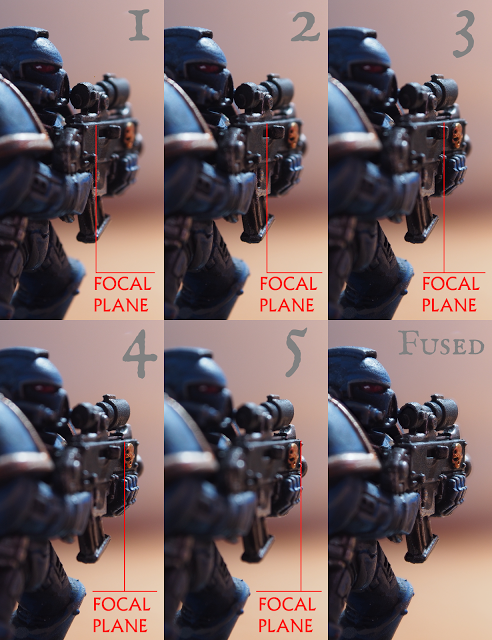
Теперь сшиваем все воедино с помощью Enfuse. Основной принцип — выделение наиболее контрастных и резких деталей на каждой картинке для последующего сшивания. Небольшое гало все же остается.
Запускаем:
enfuse -o result.jpg -v --exposure-weight=0 --saturation-weight=0 --contrast-weight=1 --hard-mask *.tif
-o result.jpg — финальный файл для вывода, *.tif — маска для input. tif — результат вывода предыдущей утилиты, но если вы сшиваете исходники с другим расширением — замените соответственно.
Примеры сшивания
Я не буду приводить все фотографии серии, лишь несколько для примера.
Банка джема:


Специальная лабораторная салфетка под микроскопом:


