
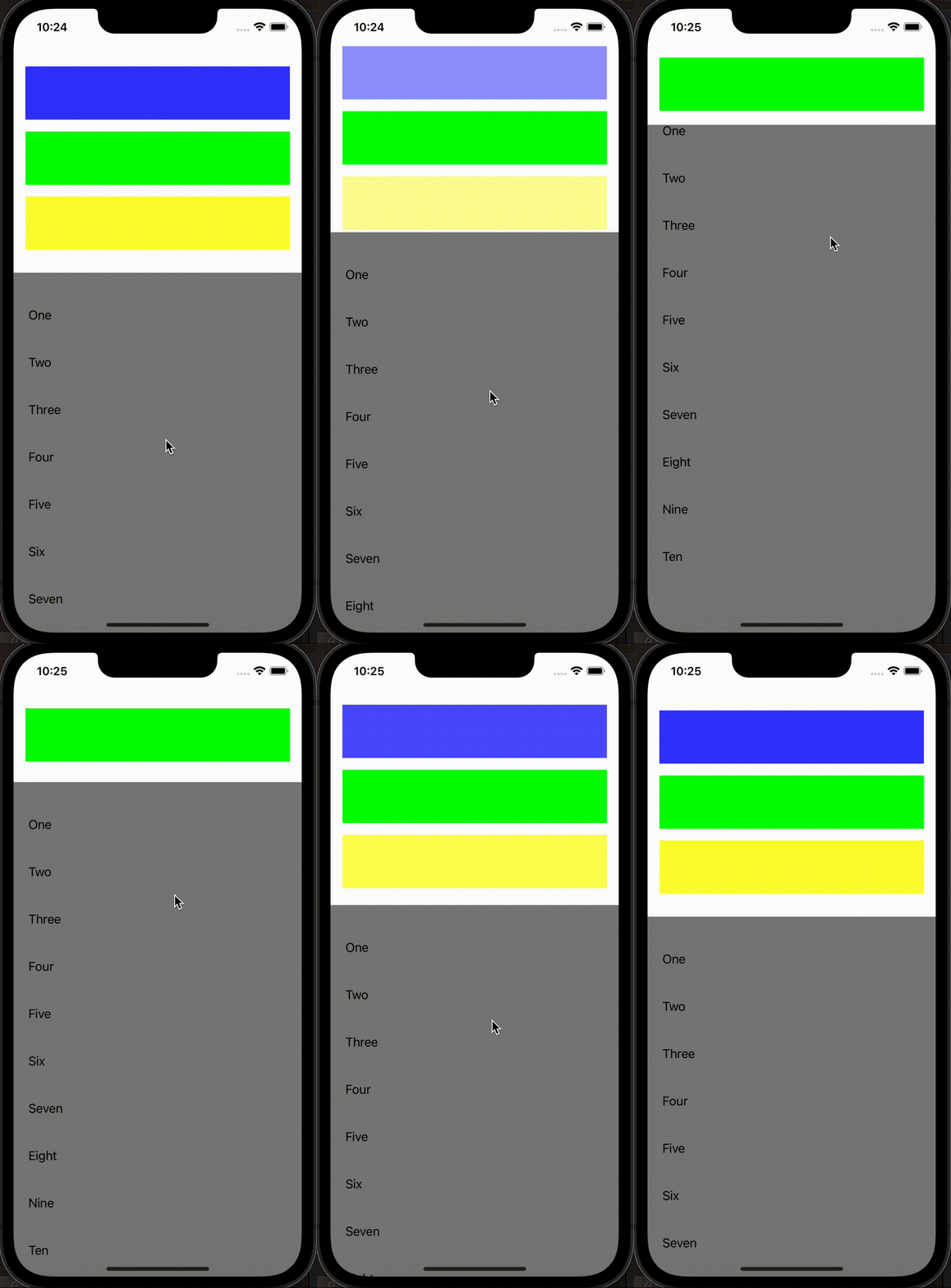
Hello there! Recently, I had very cool experience at my work. I needed to set tableView with a dynamic header. The information in the header was complete in the initial state, and when the user was scrolling the table, some part in the header was smoothly hiding and the main part remained on the top. Cool, right?
I have created two files HeaderView and, of course, ViewController.
First of all, let’s take a look at HeaderView. I have added three views with different colors as an example in UIStackView in HeaderView. All the magic with a smooth hidden and alpha of this objects will be here. Also, we have var height. In the observer (didSet) we will calculate an actual height of our HeaderView and make the colored views invisible or not.
private lazy var blueView: UIView = {
        let view = UIView()
        view.backgroundColor = .blue
        view.heightAnchor.constraint(equalToConstant: 72).isActive = true
        return view
    }()

    private lazy var greenView: UIView = {
        let view = UIView()
        view.backgroundColor = .green
        view.heightAnchor.constraint(equalToConstant: 72).isActive = true
        return view
    }()

    private lazy var yellowView: UIView = {
        let view = UIView()
        view.backgroundColor = .yellow
        view.heightAnchor.constraint(equalToConstant: 72).isActive = true
        return view
    }()

    private let stackView: UIStackView = {
        let stackView = UIStackView()
        stackView.axis = .vertical
        stackView.spacing = 16
        stackView.translatesAutoresizingMaskIntoConstraints = false
        return stackView
    }()

 var height: CGFloat = 340 {
        didSet {
            let diagramAlpha = 1.0 - (maxHeight - height > 140.0 ? 140.0 : maxHeight - height) / 140.0
            blueView.alpha = diagramAlpha
            yellowView.alpha = diagramAlpha

            if diagramAlpha < 0.3 {
                blueView.isHidden = true
                yellowView.isHidden = true
            } else {
                blueView.isHidden = false
                yellowView.isHidden = false
            }
            layoutIfNeeded()
        }
    }
In HeaderView I have min/max Height variable we needed to set actual value from view controller
var maxHeight: CGFloat = 340
var minHeight: CGFloat = 110
The next step – we are going to the controller. I am creating the usual UITableViewand adding our HeaderView. For the both objects I am setting topAnchor = view.topAnchor
Then I am creating three methods that will do all the magic.
private func calculateHeaderViewHeight(for currentOffset: CGFloat) {
        if currentOffset <= 0 {
            setHeaderViewHeight(for: headerView.maxHeight)
        } else {
            var newHeight = headerView.maxHeight - currentOffset
            if newHeight < headerView.minHeight {
                newHeight = headerView.minHeight
            }
            setHeaderViewHeight(for: newHeight)
        }
    }

    private func setHeaderViewHeight(for newHeight: CGFloat) {
        if headerViewHeightConstraint?.constant != newHeight {
            headerViewHeightConstraint?.constant = newHeight
            headerView.height = newHeight
        }
    }

    private func changeHeaderStateIfNeeded() {
        var offset = CGPoint(x: 0, y: -480)
        var tableContentInset: UIEdgeInsets = .zero
        offset = CGPoint(x: 0, y: -480)
        tableContentInset.top = 330
        tableView.contentInset = tableContentInset
        tableView.setContentOffset(offset, animated: true)
        setHeaderViewHeight(for: headerView.maxHeight)
        view.layoutIfNeeded()
    }
And I am adding calculateHeaderViewHeight in func scrollViewDidScroll(_ scrollView: UIScrollView) that will observe contentInset and contentOffsetand set the necessary state.
func scrollViewDidScroll(_ scrollView: UIScrollView) {
        let currentOffset = scrollView.contentOffset.y + scrollView.contentInset.top
        calculateHeaderViewHeight(for: currentOffset)
    }
And last but not least if you want to add an automatic and smooth transition for your tableView, just add this code.
func scrollViewDidEndDragging(_ scrollView: UIScrollView, willDecelerate decelerate: Bool) {
        let currentOffset = scrollView.contentOffset.y + scrollView.contentInset.top
        var offset: CGPoint = .zero

        let transition = UIViewPropertyAnimator(duration: 0.0, dampingRatio: 1) {
            if currentOffset < 170 {
                offset.y = -300
            } else {
                guard currentOffset < 276 else { return }
                offset.y = -230
            }
            DispatchQueue.main.async {
                self.tableView.setContentOffset(offset, animated: true)
            }
        }
        transition.startAnimation()
    }
And don’t forget the code that we need to write for the moment when we will stop dragging our tableView.
func scrollViewWillEndDragging(_ scrollView: UIScrollView, withVelocity velocity: CGPoint, targetContentOffset: UnsafeMutablePointer<CGPoint>) {
        targetContentOffset.pointee.y = max(targetContentOffset.pointee.y - 1, 1)
    }
Let's see what we have finally got in ViewController.
import UIKit

class ViewController: UIViewController {
    private var headerViewHeightConstraint: NSLayoutConstraint?

    private lazy var headerView: HeaderView = {
        let view = HeaderView()
        view.translatesAutoresizingMaskIntoConstraints = false
        view.backgroundColor = .white
        return view
    }()

    private lazy var tableView: UITableView = {
        let tableView = UITableView(frame: .zero, style: .grouped)
        tableView.separatorStyle = .none
        tableView.delegate = self
        tableView.dataSource = self
        tableView.showsVerticalScrollIndicator = false
        tableView.backgroundColor = .gray
        tableView.translatesAutoresizingMaskIntoConstraints = false
        return tableView
    }()

    var numbersArray = ["One", "Two", "Three", "Four", "Five", "Six", "Seven", "Eight", "Nine", "Ten"]

    // MARK: - Life cycle
    override func viewDidLoad() {
        super.viewDidLoad()
        setupUI()
    }

    // MARK: Private
    private func calculateHeaderViewHeight(for currentOffset: CGFloat) {
        if currentOffset <= 0 {
            setHeaderViewHeight(for: headerView.maxHeight)
        } else {
            var newHeight = headerView.maxHeight - currentOffset
            if newHeight < headerView.minHeight {
                newHeight = headerView.minHeight
            }
            setHeaderViewHeight(for: newHeight)
        }
    }

    private func setHeaderViewHeight(for newHeight: CGFloat) {
        if headerViewHeightConstraint?.constant != newHeight {
            headerViewHeightConstraint?.constant = newHeight
            headerView.height = newHeight
        }
    }

    private func changeHeaderStateIfNeeded() {
        var offset = CGPoint(x: 0, y: -480)
        var tableContentInset: UIEdgeInsets = .zero
        offset = CGPoint(x: 0, y: -480)
        tableContentInset.top = 330
        tableView.contentInset = tableContentInset
        tableView.setContentOffset(offset, animated: true)
        setHeaderViewHeight(for: headerView.maxHeight)
        view.layoutIfNeeded()
    }
}

// MARK: SetupUI
extension ViewController {
    private func setupUI() {
        view.addSubview(tableView)
        view.addSubview(headerView)

        view.backgroundColor = .white
        let headerHeightConstraint = headerView.heightAnchor.constraint(equalToConstant: headerView.maxHeight)
        self.headerViewHeightConstraint = headerHeightConstraint

        NSLayoutConstraint.activate([
            headerView.topAnchor.constraint(equalTo: view.safeAreaLayoutGuide.topAnchor),
            headerView.leadingAnchor.constraint(equalTo: view.leadingAnchor),
            headerView.trailingAnchor.constraint(equalTo: view.trailingAnchor),
            headerHeightConstraint,

            tableView.topAnchor.constraint(equalTo: view.safeAreaLayoutGuide.topAnchor),
            tableView.leftAnchor.constraint(equalTo: view.leftAnchor),
            tableView.rightAnchor.constraint(equalTo: view.rightAnchor),
            tableView.bottomAnchor.constraint(equalTo: view.bottomAnchor)
        ])

        changeHeaderStateIfNeeded()
    }
}

// MARK: UITableViewDelegate
extension ViewController: UITableViewDataSource, UITableViewDelegate {

    func tableView(_ tableView: UITableView, numberOfRowsInSection section: Int) -> Int {
        return numbersArray.count
    }

    func tableView(_ tableView: UITableView, viewForFooterInSection section: Int) -> UIView? {
        return nil
    }

    func tableView(_ tableView: UITableView, heightForFooterInSection section: Int) -> CGFloat {
        return .leastNormalMagnitude
    }

    func tableView(_ tableView: UITableView, cellForRowAt indexPath: IndexPath) -> UITableViewCell {
        let cell = UITableViewCell()
        var contentConfiguration = UIListContentConfiguration.sidebarCell()
        contentConfiguration.text = numbersArray[indexPath.row]
        cell.contentConfiguration = contentConfiguration
        cell.backgroundColor = .gray
        return cell
    }

    func tableView(_ tableView: UITableView, heightForRowAt indexPath: IndexPath) -> CGFloat {
        return 64
    }
}

// MARK: UIScrollView
extension ViewController {
    func scrollViewDidScroll(_ scrollView: UIScrollView) {
        let currentOffset = scrollView.contentOffset.y + scrollView.contentInset.top
        calculateHeaderViewHeight(for: currentOffset)
    }

    func scrollViewDidEndDragging(_ scrollView: UIScrollView, willDecelerate decelerate: Bool) {
        let currentOffset = scrollView.contentOffset.y + scrollView.contentInset.top
        var offset: CGPoint = .zero

        let transition = UIViewPropertyAnimator(duration: 0.0, dampingRatio: 1) {
            if currentOffset < 170 {
                offset.y = -300
            } else {
                guard currentOffset < 276 else { return }
                offset.y = -230
            }
            DispatchQueue.main.async {
                self.tableView.setContentOffset(offset, animated: true)
            }
        }
        transition.startAnimation()
    }

    func scrollViewWillEndDragging(_ scrollView: UIScrollView, withVelocity velocity: CGPoint, targetContentOffset: UnsafeMutablePointer<CGPoint>) {
        targetContentOffset.pointee.y = max(targetContentOffset.pointee.y - 1, 1)
    }
}
I hope you have enjoyed this article and it has been useful for you. Thanx for reading! And feel free to like it.
