
Greetings everyone!
I present a utility for supporting Xray on Keenetic routers — Xkeen.
All the code is written in pure shell and is open source on GitHub.
This post is updated regularly. The latest version is always on the Keenetic

What is Xray
Xray / v2ray is a very flexible utility for proxying and securing connections, created to bypass the GFW (Great Firewall of China).
It can even bypass blocks in Iran. I believe this solution will be sufficient in the Russian Federation for a considerable time.
The solution will not work in Turkmenistan without deep configuration
The solution will not work in the DPRK.
There is no internet there in the sense we are used toThe solution is used not only for bypassing blocks, but also for securing connections
Key features of Xray
Selective work with DNS using modern protocols
Creating your own DNS — FakeDNS
Support for reverse proxying — Reverse Proxy
Configuring policies for different users
Routing supporting
Geosite — the same as Geoip, but with domains.
Exact matches
Partial matches
Subdomains
Rule-based segmentation and management of incoming traffic by protocol
Rule-based segmentation and management of outgoing traffic by protocol
Using modern transport protocols
Ensuring transport security
Key features of Xkeen
Automatic build of the latest Xray version for your Keenetic.
Tested on aarch64, but should theoretically work on mips, mipsel.
Automatic updates
Can be enabled optionally with flexible configuration of update times
Xkeen
Xray
GeoSite
GeoIP
Integrated into the utility
Can be enabled optionally
GeoSite
GeoIP
Xkeen launch keys
Example of using launch keys: "xkeen -x", where "-x" is the key you selected.
Full installation cycle
-i — Required packages, Xray and Xkeen services
Update
-ux — Xray
-uk — Xkeen
-ugs — GeoSite
-ugi — GeoIP
Enable or change update rules
-uac — Xray, Xkeen, GeoSite, GeoIP
-uxc — Xray
-ukc — Xkeen
-ugsc — GeoSite
-ugic — GeoIP
Registration
-rx — Xray
-rk — Xkeen
-ri — Automatic startup of Xray using init
Remove / Automatic updates
-dac — Xray, Xkeen, GeoSite, GeoIP
-dxc — Xray
-dkc — Xkeen
-dgsc — GeoSite
-dgic — GeoIP
Remove / Utilities and components
-dx — Xray
-dk — Xkeen
-dgs — GeoSite
-dgi — GeoIP
-dc — Xray configurations
-dt — Temporary files
Remove / Registrations
-drx — Xray
-drk — Xkeen
Update utility registrations
-rrx — Xray
-rrk — Xkeen
Reinstall
-x — Xray
-k — Xkeen
-rc — Xray configuration files
Backups / Create
-xb — Xray
-kb — Xkeen
-cb — Xray configuration files
Backups / Restore latest
-xbr — Xray
-kbr — Xkeen
-cbr — Xray configuration files
Checks
-tpc — Connection
-tpx — Xray ports
-tfx — Xray files
-tfk — Xkeen files
-v — Xkeen version
Manage Xray
-start — Start Xray
-stop — Stop Xray
-restart — Restart Xray
-status — Show current Xray status
Author
-ad — If you find the utility useful, you can buy me a coffee
-af — Feedback
List of tested devices
Giga
KN-1010 / Works
KN-1011 / Works
KN-2410 / Works
Ultra
KN-1810 / Works
KN-1811 / Works
KN-2510 / Works
Peak
KN-2710 / Works
Hopper
KN-3610 / Works
Viva
KN-1910 / Works
KN-1912 / Works
Hero 4G+
KN-2311 / Works
Giant
KN-2610 / Works
If your device is not on the list, it doesn't mean Xkeen won't work on it.
It just means it hasn't been tested on it. Feel free to try installing it on your device.
You won't break anything.
If, when executing the command
xkeen -start
you get an error similar to
line 1: can't open html: no such file
line 2: syntax error: unexpected redirection
Please report it in the thread or to me via private message, specifying your router model.
The error will be fixed in a future update. Until then, your device is not supported.
Installation method
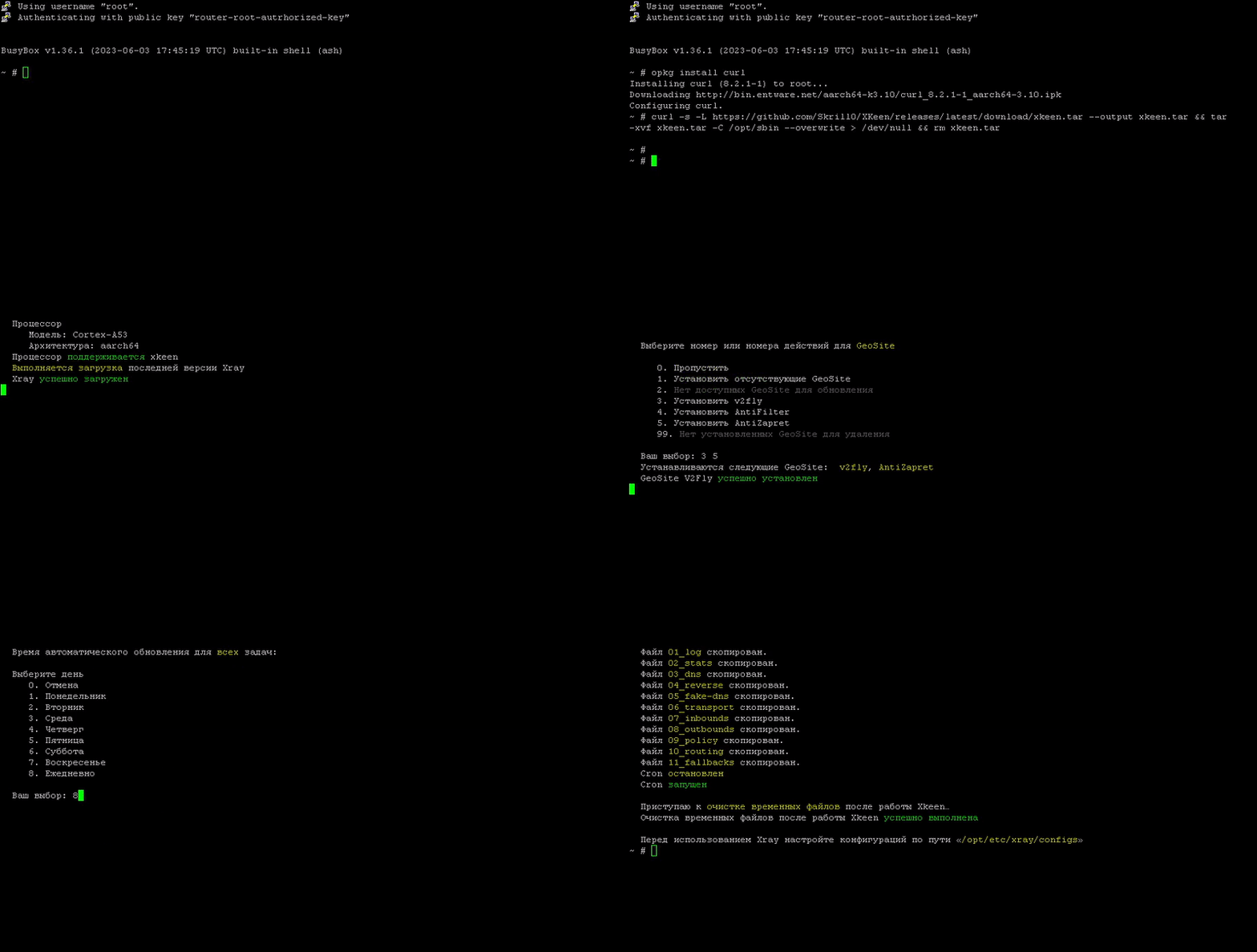
opkg install curl tar
curl -s -L https://github.com/Skrill0/XKeen/releases/latest/download/xkeen.tar --output xkeen.tar && tar -xvf xkeen.tar -C /opt/sbin --overwrite > /dev/null && rm xkeen.tar
xkeen -i
Select the GeoIP and GeoSite you are interested in.
You can install them all at once.Set the automatic update time.
Done. You are awesome.
You can now configure Xray to suit your needs.The configuration files are located at "/opt/etc/xray/configs/"
Some have detailed descriptions. You can delete them.
How the installation looks in PuTTy
Useful links for configuration
Xray GitHub repository
X project chat on Telegram — you can ask our Chinese friends.
I recommend writing in English.
Quick start from XTLS-Team
Basic guide from XTLS-Team
Advanced guide from XTLS-Team
Quick server setup on a VPS
Minimalistic, but more complex server setup on a VPS
Basic breakdown of technologies and protocols
Configuration samples
Useful GeoSite categories
GeoSite v2fly does not have a Ru zone.
Advertising
ext:geosite_v2fly.dat:category-ads-all — Compilation
* EasyList, AdGuard DNS Filter, Peter Lowe, Dan Pollokext:geosite_v2fly.dat:xiaomitv-ads
ext:geosite_v2fly.dat:adobe-ads
ext:geosite_v2fly.dat:apple-ads
ext:geosite_v2fly.dat:adcolony-ads
ext:geosite_v2fly.dat:adblock
ext:geosite_v2fly.dat:adblockplus
ext:geosite_v2fly.dat:adguard
Search engines
ext:geosite_v2fly.dat:duckduckgo
ext:geosite_v2fly.dat:google
ext:geosite_v2fly.dat:yandex
Games
ext:geosite_v2fly.dat:xbox
ext:geosite_v2fly.dat:playstation
ext:geosite_v2fly.dat:steam
ext:geosite_v2fly.dat:rockstar
ext:geosite_v2fly.dat:epicgames
ext:geosite_v2fly.dat:gog
Services
ext:geosite_v2fly.dat:sony
ext:geosite_v2fly.dat:microsoft
ext:geosite_v2fly.dat:nvidia
ext:geosite_v2fly.dat:xiaomi
ext:geosite_v2fly.dat:category-android-app-download
ext:geosite_v2fly.dat:openai
ext:geosite_v2fly.dat:paypal
ext:geosite_v2fly.dat:ebay
ext:geosite_v2fly.dat:facebook
ext:geosite_v2fly.dat:instagram
ext:geosite_v2fly.dat:youtube
ext:geosite_v2fly.dat:tiktok
ext:geosite_v2fly.dat:vk
ext:geosite_v2fly.dat:telegram
ext:geosite_v2fly.dat:whatsapp
ext:geosite_v2fly.dat:adobe
ext:geosite_v2fly.dat:adobe-activation
Additional Geo
ext:geosite_v2fly.dat:category-gov-ru — Russian government websites
ext:geosite_antizapret.dat:zapretinfo — Domain names from the AntiZapret list
ext:geosite_antifilter.dat:antifilter — Domain names from the AntiFilter list
ext:geosite_antifilter.dat:antifilter-community — Domain names from the AntiFilter Community list
Useful GeoIP categories
Main
ext:geoip_v2fly.dat:ru — Ru zone
Services
ext:geoip_v2fly.dat:cloudflare
ext:geoip_v2fly.dat:cloudfront
ext:geoip_v2fly.dat:facebook
ext:geoip_v2fly.dat:fastly
ext:geoip_v2fly.dat:google
ext:geoip_v2fly.dat:netflix
ext:geoip_v2fly.dat:twitter
ext:geoip_v2fly.dat:telegram
ext:geoip_v2fly.dat:private
Additional Geo
ext:geoip_antifilter.dat:antifilter — AntiFilter List
ext:geoip_antifilter.dat:antifilter-community — AntiFilter Community List
Basic method for manual routing configuration
Besides GeoIP / GeoSite, there are the following options for adding routes
Partial match
"vk.com" = "vk.com.ru", "music.vk.com.ru", "www.vk.com/im" ≠ vk.ruRegular expression
Example entry: "regexp:\\.ya.*\\.ru$" = "www.yandex.ru", "mail.yandex.ru" ≠ "ya.ru"
Must start with "regexp:"Subdomain
Example entry: "domain:keenetic.com" = "forum.keenetic.com" ≠ "forum.keenetic12345.com"Exact match
Example entry: "full:keenetic.com" = "keenetic.com" ≠ "www.keenetic.com", "keenetic123.com"
Example entry in 10_routing.json
{
  "routing": {
    "rules": {
      "domain": [ //Указываем нужные Вам доменные имена
        "full:keenetic.com", // Точное совпадение
        "domain:keenetic.com", // Поддомен
        "regexp:\\.ya.*\\.ru$", // Регулярное выражение
        "vk.com", // Частичное совпадение
        "ext:geosite_antizapret.dat:ZAPRETINFO" // GeoSite AntiZapret
      ],
      "ip": [ // Указываем нужные Вам IP
        "192.168.1.1", // Точное совпадение
        "10.0.0.0/8", // CIDR
        "ext:geoip_antifilter.dat:antifilter" // GeoIP AntiFilter
      ],
      "outboundTag": "proxy" // Указываем тег подключения, через которое открывать ресурсы
    }
  }
}
When using the built-in Keenetic proxy client
The proxy client component from the firmware does not support UDP — Official response from Keenetic support
In policies, do not raise the proxy connection above the main one
* If you do, you need to specify the path to the VPS server in the routes. Thanks to Artem LaptevApply the proxy policy to specific clients
In the Proxy connection, "Use for Internet access" must be enabled
"localhost" does not work in the Keenetic proxy client settings.
Thanks to Artem Laptev
* Probably a feature of the proxy client implementationOn firmwares below 4.x, you need to set up a route through the created proxy connection, as shown in the screenshot below. Thanks to Artem Laptev.
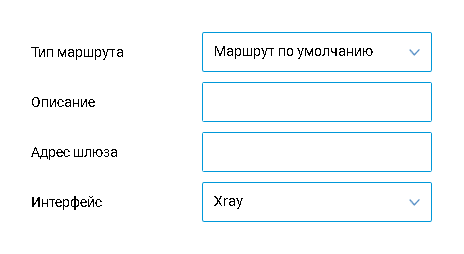
At this stage, the built-in proxy client is the easiest way to direct the connection to Xray.
In 99% of cases, there is no point in messing with tproxy / dokodemo-door or marking UDP/TCP traffic.
The Keenetic proxy client directs the connection to Xray running on the router. And only then, for example, to the connection with the VPS.
Xray will also wrap your traffic in whatever you specified in its configuration.
For example, in TCP. Because the client and server connection must have an identical configuration. Otherwise, your traffic will be recognized as "foreign".
Maintaining comfort even on a mobile network
Uninstallation method
opkg remove xkeen
opkg remove xray
Delete backups in "/opt/"
* If you don't need backups of Xray / Xkeen / your configurations.
Known issues
Incorrectly detects processor modelMIPS 1004KcFixedXray compiles incorrectly on MIPS 24kc processors In progress
The -tpx key does not workFixedIncorrectly works the selection of individual GeoIPsFixed
If Xray autorun on router startup or automatic updates do not work
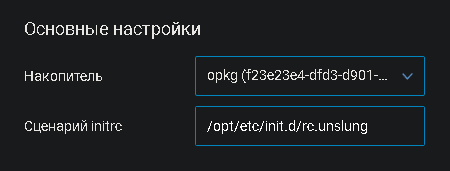
Check that you have specified the path to the Entware autoloader initiator in the router's Web UI. This is done as follows
Access the interface through the router's gateway. By default, it is 192.168.1.1
Management > OPKG
Check the "initrc script" field. It should have the following content
/opt/etc/init.d/rc.unslung
Updates
Version 0.6 from September 12, 2023
Completely rewrote the logic for detecting the processor architecture and instruction set
Added backup Xray repositories
Minor interface fixes
Improved logging
Updated S05crond creation logic
Added support for Keenetic routers:
Giga
KN-1010 / Tested
KN-1011 / Tested
KN-2410 / Tested
Ultra
KN-1810 / Tested
KN-1811
KN-2510 / Tested
Peak
KN-2710
Hooper
KN-3810 / Tested
KN-3610 / Tested
Extra
KN-1710 / Tested
KN-1711 / Tested
KN-1713 / Tested
Viva
KN-1910 / Tested
KN-1912 / Tested
4G
KN-1210 / Tested
KN-1211 / Tested
KN-1212 / Tested
Hero 4G+
KN-2311 / Tested
DSL
N-2010 / Tested
Duo
KN-2110 / Tested
Omni
KN-1410 / Tested
Giant
KN-2610 / Tested
Version 0.7 from September 12, 2023
Fixed environment variables
Fixed architecture detection
Version 0.8 from September 17, 2023
Fixed GeoIP selection
Refactored code for architecture detection
Improved init script for Xray autorun
Added handling of important operations in the router log
* Stop / Start Xray, automatic updates, and othersFixed the -tpx key
Project roadmap
Fixing bugs from the "Known issues" section
Improving the installation interface in the automatic updates module
Writing a series of articles from the poll in the thread on Xray configurations
Web interface / Tentative
If you need help
First, try to find the answer on the Keenetic forum using keywords
If you can't find the answer, then
Be respectful to forum members
Identify at what stage the problem occurs
What solutions have you already tried
Attach the log files from the following paths:
"/opt/var/log/xkeen/error.log", "/opt/var/log/xkeen/info.log", "/opt/var/log/xray/error.log", "/opt/var/log/xray/access.log".Attach any screenshots you think are necessary
Make your post easy to read and well-formatted
I invite everyone in the thread to share their observations and solutions related to Xray and its configuration.
All solutions will be added to the top of the thread and, if possible, implemented in the utility in the future.
The author bears no responsibility and does not guarantee support
If you want to buy the author a coffee
Tinkoff
Direct link
tinkoff.ru/rm/krasilnikova.alina18/G4Z9433893
Card number
2200 7008 8716 3128
QIWI
Direct link
qiwi.com/n/21BUNNY21
QIWI wallet nickname
21BUNNY21
YooMoney
Direct link
yoomoney.ru/to/410018052017678
YooMoney wallet number
4100 1805 201 7678
Crypto
USDT coin, TRC20 network
TSC6Emx5KHK4CpYFKWj7duSYboKRAVxS3M
USDT coin, ERC20 network
0x4a0369a762e3a23cc08f0bbbf39e169a647a5661
USDT coin, BEP20 network
0x4a0369a762e3a23cc08f0bbbf39e169a647a5661