
Хабр Курсы для всех
РЕКЛАМА
Практикум, Хекслет, SkyPro, авторские курсы — собрали всех и попросили скидки. Осталось выбрать!


Видео можно найти только в ограниченном тираже с круглой белой наклейкой «Только в Vogue ролик с участием Моники Беллуччи».







$ sudo ../jz_tools_20090224/usb_tools/usbtool 1 jz_xloader.bin 0x80000000
USBtool v0.4 - © 2008 Maurus Cuelenaere
This is free software; see the source for copying conditions.  There is NO
warranty; not even for MERCHANTABILITY or FITNESS FOR A PARTICULAR PURPOSE.

[INFO] File size: 1512 bytes
[INFO] Searching for device...
[INFO] Found device, uploading application.
[INFO] GET_CPU_INFO:
[ERR]  Error sending control message (-110, error sending control message: Connection timed out)
git clone git://projects.qi-hardware.com/xburst-tools.git
cd xburst-tools
vim xbboot/host-app/host_main.c
vim usbboot/src/ingenic_usb.{h,c}
./autogen.sh && ./configure.sh --disable-firmware && make
sudo ./usbboot/src/usbboot -f /etc/xburst-tools/usbboot.cfg -1 ../jz_hacking_20090224/jz_xloader.bin -2 ../jz_hacking_20090224/u-boot-boot-linux.bin -c boot$ sudo ../xburst-tools/usbboot/src/usbboot -f /etc/xburst-tools/usbboot.cfg -1 ./fw.bin -2 ./usb_boot.bin -c boot usbboot - Ingenic XBurst USB Boot Utility © 2009 Ingenic Semiconductor Inc., Qi Hardware Inc., Xiangfu Liu, Marek Lindner This program is Free Software and comes with ABSOLUTELY NO WARRANTY. Now checking whether all configure args valid: YES Current device setup information: Crystal work at 12MHz, the CCLK up to 96MHz and PMH_CLK up to 32MHz SDRAM Total size is 32 MB, work in 4 bank and 16 bit mode Nand page per block 64, Nand page size 4096, ECC offset in OOB 12, bad block offset in OOB 0, bad block page 127, use 1 plane mode Execute command: boot CPU data: JZ4750V1 CPU not yet booted, now booting... Loading stage1 from './fw.bin' Download stage 1 program and execute at 0x80002000 CPU data: JZ4750V1 Loading stage2 from './usb_boot.bin' Download stage 2 program and execute at 0x81c00000 CPU data: JZ4750V1 CPU data: Boot4750 Booted successfully! CPU data: Boot4750 Configuring XBurst CPU succeeded. $ sudo ../xburst-tools/usbboot/src/usbboot -f /etc/xburst-tools/usbboot.cfg -1 ./fw.bin -2 ./usb_boot.bin -c "nquery 0 0" usbboot - Ingenic XBurst USB Boot Utility © 2009 Ingenic Semiconductor Inc., Qi Hardware Inc., Xiangfu Liu, Marek Lindner This program is Free Software and comes with ABSOLUTELY NO WARRANTY. Now checking whether all configure args valid: YES Current device setup information: Crystal work at 12MHz, the CCLK up to 96MHz and PMH_CLK up to 32MHz SDRAM Total size is 32 MB, work in 4 bank and 16 bit mode Nand page per block 64, Nand page size 4096, ECC offset in OOB 12, bad block offset in OOB 0, bad block page 127, use 1 plane mode Execute command: nquery 0 0 CPU data: Boot4750 ID of No.0 device No.0 flash: Vendor ID :0xec Product ID :0xd3 Chip ID :0x14 Page ID :0xa5 Plane ID :0x64


 Welcome!
 USB Boot Host Software!
 USB Boot Software current version: 1.4b
 Handling user command.
 USBBoot :> boot 0

 Checking state of No.0 device: Unboot
 Now booting No.0 device:
 Download stage one program and execute at 0x80002000: Pass
 Download stage two program and execute at 0x80c00000: Pass
 Boot success!
 Now configure No.0 device:
 Now checking whether all configure args valid:
 Current device information: CPU is Jz4750
 Crystal work at 12MHz, the CCLK up to 336MHz and PMH_CLK up to 112MHz
 Total SDRAM size is 16 MB, work in 4 bank and 16 bit mode
 Nand page size 4096, ECC offset 24, bad block ID 127, use 1 plane mode
 Configure success!
 USBBoot :> nquery 0 0

 ID of No.0 device No.0 flash:
 Vendor ID    :0xec
 Product ID   :0xd3
 Chip ID      :0x14
 Page ID      :0xa5
 Plane ID     :0x64
 Operation status: Success!
 USBBoot :>


Checking state of No.0 device: Unboot
Now booting No.0 device:
Download stage one program and execute at 0x80002000:
ERROR: DeviceIoControl returns 1f.Pass
Download stage two program and execute at 0x80c00000:
ERROR: DeviceIoControl returns 1f.
Boot fail



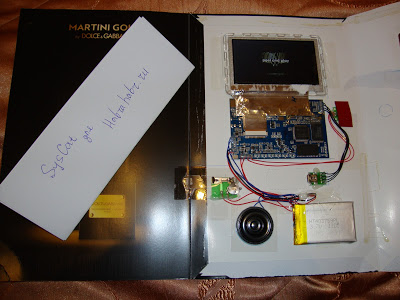


стоит отметить, что при тираже в 10-20 тысяч экземпляров номер журнала с видеорекламой будет стоить около 30 евро.


Prepare to Download MINIOS.


 Ingenic Semiconductor Co., Ltd. Loader Version V1.0
00000040
00000040
 Jump to 0x80800000
 Lapuctemp = 0xa08231c0
All of the buffer size = 0x1c4
puctemp = 0xa00821c0
All of the buffer size = 0x1c4
 bad blocks num =0
first_page = 32768 bytesize = 67108864 totalpage = 32768 g_nandpagesize = 2048
first_page = 8192 bytesize = 16777216 totalpage = 8192 g_nandpagesize = 2048
totalsect = 411570
totalsect = 411570
---------TranslateKeyCode,key:40
TranslateKeyCode,VK_PLAY
---------TranslateKeyCode,key:40
TranslateKeyCode,VK_PLAY
---------TranslateKeyCode,key:40
TranslateKeyCode,VK_PLAY
+++ table init start 1, 1 +++
+++ install_init_plugin_complete = 0  +++
+++ name = xvid +++

+++++++++ h264dsputil_init_funcp = 0x803bcf80 +++++++++
---------TranslateKeyCode,key:20
TranslateKeyCode,VK_RIGHT


запоротый девайс


Вышлите в Екатеринбург, для опытов/экспериментов, возможно, что-то получится интересное. ICQ 555/66/25
$ sudo ./usbboot -1 /usr/local/share/xburst-tools/fw.bin -2 /usr/local/share/xburst-tools/u-boot.bin

usbboot - Ingenic XBurst USB Boot Utility

© 2009 Ingenic Semiconductor Inc., Qi Hardware Inc., Xiangfu Liu, Marek Lindner

This program is Free Software and comes with ABSOLUTELY NO WARRANTY.


Now checking whether all configure args valid: YES

Current device setup information:

Crystal work at 12MHz, the CCLK up to 252MHz and PMH_CLK up to 84MHz

SDRAM Total size is 32 MB, work in 4 bank and 16 bit mode

Nand page per block 128, Nand page size 4096, ECC offset in OOB 12, bad block offset in OOB 0, bad block page 127, use 1 plane mode

usbboot :> boot

 CPU not yet booted, now booting...

 Loading stage1 from '/usr/local/share/xburst-tools/fw.bin'

 Download stage 1 program and execute at 0x80002000

 Loading stage2 from '/usr/local/share/xburst-tools/u-boot.bin'

 Download stage 2 program and execute at 0x81c00000

Error - can't retrieve XBurst CPU information: -110
usbboot :> load 0x80600000 uImage 0

 start:::::: 0x80600000

 Total size to send in byte is :1993303

 Loading data to SDRAM :

Error - can't read bulk data from Ingenic device:-110

 Load last address at 0x1

 0x80603000

Error - can't read bulk data from Ingenic device:-110

 Load last address at 0x1


BADBLACKPOS 0

BADBLACKPAGE 0

Linux version 2.6.31.3 (kmeaw@baron13) (gcc version 4.4.5 (Gentoo 4.4.5 p1.0, pie-0.4.5) ) #15 PREEMPT Thu Dec 2 19:47:27 MSK 2010

console [early0] enabled

CPU revision is: 1ed0024f (Ingenic JZRISC)

CPU clock: 336MHz, System clock: 112MHz, Peripheral clock: 112MHz, Memory clock: 112MHz

JZ4725 DIPPER board setup

Determined physical RAM map:

 memory: 04000000 @ 00000000 (usable)

User-defined physical RAM map:

 memory: 02000000 @ 00000000 (usable)

Initrd not found or empty - disabling initrd

Zone PFN ranges:

 Normal 0x00000000 -> 0x00002000

Movable zone start PFN for each node

early_node_map[1] active PFN ranges

 0: 0x00000000 -> 0x00002000

Built 1 zonelists in Zone order, mobility grouping off. Total pages: 8128

Kernel command line: panic=50 mem=32M console=ttyS0,57600

PID hash table entries: 128 (order: 7, 512 bytes)

Dentry cache hash table entries: 4096 (order: 2, 16384 bytes)

Inode-cache hash table entries: 2048 (order: 1, 8192 bytes)

Primary instruction cache 16kB, VIPT, 4-way, linesize 32 bytes.

Primary data cache 16kB, 4-way, VIPT, no aliases, linesize 32 bytes

Memory: 29560k/32768k available (1537k kernel code, 3208k reserved, 300k data, 940k init, 0k highmem)

Hierarchical RCU implementation.

NR_IRQS:256

Console: colour dummy device 80x25

console handover: boot [early0] -> real [ttyS0]

Calibrating delay loop... 








 Я был ослеплён нетерпением!


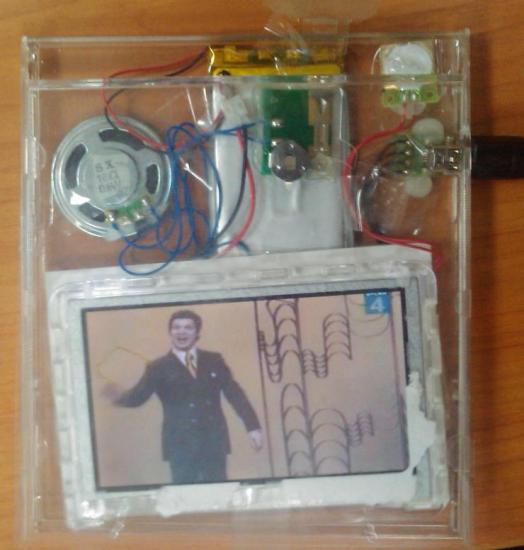


Взлом журнала Vogue или видео плеер за 119 руб