Apache Kafka and AWS S3: backup and restore

It hasn't been that long since my last cheat sheet was published and this is the day for the new one. This time I got a task to find a solution for backing up Kafka to S3 bucket, following the terms:

Software Development Methodology

It hasn't been that long since my last cheat sheet was published and this is the day for the new one. This time I got a task to find a solution for backing up Kafka to S3 bucket, following the terms:

I'm Alex Movergan, DevOps team lead at Altenar. I focus on automation in general and on improving troubleshooting skills within my team. In this article, I'll share a captivating tale that revolves around Kubernetes, validation webhooks, kubespray, and Calico.
Join me on this DevOps journey as we explore real-world scenarios unraveling the intricacies of troubleshooting in a Kubernetes environment.

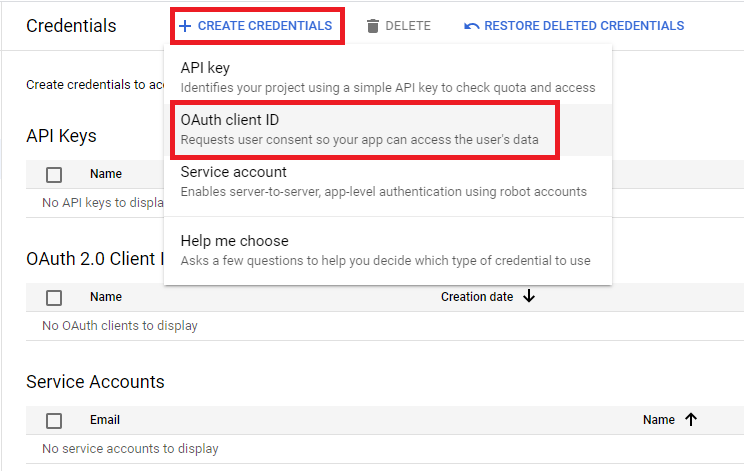
As many times before, I keep writing cheat sheets after the tasks which made me search a lot and glue things together before I found a solution. Long story short, this time I was asked to set up Google SSO for Kibana without switching from a basic license to a paid one. Kibana, by the moment, already had authentication set up and the customer wanted to log in there with the use of Google Workspace user accounts. Along with that, the customer wanted to keep user account which was already there, in Kibana. There was no need for role mapping or other advanced features, just plain SSO and that's all. As you probably know Elastic provides SSO feature only on paid license, so I have had no other way to get it working except for using 3rd party software. But first things first, let's list the steps we should go over:
There is a task to develop a solution that allows:
- Access control to web applications via #oidc/#saml
- Access control to vanilla #Kubernetes
- SSH access control to bare-metal hosts - using SSH certificate technology if possible
- Authorizing users to other server applications such as #Vault, #PostgreSQL, #Kafka, #ClickHouse, #MongoDB
- Being able to connect users from third-party organizations to certain resources based on group membership, etc
- Ensuring that everything described above works, including the bare metal environment

Video recording of our webinar about dstack and reproducible ML workflows, AVL binary tree operations, Ultralytics YOLOv8, training XGBoost, productionize ML models, introduction to forecasting ensembles, domain expansion of image generators, Muse, X-Decoder, Box2Mask, RoDynRF, AgileAvatar and more.

Software message brokers became the standard for creating complex systems. However not all IT specialists understand how these instruments work. Pavel Malygin, Lead System Analyst at Innotech, dives into the topic of message brokers and explains how they are used.

No matter how we deceive ourselves - size matters! Of course, we will talk about the size of our android application, where we add a bunch of cool features, and we don’t even think about how this can negatively affect the app size. Therefore, we will learn how to detect app size regression on CI to automate this process. In this part, we will discuss how you can easily check the app size in development branch.

Typically when a Node falls out of the OpenShift cluster, this is resolved by simply restarting the offending element. What should you do, however, if you’ve forgotten the SSH key or left it in the office? You can attempt to restore access by using your wit and knowledge of Linux commands. Renat Garaev, lead developer at Innotech, described how he found the solution for this riddle and what was the outcome.

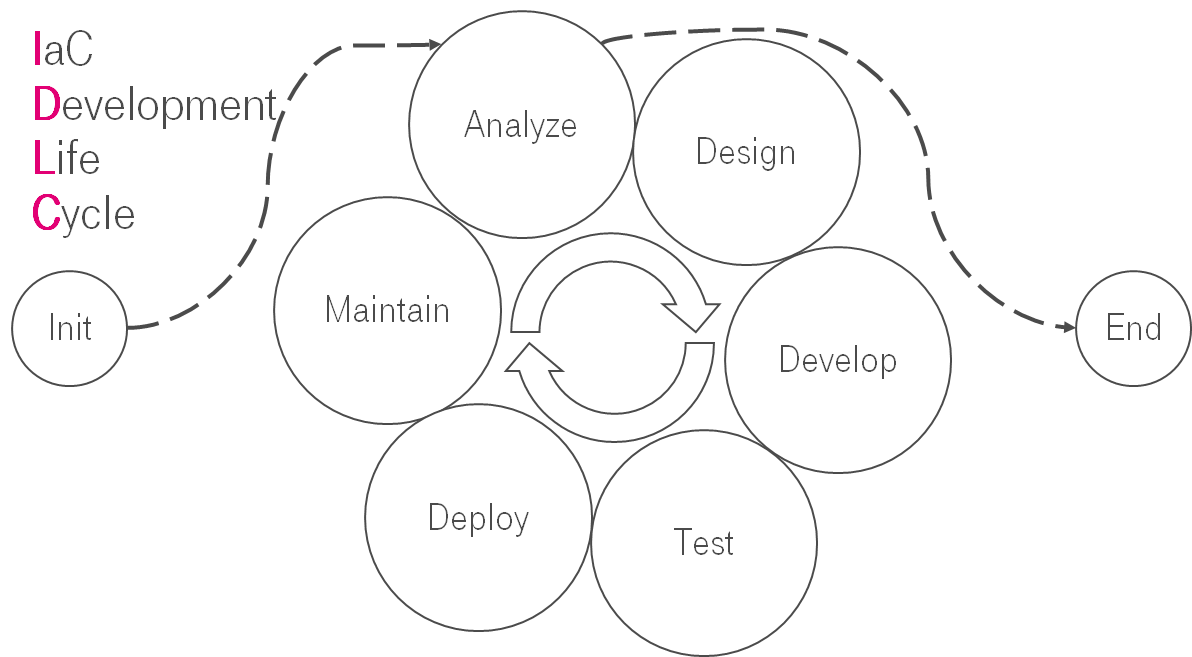
This is the translation of my speech at T-Meetup: DevOps Life Cycle.
I believe that you have heard about SDLC (Systems development life cycle). Is it possible that the same things are applicable for the IaC?

Everyone who runs the static analyzer on a project for the first time is slightly shocked by hundreds, thousands or even tens of thousands of warnings. It may be frustrating. Is my code so terrible? Or is the analyzer lying? In any case, filtering by the severity changes the situation, not completely though. That's why we thought about how we could improve the first experience with the analyzer. Let me show you the new feature step by step...

This article continues the series of articles on load tests. Today we will analyze the testing methodology and answer the question: "How many IP cameras can be connected to a WebRTC server?"

Do you remember how just a few years ago it was a disaster to lose a camera at the end of a vacation? All memorable pictures and videos then disappeared along with the lost device. Probably, this fact prompted the great minds to invent cloud storage, so that the safety of records no longer depends on the presence of the devices on which these records are made.

We continue to review variants of load tests. In this article we will go over the testing methodology and conduct a load test that we will use to try and determine the number of users that could watch and stream at the same time, meaning the users will simultaneously publish and view the streams.

This article is a continuation of our series of write-ups about load tests for our server. We have already discussed how to compile metrics and how to use them to choose the equipment, and we also provided an overview of various load testing methods. Today we shall look at how the server handles stream mixing.

In the previous article we went over a load test whose data could be used to choose a load-appropriate server. In the course of the testing, we would publish a stream on one WCS, and we would pick up that stream several times using a second WCS. The acquired results could be used as a basis for decisions on server operability.
Some would (justly) have concerns regarding the possible biases in such a test — after all, one of our servers was used to test another one of our servers. Could it be that we were using a specially optimized code that skewed the results in our favor?

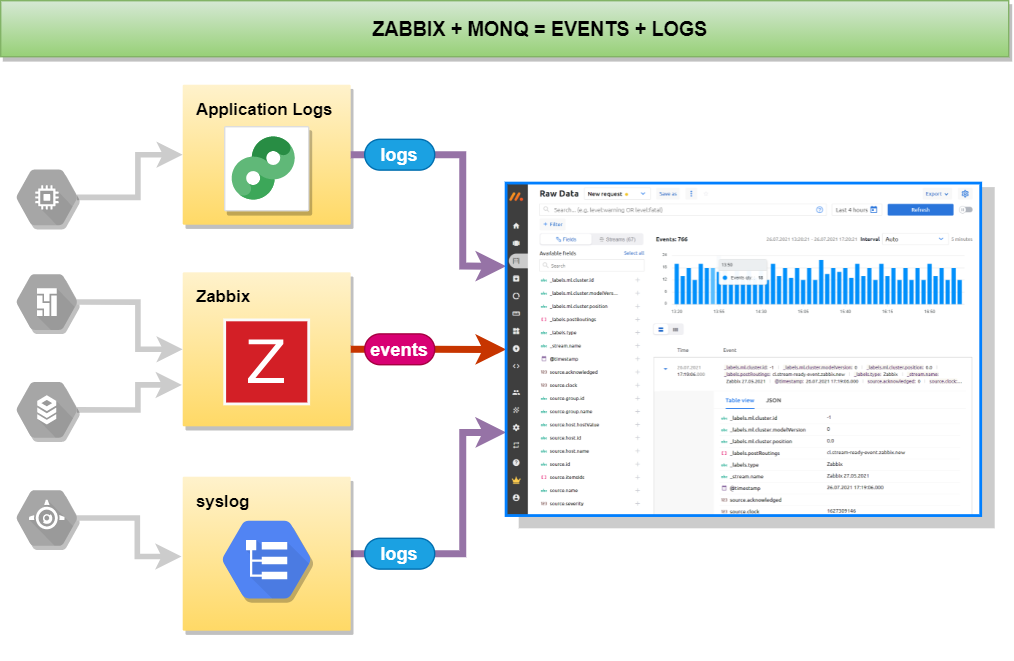
If you use Zabbix to monitor your infrastructure objects but have not previously thought about collecting and storing logs from these objects then this article is for you.

In any project, a great deal of importance is placed on the selection of server hardware and WebRTC streaming is no exception. One of the key principles of such a selection is balance – the hardware should be powerful enough to handle the streams with no drops in quality, but not too powerful so as to waste resources. So, how does one choose the right server?

Monitoring systems are a vital tool for any system administrator, because they can be used to extract specific information from services, such that:

A few weeks ago we wrote an article about Docker and WebRTC servers and talked about the intricacies of launching containers. Our readers (rightly) questioned whether Docker was a suitable tool for production, for the following reasons:
The developer or owner of a software product often faces the question of choosing a suitable location for hosting server capacity. As you know, software always meets hardware.