Domain-Specific system based on console JAVA applications
Hello, Habr! I'd like to share my experience developing such a system.
The defining parameters of a domain-specific system are:

Developing for *nix
Hello, Habr! I'd like to share my experience developing such a system.
The defining parameters of a domain-specific system are:

Historically, we’ve ended up using a few rather obscure PHP extensions—written and barely (if at all) maintained by their original authors—that aren’t available in standard Debian package sources.
We stick to the principle of “do it right, and it’ll work right,” which means Slackware-style dropping binaries into the system outside of package managers is frowned upon.
So instead, we’ll be building proper .deb packages for PHP extensions—without breaking compatibility with the existing environment.

Recently I have bought starfive visionfive-2 SoC for my own experiments, honestly speaking
I am striving to work with risc-v. After some time I decided to share my experience. Here my bulletpoints:
Small preparation USB-to-Serial connector Write image to microSD/SSD Set boot mode settings
Boot Update bootloader Build kernel Native build Pod build Cross-build on amd64: fast and handy
Chroot to risc-v system from amd64 and install packages
Bonus 1: run qemu with risc-v
Bonus 2: build deb packages for risc-v
Bonus 3: kernel build script
Conclusions

Hey there, Habr! My name is Alexey Kolesnikov. I am a Malware Detection Specialist at the Positive Technologies Expert Security Center (PT ESC). I recently spoke at the AVAR 2023 international conference in Dubai, where I covered new plugins developed by PT ESC for an open-source dynamic malware analysis system named DRAKVUF and demonstrated how they can be used to detect current Linux threats in sandbox for protection against targeted and mass attacks PT Sandbox.
Read on for a brief overview of popular malware monitoring tools for Linux, a description of how our plugins work in DRAKVUF, and a malware analysis that relies on these plugins.

In this article, I will cover the memory consumption of .NET applications on Linux. Firstly, we will try to understand the idea of virtual memory. Then, we will examine the memory statistics that Linux provides, such as RSS (Resident Set Size), VmData, RES (Resident Memory Size), and SWAP. Following that, we will delve into specifics related to the .NET.

Asynchronous programming is commonly employed for efficient implementation of network interactions in C++. The essence of this approach lies in the fact that the results of socket read/write functions are not immediately available but become accessible after some time. This approach allows for loading the processor with useful work during the wait for data. Various implementations of this approach exist, such as callbacks, actors, future/promise, coroutines. In C++, these implementations are available as libraries from third-party developers or can be implemented independently.
Coroutines are the most challenging to implement as they require writing platform-dependent code. However, the recent version of the C++ 20 language standard introduces support for coroutines at the compiler and standard library levels. Coroutines are functions that can suspend their execution, preserving their state, and later return to that state to resume the function's work. The compiler automatically creates a checkpoint with the coroutine's state.
For a comprehensive understanding of C++ 20 coroutines, refer to this article. Below, we examine a code example using coroutines and describe important points applied during implementation.

Once every true-linux engineer gets a trouble: there is no any software in his distro or it's built without needed options. I am keen on the phrase: "Only source control gives you freedom".
Of course, you can build this software on your computer without any src-packages, directly (with simplification: configure, make, make install). But it's a non-reproducible solution, also hard for distribution.
The better way is to make distro-aligned package that can be built if needed and that produces lightly distributed binary-packages. It's about debian-source packages(debian,ubuntu,etc), pkgbuild (for arch), ebuild for gentoo, src-rpm for red hat-based, and many others.
I will use cri-o like a specimen.
Before reading the text below I strongly recommend to get familiarized with the official Debian policy manual placed here and debhelper manpage.
Also you will be required to setup some variables like DEBMAIL and DEBFULLNAME for proper data in changelog and other places.

Hearing is one of the few basic senses that we humans have along with the other our abilities to see, smell, taste and touch. If we couldn't hear, the world as we know it would be less interesting and colorful to us. It would be a total silence - a scary thing, even to imagine. And speaking makes our life so much fun, because what else can be better than talking to our friends and family? Also, we're able to listen to our favorite music wherever we are, thanks to computers and headphones. With the help of tiny microphones integrated into our phones and laptops we are now able to talk to the people around the world from any place with an Internet connection. But computer hardware alone isn't enough - it is computer software that really defines the way how and when the hardware should operate. Operating Systems provide the means for that to the apps that want to use computer's audio capabilities. In real use-cases audio data usually goes the long way from one end to another, being transformed and (un)compressed on-the-fly, attenuated, filtered, and so on. But in the end it all comes down to just 2 basic processes: playing the sound or recording it.
Today we're going to discuss how to make use of the API that popular OS provide: this is an essential knowledge if you want to create an app yourself which works with audio I/O. But there's just one problem standing on our way: there is no single API that all OS support. In fact, there are completely different API, different approaches, slightly different logic. We could just use some library which solves all those problems for us, but in that case we won't understand what's really going on under the hood - what's the point? But humans are built the way that we sometimes want to dig a little bit deeper, to learn a little bit more than what just lies on the surface. That's why we're going to learn the API that OS provide by default: ALSA (Linux), PulseAudio (Linux), WASAPI (Windows), OSS (FreeBSD), CoreAudio (macOS).

Sometimes all of us need to make a graphical installer for one's own linux distro. It goes without saying that you are able to use a distro-specific installer like Anaconda for RedHat-based or DebianInstaller for debian-based. On the other hand Calamares is a graphical installer which is not aligned with only one package manager.
I want to share my experience how to make a universal install solution with GUI. I did not find any complete article about it, hence, I reinvented the wheel.

When talking about high-performance software we probably think of server software (such as nginx) which processes millions requests from thousands clients in parallel. Surely, what makes server software work so fast is high-end CPU running with huge amount of memory and a very fast network link. But even then, the software must utilize these hardware resources at maximum efficiency level, otherwise it will end up wasting the most of the valuable CPU power for unnecessary kernel-user context switching or while waiting for slow I/O operations to complete.
Thankfully, the Operating Systems have a solution to this problem, and it's called kernel event queue. Server software and OS kernel use this mechanism together to achieve minimum latency and maximum scalability (when serving a very large number of clients in parallel). In this article we are going to talk about FreeBSD, macOS and kqueue, Linux and epoll, Windows and I/O Completion Ports. They all have their similarities and differences which we're going to discuss here. The goal of this article is for you to understand the whole mechanism behind kernel queues and to understand how to work with each API.

On August 25th, 2021, the Linux kernel celebrated its 30th anniversary. Since then, it's changed a lot. We changed too. Nowadays, the Linux kernel is a huge project used by millions. We checked the kernel 5 years ago. So, we can't miss this event and want to look at the code of this epic project again.

Tested on the following configuration:
Server: ubuntu 20.04
Clients: ubuntu 16.04, 18.04, 20.04
It doesn’t require a lot of software to create it.

You may have already read a recent article about the first PVS-Studio run and filtration of warnings. We used the GTK 4 project as an example. It's about time we worked with the received report in more detail. Our regular readers may have already guessed that this article will be a description of errors found in the code.

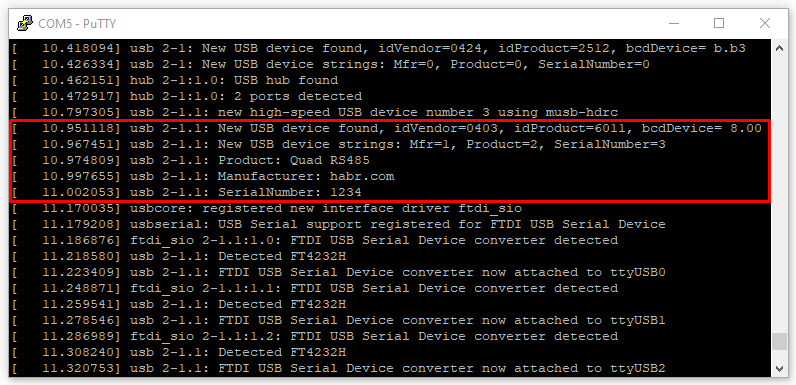
The FT4232H is USB 2.0 High speed to UART IC converter. The FT4232H has four UART ports and one USB port.
By connecting EEPROM memory to this chip, you can set specific operating modes or change the manufacturer's data.
Let's look at the example and configure FT4232H directly on a system running GNU/Linux. We will do this using the ftdi_eeprom.
struct Test<T>: Codable where T: Codable {
enum CodingKeys: String, CodingKey {
case value
}
let value: T
let info: String
}
extension Test {
init(from decoder: Decoder) throws {
let container = try decoder.container(keyedBy: CodingKeys.self)
self.value = try container.decode(T.self, forKey: .value)
self.info = "Default init(from decoder:)"
}
}
extension Test where T == String {
init(from decoder: Decoder) throws {
let container = try decoder.container(keyedBy: CodingKeys.self)
self.value = try container.decode(T.self, forKey: .value)
self.info = "Custom init(from decoder:)"
}
}
let data = #"{"value":"Hello, World!"}"#.data(using: .utf8)!
let object = try? JSONDecoder().decode(Test<String>.self, from: data)
print(object.debugDescription)
Optional(
Test<String>(
value: "Hello, World!",
info: "Default init(from decoder:)"
)
)
Every Linux professional write scripts. Someеimes light, linear. Sometimes complex script with functions and libs(yes, you can write your bash-library for use in other scripts).
But some of the scripts need a configuration file to work. For instance, I wrote a script that builds the ubuntu image for pxe, and I need to change the build process without build-script changes. The best way to resolve this task is to add configuration files.
PXE is a great solution for booting a diskless computer (or a computer without an OS installed). This method is often used for terminal stations and OS mass installation.
Stock ubuntu (16.04) in pxe-mode can mount rootfs only from NFS. But this is not a great idea: any difficulties with the network/NFS server and the user gets problems.
In my opinion, it's best to use other protocols, such as http/ftp. Once booting, you will have an independent system


Originally, Buildroot offers a limited number of packages. It makes sense — there is everything you need, but any other packages can be added.
To add a package, create 2 description files, an optional checksum file, and add a link to the package in the general package list. There are hooks at different stages of the build. At the same time, Buildroot can recognize the needed type of packages: