Pull to refresh
256K+

Development for Windows *

Developing for Microsoft OSs

114,42
Rating
Show first
Rating limit
Level of difficulty

Windows 11 Enterprise G – What is this edition for the Chinese government and why would you need it?

Level of difficultyHard
Reading time11 min
Reach and readers1.5K

Today I would like to share some information with you about a special, somewhat unique edition that exists in Windows 10 and Windows 11, released by Microsoft for the Chinese government sector. What is Windows Enterprise G, also known as Windows Enterprise Government China, how does it differ from other editions, and most importantly, how (and why) you can get it.

Read more

Wrapping YouTube with a snake, or how to watch and download YouTube videos without a VPN using pure Python. Part 1

Level of difficultyEasy
Reading time13 min
Reach and readers955

The modern world is saturated with all kinds of information, and in our difficult times, it's important to be able to not only find it but also to save it. Many have probably noticed that on YouTube, besides the junk, cats, and other useless things (which we sometimes don't mind watching), there is a lot of useful material on a wide variety of topics. And sometimes it would be nice to save this material for the future, so as not to depend on the changing moods in the world.

In this article, I want to explain how you can download videos, audio (Part 1 of the article), playlists, and entire channels from YouTube (Part 2 of the article) without using a VPN and in pure Python. A quick disclaimer: we won't need a VPN, but we will create our own tool that will solve the "problem with outdated and worn-out equipment Google Global Cache" (you know what I mean). I think this tool will be especially relevant today, when for many Russians, YouTube barely works or doesn't work at all.

Read more

Excel Life Hacks That 'Experts' Don't Know

Level of difficultyEasy
Reading time5 min
Reach and readers761

I watched my experienced finance colleague struggle with Excel for a whole hour. He's an Excel guru, has been working with it for 20 years. But when I saw how he was typing formulas, I couldn't help but show him a couple of simple tricks that blew his mind.

It was a problem of ignorance—ignorance of features that have been in Excel for years, saving hours of work, but which no one ever talks about.

That's why I'm writing this article, to gather the best life hacks and save precious seconds of your life.

Read more

MDM — It's Not About Paranoia. It's About Sleeping Well at Night

Level of difficultyMedium
Reading time6 min
Reach and readers3.4K

It was 10 PM on a Tuesday. An employee sent a message: "I lost my laptop. Somewhere in the city. I have no idea where it is."

Inside that laptop: access to work tools, internal conversations, probably cached authentication tokens. Potentially a way into systems that had nothing to do with the device itself.

We locked it remotely in a few minutes. No panic. No emergency calls. No incident post-mortem the next morning.

And then we just went to sleep.

That's what MDM actually is — not technology for technology's sake, but the ability to not turn a bad moment into a crisis. The difference between "we handled it" and "we need to talk about what happened."

Read more

DENUVO Hypervisor. How does it work?

Level of difficultyMedium
Reading time7 min
Reach and readers12K

Analyzing a Denuvo bypass approach based on virtualization (Resident Evil: Requiem).

This article serves more or so to analyze this bypass approach and how to circumvent it on Denuvo’s side.

DenuvOWO CPU @ 1337 GHz

How to Speed Up and Optimize Windows 11

Level of difficultyEasy
Reading time4 min
Reach and readers6.1K

Windows 11 is a modern and beautiful operating system, but sometimes it can run slower than you'd like. This is especially noticeable on older or less powerful PCs. The good news is that there are several simple and effective ways to improve system performance, making it faster and more convenient to use.

In this article, we'll look at how to properly configure Windows 11, get rid of unnecessary processes, and optimize its performance so that your computer runs smoothly and stably.

By the way, if you're interested in IT and useful tools, check out my Telegram channel. I regularly post fresh news, life hacks, and other useful things there. And now, to the heart of the article.

Read more

(VLESS) VPN client for Windows

Level of difficultyEasy
Reading time3 min
Reach and readers21K

Recently, I needed to run a VLESS subscription on Windows, make it work with my work VPN, and deal with all the associated 'joys.' I tried v2rayN, Nekoray, and Hiddify—and quickly realized I wanted to write my own client.
And so, singbox-launcher was born:
👉 https://github.com/Leadaxe/singbox-launcher

Below are a few details about why and what came of it.

Read more

Installing macOS or How to Turn Your PC into a Hackintosh

Level of difficultyMedium
Reading time24 min
Reach and readers2.2K

Hello, Habr!

I've been putting off writing this article for a long time, but the time has come.

There are quite a few materials on the internet about how to run macOS on regular, IBM-compatible PCs. Their problem is exactly the same as with Wine, which I also wrote my own article about - they are too... vague on the details of how to create an installation media and what to do after installation.

In this article, I will be following the guide from Dortania. There is a Russian version, but it's always older than the most current one, so I will use the original. I will also be taking some screenshots and links from there.

Before we begin, I'd like to enlighten those who are not aware of what a Hackintosh is.

A Hackintosh is the process of installing macOS on regular PCs. What's the difficulty?

All MacBooks use their own hardware (at least now, in 2025). They used to use different processors - in classic Macintoshes they used processors from Motorola. Later models featured processors from IBM PowerPC (during this period they were called PowerMacs). And in the early 2000s, Apple switched to Intel processors. It was during this period that the system we are most interested in appeared - OSX, later renamed to macOS.

Read more

Utilities for Customizing Windows

Level of difficultyEasy
Reading time6 min
Reach and readers1.4K

In this article, we will look at how you can customize Windows, adjusting the appearance and functionality of the operating system to your preferences. This can be done using both built-in tools and third-party programs.

When customizing Windows, it's important to remember that most third-party programs make changes to system files and the registry. This can lead to malfunctions, conflicts between utilities, and problems after operating system updates.

List of utilities that will be covered in this article: PowerToys, WinAero Tweaker, ExplorerPatcher, Rainmeter, TranslucentTB, EarTrumpet.

By the way, if you are interested in IT technologies and useful tools, check out my Telegram channel. I regularly post fresh news, life hacks, and other useful things there. And now, to the heart of the article.

Read more

BlueVein: How I spent a month to avoid wasting 56 hours a year reconnecting Bluetooth devices in dual-boot

Level of difficultyMedium
Reading time5 min
Reach and readers6.8K

Do you switch between Linux and Windows in dual-boot? Then you're probably familiar with this problem: you have to reconnect all your Bluetooth devices every time. Headphones, mouse, keyboard, gamepad — everything has to be reconnected.

It's scary to even think about it:
3 devices × 90 seconds × 3 switches per day × 250 days = 56 hours wasted per year.

I spent a month solving this problem and wrote BlueVein — a utility for automatically synchronizing Bluetooth keys between operating systems.

Read more

How to build and run calculator from Windows XP using GCC x64?

Level of difficultyHard
Reading time63 min
Reach and readers3K

Hi Everyone!

In this article we a little bit will analyze of code of Windows XP and will compile the calculator application using GCC x64 in Windows 10 environment. We will look what kind of errors I faced during the build and the methods how to solve them. At the end we will launch the build of the calc.exe application.

Have a nice reading!

Read more

Top 10 Best Free Partition Manager Software for Windows PC/Laptop

Level of difficultyMedium
Reading time12 min
Reach and readers27K

If you are searching for free partition manager software for your Windows PC, then Download the Top and best Partition Manager Software on Windows PC/Laptop.

It is a software program that lets us create, delete, shrink, expand, split, or merge partitions on our hard drives or other storage devices. Without extra software, a hard drive will be partitioned into Windows. But we can’t resize or combine them without any extra help.

The important aspect of owning a PC is to manage your hard-drive partitions very effectively. Based on categories, it divides data to allow people. For example, you can keep your multimedia files, work folders, and your programs in different partitions and install them on your system drive.

If you use your PC to double or triple-boot into various operating systems as a power user. Your SSD or HDD must be divided into smaller partitions; otherwise, it is impossible.

In 2020, in managing software partitions effectively. We help you with Windows and Linux by compiling a list of the best free partition software. So let’s read more to get the free partition manager Windows 10/8/7.

Read more

Audio API Quick Start Guide: Playing and Recording Sound on Linux, Windows, FreeBSD and macOS

Reading time35 min
Reach and readers29K

Hearing is one of the few basic senses that we humans have along with the other our abilities to see, smell, taste and touch. If we couldn't hear, the world as we know it would be less interesting and colorful to us. It would be a total silence - a scary thing, even to imagine. And speaking makes our life so much fun, because what else can be better than talking to our friends and family? Also, we're able to listen to our favorite music wherever we are, thanks to computers and headphones. With the help of tiny microphones integrated into our phones and laptops we are now able to talk to the people around the world from any place with an Internet connection. But computer hardware alone isn't enough - it is computer software that really defines the way how and when the hardware should operate. Operating Systems provide the means for that to the apps that want to use computer's audio capabilities. In real use-cases audio data usually goes the long way from one end to another, being transformed and (un)compressed on-the-fly, attenuated, filtered, and so on. But in the end it all comes down to just 2 basic processes: playing the sound or recording it.

Today we're going to discuss how to make use of the API that popular OS provide: this is an essential knowledge if you want to create an app yourself which works with audio I/O. But there's just one problem standing on our way: there is no single API that all OS support. In fact, there are completely different API, different approaches, slightly different logic. We could just use some library which solves all those problems for us, but in that case we won't understand what's really going on under the hood - what's the point? But humans are built the way that we sometimes want to dig a little bit deeper, to learn a little bit more than what just lies on the surface. That's why we're going to learn the API that OS provide by default: ALSA (Linux), PulseAudio (Linux), WASAPI (Windows), OSS (FreeBSD), CoreAudio (macOS).

Read more

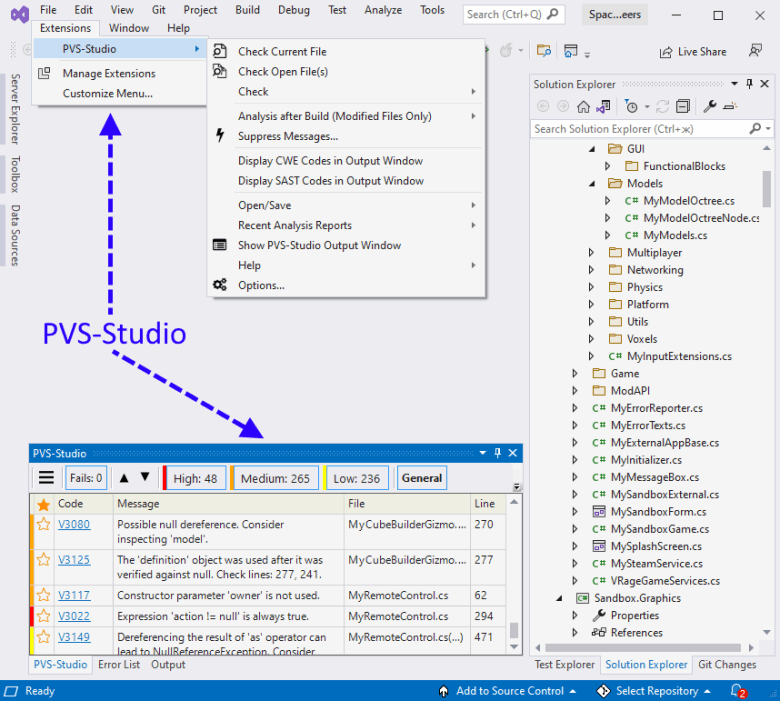
Visual Studio 2022 — stylish and fresh. How PVS-Studio supported VS2022

Reading time7 min
Reach and readers2K

Seems like Microsoft has just announced Visual Studio 2022. And it already came out! For us at PVS-Studio, this meant only one thing — we must support this IDE in the next PVS-Studio release. Almost everything went smoothly. However, there were some hitches that we're going to discuss today.

Read more

Re-checking PascalABC.NET

Reading time8 min
Reach and readers1.6K

Welcome all fans of clean code! Today we analyze the PascalABC.NET project. In 2017, we already found errors in this project. We used two static analysis tools (more precisely, plugins for SonarQube): SonarC# and PVS-Studio. Today, we analyze this project with the latest version of the PVS-Studio analyzer for C#. Let's see what errors we can find today, especially when our analyzer has become more advanced and got new features: it can find more exquisite errors and potential vulnerabilities.


0912_PascalABCNET_2/image1.png

Read more →