Pull to refresh
1359.97

Programming *

The art of creating computer programs

Show first
Period
Level of difficulty

Structured Logging and Interpolated Strings in C# 10

Level of difficultyMedium
Reading time10 min
Reach and readers53K

Structured logging is gaining more and more popularity in the developers' community. In this article I'd like to demonstrate how we can use structured logging with the Microsoft.Extensions.Logging package and show the idea how we can extend it using the new features of C# 10.

Read more

Announcing .NET Core 3.1 Preview 2

Reading time1 min
Reach and readers1.1K
We’re announcing .NET Core 3.1 Preview 2. .NET Core 3.1 will be a small and short release focused on key improvements in Blazor and Windows desktop, the two big additions in .NET Core 3.0.. It will be a long term support (LTS) release with an expected final ship date of December 2019.

You can download .NET Core 3.1 Preview 2 on Windows, macOS, and Linux.


ASP.NET Core and EF Core are also releasing updates today.

Visual Studio 16.4 Preview 3 and Visual Studio for Mac 8.4 Preview 3 are also releasing today. They are required updates to use .NET Core 3.1 Preview 2. Visual Studio 16.4 includes .NET Core 3.1, so just updating Visual Studio will give you both releases.

Details:


Read more →

Upcoming SameSite Cookie Changes in ASP.NET and ASP.NET Core

Reading time5 min
Reach and readers4K
SameSite is a 2016 extension to HTTP cookies intended to mitigate cross site request forgery (CSRF). The original design was an opt-in feature which could be used by adding a new SameSite property to cookies. It had two values, Lax and Strict.

Setting the value to Lax indicated the cookie should be sent on navigation within the same site, or through GET navigation to your site from other sites. A value of Strict limited the cookie to requests which only originated from the same site. Not setting the property at all placed no restrictions on how the cookie flowed in requests. OpenIdConnect authentication operations (e.g. login, logout), and other features that send POST requests from an external site to the site requesting the operation, can use cookies for correlation and/or CSRF protection. These operations would need to opt-out of SameSite, by not setting the property at all, to ensure these cookies will be sent during their specialized request flows.

Google is now updating the standard and implementing their proposed changes in an upcoming version of Chrome. The change adds a new SameSite value, «None», and changes the default behavior to «Lax». This breaks OpenIdConnect logins, and potentially other features your web site may rely on, these features will have to use cookies whose SameSite property is set to a value of «None».

However browsers which adhere to the original standard and are unaware of the new value have a different behavior to browsers which use the new standard as the SameSite standard states that if a browser sees a value for SameSite it does not understand it should treat that value as «Strict». This means your .NET website will now have to add user agent sniffing to decide whether you send the new None value, or not send the attribute at all.

Read more →

Blazor Server in .NET Core 3.0 scenarios and performance

Reading time6 min
Reach and readers5K
Since the release of Blazor Server with .NET Core 3.0 last month lots of folks have shared their excitement with us about being able to build client-side web UI with just .NET and C#. At the same time, we’ve also heard lots of questions about what Blazor Server is, how it relates to Blazor WebAssembly, and what scenarios Blazor Server is best suited for. Should you choose Blazor Server for your client-side web UI needs, or wait for Blazor WebAssembly? This post seeks to answer these questions, and to provide insights into how Blazor Server performs at scale and how we envision Blazor evolving in the future.

What is Blazor Server?


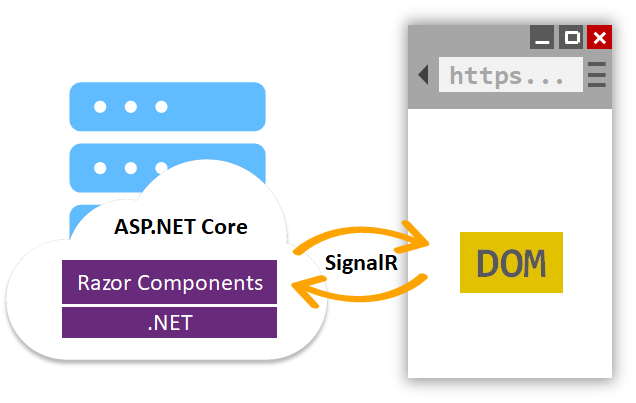
Blazor Server apps host Blazor components on the server and handle UI interactions over a real-time SignalR connection. As the user interacts with the app, the UI events are sent to the server over the connection to be handled by the various components that make up the app. When a component handles a UI event, it’s rendered based on its updated state. Blazor compares the newly rendered output with what was rendered previously and send the changes back to the browser and applies them to the DOM.

Read more →

Announcing Support for Native Editing of Jupyter Notebooks in VS Code

Reading time3 min
Reach and readers2K
With October release of the Python extension, we’re excited to announce the support of native editing of Jupyter notebooks inside Visual Studio Code! You can now directly edit .ipynb files and get the interactivity of Jupyter notebooks with all of the power of VS Code.

You can manage source control, open multiple files, and leverage productivity features like IntelliSense, Git integration, and multi-file management, offering a brand-new way for data scientists and developers to experiment and work with data efficiently. You can try out this experience today by downloading the latest version of the Python extension and creating/opening a Jupyter Notebook inside VS Code.


Since the initial release of our data science experience in VS Code, one of the top features that users have requested has been a more notebook-like layout to edit their Jupyter notebooks inside VS Code. In the rest of this post we’ll take a look at the new capabilities this offers.
Read more →

Introducing Cascadia Code font

Reading time2 min
Reach and readers2.1K
Cascadia Code is finally here! You can install it directly from the GitHub repository’s releases page or automatically receive it in the next update of Windows Terminal.


Wait, what’s Cascadia Code?


Cascadia Code was announced this past May at Microsoft’s Build event. It is the latest monospaced font shipped from Microsoft and provides a fresh experience for command line experiences and code editors. Cascadia Code was developed hand-in-hand with the new Windows Terminal application. This font is most recommended to be used with terminal applications and text editors such as Visual Studio and Visual Studio Code.
Read more →

How to Catch a Cat with TLA+

Reading time3 min
Reach and readers2.1K
Many programmers struggle when using formal methods to solve problems within their programs, as those methods, while effective, can be unreasonably complex. To understand why this happens, let’s use the model checking method to solve a relatively easy puzzle:

Conditions


You’re in a hallway with seven doors on one side leading to seven rooms. A cat is hiding in one of these rooms. Your task is to catch the cat. Opening a door takes one step. If you guess the correct door, you catch the cat. If you do not guess the correct door, the cat runs to the next room.
Read more →

Write Better Code Faster with Roslyn Analyzers

Reading time3 min
Reach and readers4.9K
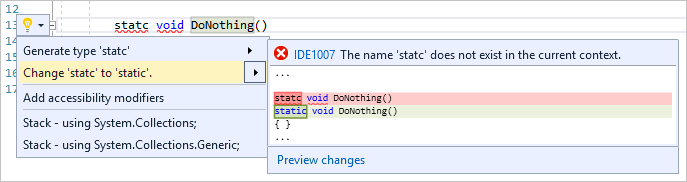
Roslyn, the .NET compiler platform, helps you catch bugs even before you run your code. One example is Roslyn’s spellcheck analyzer that is built into Visual Studio. Let’s say you are creating a static method and misspelled the word static as statc. You will be able to see this spelling error before you run your code because Roslyn can produce warnings in your code as you type even before you’ve finished the line. In other words, you don’t have to build your code to find out that you made a mistake.


Roslyn analyzers can also surface an automatic code fix through the Visual Studio light bulb icon that allows you to fix your code immediately.

Read more →

Simplify Your Code With Rocket Science: C++20’s Spaceship Operator

Reading time8 min
Reach and readers2.6K
C++20 adds a new operator, affectionately dubbed the «spaceship» operator: <=>. There was a post awhile back by our very own Simon Brand detailing some information regarding this new operator along with some conceptual information about what it is and does. The goal of this post is to explore some concrete applications of this strange new operator and its associated counterpart, the operator== (yes it has been changed, for the better!), all while providing some guidelines for its use in everyday code.

Read more →

Python in Visual Studio Code – June 2019 Release

Reading time2 min
Reach and readers2.5K
We are pleased to announce that the June 2019 release of the Python Extension for Visual Studio Code is now available. You can download the Python extension from the Marketplace, or install it directly from the extension gallery in Visual Studio Code. If you already have the Python extension installed, you can also get the latest update by restarting Visual Studio Code. You can learn more about Python support in Visual Studio Code in the documentation.

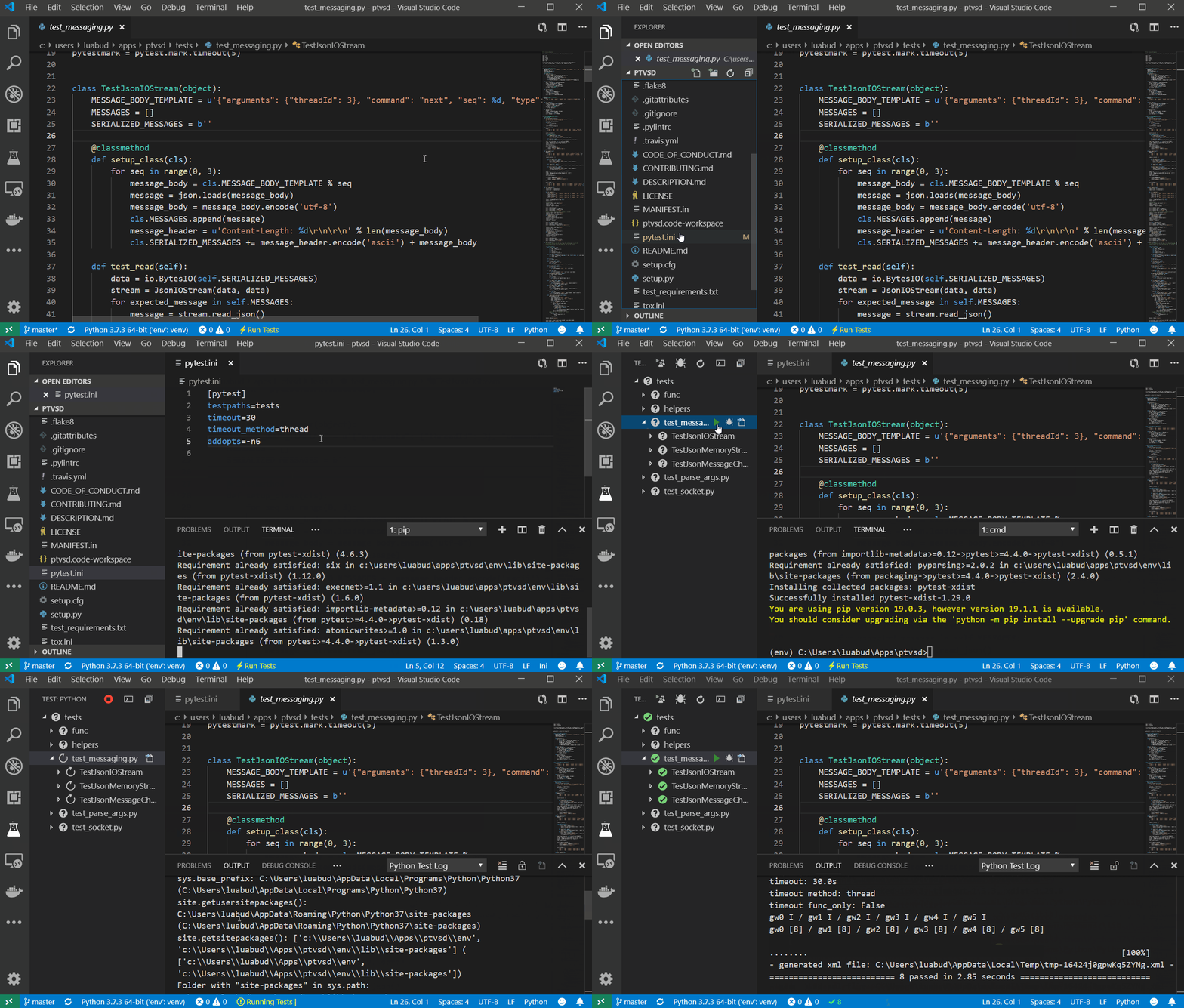
In this release we made improvements that are listed in our changelog, closing a total of 70 issues including a plot viewer with the Python Interactive window, parallel tests with pytest, and indentation of run selection in the terminal.

Read more →

Just take a look at SObjectizer if you want to use Actors or CSP in your C++ project

Reading time21 min
Reach and readers4K


A few words about SObjectizer and its history


SObjectizer is a rather small C++ framework that simplifies the development of multithreaded applications. SObjectizer allows a developer to use approaches from Actor, Publish-Subscribe and Communicating Sequential Processes (CSP) models. It's an OpenSource project that is distributed under BSD-3-CLAUSE license.


SObjectizer has a long history. SObjectizer itself was born in 2002 as SObjectizer-4 project. But it was based on ideas from previous SCADA Objectizer that was developed between 1995 and 2000. SObjectizer-4 was open-sourced in 2006, but its evolution was stopped soon after that. A new version of SObjectizer with the name SObjectizer-5 was started in 2010 and was open-sourced in 2013. The evolution of SObjectizer-5 is still in progress and SObjectizer-5 has incorporated many new features since 2013.


SObjectizer is more or less known in the Russian segment of the Internet, but almost unknown outside of the exUSSR. It's because the SObjectizer was mainly used for local projects in exUSSR-countries and many articles, presentations, and talks about SObjectizer are in Russian.


A niche for SObjectizer and similar tools


Multithreading is used in Parallel computing as well as in Concurrent computing. But there is a big difference between Parallel and Concurrent computing. And, as a consequence, there are tools targeted Parallel computing, and there are tools for Concurrent computing, and they are different.

Read more →

The Data Structures of the Plasma Cash Blockchain's State

Reading time7 min
Reach and readers1.7K


Hello, dear Habr users! This article is about Web 3.0 — the decentralized Internet. Web 3.0 introduces the concept of decentralization as the foundation of the modern Internet. Many computer systems and networks require security and decentralization features to meet their needs. A distributed registry using blockchain technology provides efficient solutions for decentralization.
Read more →

Version 12 Launches Today! (And It’s a Big Jump for Wolfram Language and Mathematica)

Reading time47 min
Reach and readers3.5K

Live Share now included with Visual Studio 2019

Reading time2 min
Reach and readers1.2K

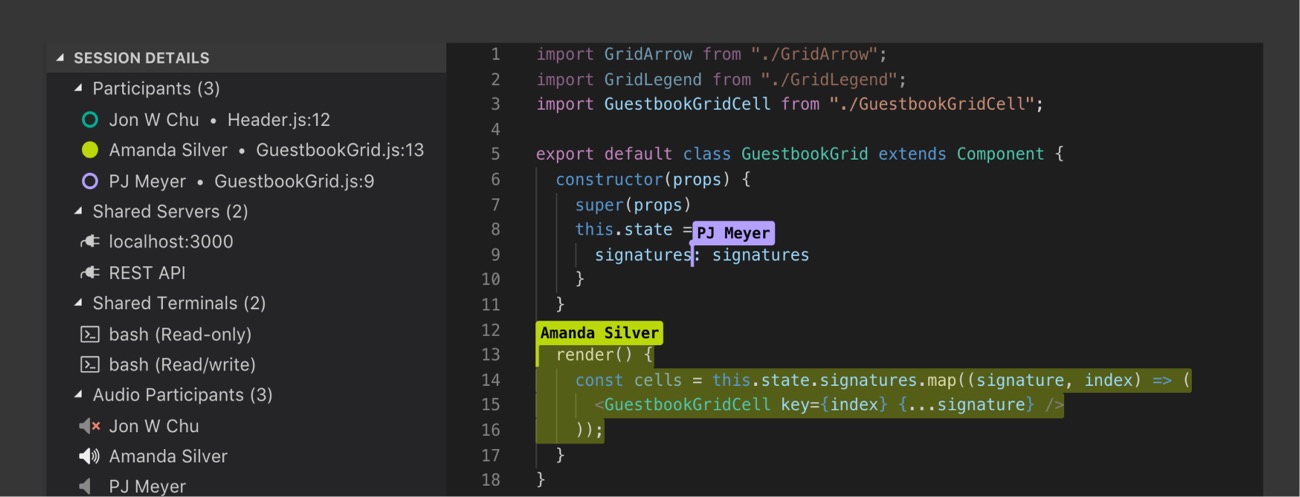
We’re excited to announce the general availability of Visual Studio Live Share, and that it is now included with Visual Studio 2019! In the year since Live Share began its public preview, we’ve been working to enhance the many ways you collaborate with your team. This release is the culmination of that work, and all the things we’ve learned from you along the way.


If you haven’t heard of Live Share, it’s a tool that enables real-time collaborative development with your teammates from the comfort of your own tools. You’re able to share your code, and collaboratively edit and debug, without needing to clone repos or set up environments. It’s easy to get started with Live Share.


Read more →

Memory and Span pt.3

Reading time10 min
Reach and readers2.8K


Memory<T> and ReadOnlyMemory<T>


There are two visual differences between Memory<T> and Span<T>. The first one is that Memory<T> type doesn’t contain ref modifier in the header of the type. In other words, the Memory<T> type can be allocated both on the stack while being either a local variable, or a method parameter, or its returned value and on the heap, referencing some data in memory from there. However, this small difference creates a huge distinction in the behavior and capabilities of Memory<T> compared to Span<T>. Unlike Span<T> that is an instrument for some methods to use some data buffer, the Memory<T> type is designed to store information about the buffer, but not to handle it. Thus, there is the difference in API.


  • Memory<T> doesn’t have methods to access the data that it is responsible for. Instead, it has the Span property and the Slice method that return an instance of the Span type.
  • Additionally, Memory<T> contains the Pin() method used for scenarios when a stored buffer data should be passed to unsafe code. If this method is called when memory is allocated in .NET, the buffer will be pinned and will not move when GC is active. This method will return an instance of the MemoryHandle structure, which encapsulates GCHandle to indicate a segment of a lifetime and to pin array buffer in memory.

This chapter was translated from Russian jointly by author and by professional translators. You can help us with translation from Russian or English into any other language, primarily into Chinese or German.

Also, if you want thank us, the best way you can do that is to give us a star on github or to fork repository github/sidristij/dotnetbook.
Read more →

SAPUI5 for dummies part 5: A complete step-by-step exercise

Reading time4 min
Reach and readers7K


Introduction & Recap


In the previous blog post, we learned how to create a second level of drill-down (detail of detail) and how to interact with OData and ODataModel (v2) in order to delete a database record.


What will be covered on this exercise


With Part 5 of this series of blog posts, we will learn how to create a SimpleForm within a Dialog that will allow us to update the information of a Sales Order Item.


Before updating the database order we have to check that everything typed by the user validates our constraints.


  • ODataModel: we have already used it to display server-side information about our Business Partner, Sales Order, and Sales Order Items. We’ve also used it to delete a database record. We’re now going to use it to update a record thanks to the submitChanges method or remove what we’ve done with the resetChanges method.
  • Expression Binding: an enhancement of the SAPUI5 binding syntax, which allows for providing expressions instead of custom formatter functions
  • SimpleForm: a layout that allows users to create a pixel-perfect form
Read more →

Why x^0 = 1 visually

Reading time3 min
Reach and readers1.6K

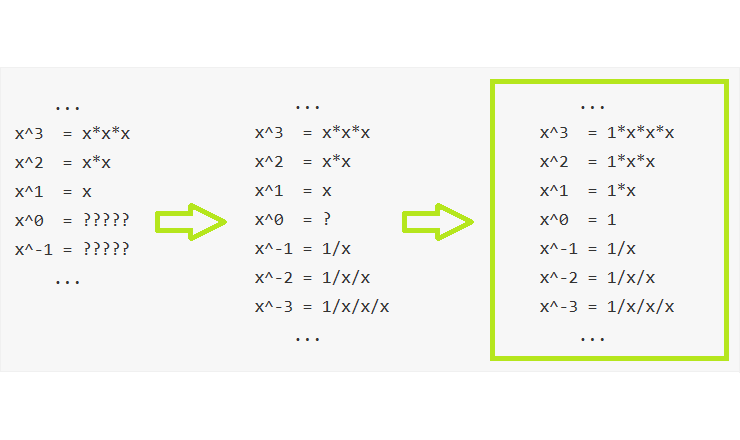
The traditional definition for the operation of exponentiation to a natural power (or a positive integer) had introduced approximately as follows:

Exponentiation is an arithmetic operation originally defined as the result of multiple multiplications a number by itself.

But the more precise formulation is still different:

Raising a number X to an integer power N is an arithmetic operation defined as the result of multiple [N by mod times] multiplications or divisions one by number X.

Let's figure it out under the cut! >>

Lingtrain Aligner. How to make parallel books for language learning. Part 1. Python and Colab version

Reading time8 min
Reach and readers5.1K

title


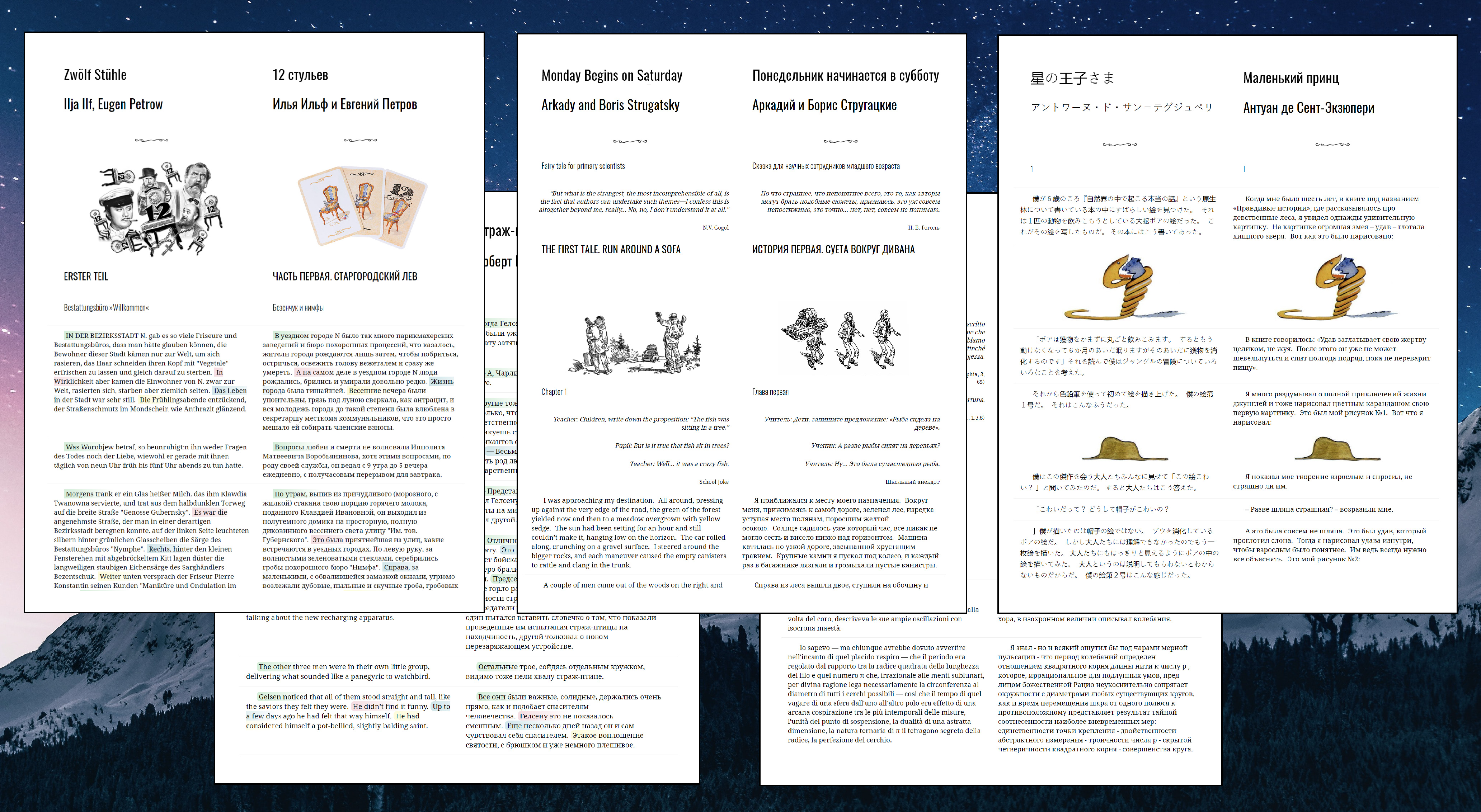
If you're interested in learning new languages or teaching them, then you probably know such a way as parallel reading. It helps to immerse yourself in the context, increases the vocabulary, and allows you to enjoy the learning process. When it comes to reading, you most likely want to choose your favorite author, theme, or something familiar and this is often impossible if no one has published such a variant of a parallel book. It's becoming even worse when you're learning some cool language like Hungarian or Japanese.


Today we are taking a big step forward toward breaking this situation.


We will use the lingtrain_aligner tool. It's an open-source project on Python which aims to help all the people eager to learn foreign languages. It's a part of the Lingtrain project, you can follow us on Telegram, Facebook and Instagram. Let's start!


Find the texts


At first, we should find two texts we want to align. Let's take two editions of "To Kill a Mockingbird" by Harper Lee, in Russian and the original one.

Read more →

Algorithms in Go

Reading time2 min
Reach and readers6.3K

Most solutions to algorithmic problems can be grouped into a rather small number of patterns. When we start to solve some problem, we need to think about how we would classify them. For example, can we apply fast and slow аlgorithmic pattern or do we need to use cyclic sortpattern? Some of the problems have several solutions based on different patterns. In this series, we discuss the most popular algorithmic patterns that cover more than 90% of the usual problems.

It is different from High-School Algorithms 101 Course, as it is not intended to cover things like Karatsuba algorithm (fast multiplication algorithm) or prove different methods of sorting. Instead, Algorithmic Patterns focused on practical skills needed for the solution of common problems. For example, when we set up a Prometheus alert for high request latency we are dealing with Sliding Window Pattern. Or let say, we organize a team event and need to find an available time slot for every participant. At the first glance, it is not obvious that in this case, we are actually solving an algorithmic problem. Actually, during our day we usually solve a bunch of algorithmic problems without realizing that we dealing with algorithms.

The knowledge about Algorithmic Patterns helps one to classify a problem and then apply the appropriate method.

But probably most importantly learning algorithmic patterns boost general programming skills. It is especially helpful when you are debugging some production code, as it trains you to understand the execution flow.

Patterns covered so far:

Sliding Window I

Sliding Window II

Merge Intervals

Dutch National Flag

Matrix Spiral

Iterative Postorder Traversal

Bit Manipulation

Stay tuned :)

<Promo> If you interested to work as a backend engineer, there is an open position in my squad. Prior knowledge of Golang is not required. I am NOT an HR and DO NOT represent the company in any capacity. However, I can share my personal experience as a backend engineer working in the company. </Promo>

Read more

Authors' contribution